DocuExtractor vs Perkoon
Side-by-side comparison to help you choose the right tool.

DocuExtractor
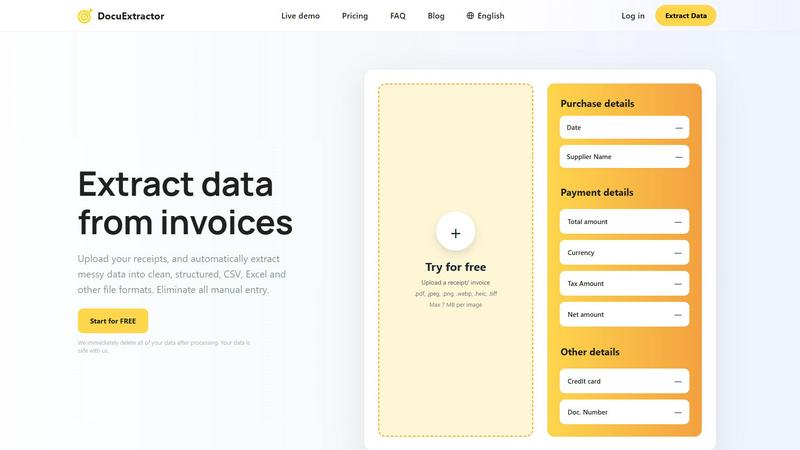
DocuExtractor instantly extracts clean data from receipts and invoices to eliminate manual entry.
Last updated: February 28, 2026

Perkoon enables free, unlimited peer-to-peer file transfers without signup, ensuring your files stay private and secure.
Last updated: March 4, 2026
Visual Comparison
DocuExtractor
Perkoon

Feature Comparison
DocuExtractor
Industry-Leading 99.6% Accuracy
Our platform delivers unmatched precision by combining advanced OCR with Deep Learning and proprietary Large Language Model (AI) technology. This multi-layered approach ensures that even the messiest handwritten notes, low-quality scans, or complex invoice layouts are interpreted correctly, extracting key fields like totals, dates, and vendor names with near-perfect reliability, eliminating costly manual verification.
Fully Automated, Drag-and-Drop Simplicity
DocuExtractor is built for speed and ease. The entire extraction process is fully automated. Users simply log in, drag and drop their documents—whether single files or large batches—into the workspace, and the AI takes over. There is no need for complex setup or manual template configuration, making it instantly accessible for teams of all technical skill levels.
Secure, Scalable & Multi-Language Processing
Engineered with enterprise-grade security and performance in mind, DocuExtractor processes over half a million documents monthly with consistent reliability. It features automatic language detection for documents in over 45 languages. Crucially, we enforce a strict data privacy protocol where all uploaded documents and extracted data are permanently deleted immediately after processing, ensuring your financial information is never stored or compromised.
Structured Output for Direct Software Integration
The core value is in the output. DocuExtractor doesn't just read text; it structures it intelligently. The AI organizes extracted data into clean, formatted CSV or Excel files that are perfectly aligned for direct import into accounting software like QuickBooks, Xero, or Sage. This eliminates the final, frustrating step of manual data reformatting and cleanup, delivering true end-to-end automation.
Perkoon
Peer-to-Peer File Transfer
Perkoon’s flagship feature allows users to transfer files directly between browsers with no size limits and without creating accounts. This P2P method ensures that data privacy is maintained, as files do not pass through a central server, making file sharing seamless and secure.
Encrypted Cloud Storage
When sending files to offline recipients, Perkoon provides an encrypted cloud storage option. This feature is essential for securing your data while it is temporarily held until the recipient can access it, ensuring that privacy and security are never compromised.
Built-in Automation Tools
Designed for the modern user, Perkoon includes native automation tools that enable AI agents to interact with the service directly. This eliminates the need for screen-scraping and enhances the efficiency of file transfers, making it a powerful tool for tech-savvy users.
User-Friendly CLI Tool
Perkoon offers a simple command-line interface (CLI) tool that allows advanced users and developers to interact with the service effortlessly. This feature is perfect for those who prefer a more technical approach to file transfers, enhancing customization and control over the transfer process.
Use Cases
DocuExtractor
Automating Accounts Payable Processing
Finance teams can instantly process hundreds of supplier invoices and receipts weekly. By uploading batches of documents, they automatically extract invoice numbers, dates, amounts due, and tax details into a structured spreadsheet. This data is ready for immediate review and posting into their ERP or accounting system, slashing processing time from hours to minutes and drastically improving cash flow management.
Streamlining Expense Reporting and Reconciliation
Employees can upload their business receipts—from coffee to client dinners—directly to DocuExtractor. The AI extracts the merchant, date, total, and tax, populating a standardized expense report template. This allows accountants to quickly verify and reconcile corporate card statements against claims, eliminating manual entry errors and accelerating the reimbursement cycle for everyone.
Accelerating Month-End and Year-End Book Closing
During critical closing periods, bookkeepers are inundated with bank statements, transaction records, and financial PDFs. DocuExtractor processes these documents en masse, extracting transaction dates, descriptions, and amounts into a clean ledger format. This provides a clear, auditable trail and reduces the frantic, error-prone manual work that delays financial reporting.
Digitizing and Organizing Historical Financial Archives
Firms transitioning from paper-based systems or dealing with years of scanned document archives can use DocuExtractor to unlock that data. By processing old invoices, receipts, and statements, they can convert entire filing cabinets into searchable, structured digital databases. This creates a single source of truth for audits, analysis, and historical reporting without monumental manual effort.
Perkoon
Everyday File Sharing
Perkoon is ideal for everyday users who need to send files quickly to friends or colleagues without the hassle of signing up for accounts. Whether it’s sharing vacation photos or work documents, Perkoon simplifies the process.
Large File Transfers
For professionals working with large files, such as designers or videographers, Perkoon’s P2P service allows for the transfer of hefty files without worries about size restrictions or costs, making it a reliable choice for creative industries.
Secure Business Communications
Businesses can utilize Perkoon for secure file transfers, ensuring that sensitive documents are sent privately and efficiently. The encrypted cloud storage feature provides an extra layer of security for important data.
Integration with AI Systems
Developers can leverage Perkoon’s built-in automation tools to integrate file transfer capabilities directly into their AI systems. This allows for streamlined workflows and enhances the productivity of AI-driven applications.
Overview
About DocuExtractor
DocuExtractor is the non-negotiable, essential AI-powered document converter engineered specifically for modern accounting and finance teams. It directly confronts the critical bottleneck of manual data entry by transforming messy, unstructured financial documents—including invoices, receipts, bank statements, and PDFs—into perfectly clean, structured, and immediately actionable data. This is not a simple scanner; it is a sophisticated data extraction platform that leverages a powerful combination of Optical Character Recognition (OCR), Deep Learning, and Large Language Model (AI) technology to achieve an industry-leading 99.6% accuracy rate. It automatically identifies and extracts every critical data point: dates, supplier names, totals, tax amounts, document numbers, and more. The extracted data is then seamlessly converted into versatile, ready-to-use formats like CSV and Excel for direct import into any accounting software, eliminating hours of tedious work and the risk of human error. Built for security and scale, it processes over 500,000 documents monthly, supports 45+ languages, and adheres to a strict privacy-first policy by deleting all user data immediately after processing. For accountants, bookkeepers, and finance professionals, DocuExtractor is a critical necessity to reclaim time, guarantee accuracy, and achieve a streamlined, efficient financial workflow from day one.
About Perkoon
Perkoon is a revolutionary file transfer service designed to simplify your digital life by providing a straightforward way to move files from one point to another without unnecessary complications. It is tailored for individuals and businesses alike who are weary of cumbersome restrictions, obligatory sign-ups, and services that commoditize personal data. At the heart of Perkoon are two fundamental methods for file transfer: a free peer-to-peer (P2P) system that enables users to send files directly between browsers in real time, and a secure cloud storage option for offline transfers. The P2P feature ensures that there are no size limitations and no need for accounts, making it a hassle-free experience. Your data remains private, as it never touches a central server, allowing Perkoon to operate at no cost to users. For offline recipients, the paid cloud storage service provides necessary encryption to keep your files secure. Perkoon is uniquely positioned for the AI age, featuring built-in automation tools and a simple command-line interface, making it an ideal solution for both everyday users and AI systems.
Frequently Asked Questions
DocuExtractor FAQ
What types of documents can DocuExtractor process?
DocuExtractor is specialized for financial documents and can accurately process invoices, receipts, bank statements, and general PDFs. It supports a wide range of file formats including PDF, JPEG, PNG, WebP, HEIC, and TIFF. The AI is trained to handle various layouts and qualities, from digital PDFs to photographed receipts.
How does DocuExtractor ensure the accuracy of extracted data?
We achieve our 99.6% accuracy rate by using a powerful, multi-stage technology stack. Advanced OCR first captures text, then Deep Learning models understand the document's structure and layout. Finally, our specialized Large Language Model (AI) interprets the context to correctly identify and classify each data field, such as distinguishing a total amount from a subtotal, ensuring exceptional precision.
Is my financial data secure with DocuExtractor?
Security and privacy are our top priorities. We employ enterprise-grade security measures throughout our platform. Most importantly, we operate on a strict zero-retention data policy. All uploaded documents and the resulting extracted data are permanently and automatically deleted from our servers immediately after processing is complete. Your data is never stored, sold, or used for training.
Can I process multiple documents at once?
Yes, batch processing is a core functionality designed for efficiency. You can upload dozens or even hundreds of documents simultaneously via drag-and-drop. DocuExtractor will automatically process them in sequence, extracting data from each one and compiling the results into a single, consolidated CSV or Excel output file, saving you immense time over processing files individually.
Perkoon FAQ
Why is Perkoon free?
Perkoon operates its P2P transfer service free of charge because it incurs minimal costs. The cloud storage option, which is a paid feature, covers the necessary expenses for server maintenance, ensuring users can enjoy free transfers without hidden fees.
Can I transfer files if the recipient is offline?
Yes, Perkoon holds files for offline recipients using its encrypted cloud storage service. This allows users to send files even when the recipient is not currently available, ensuring that file transfers are convenient and flexible.
What browsers are compatible with Perkoon?
Perkoon works seamlessly with Chrome, Edge, and Brave browsers, which support unlimited file transfers. However, users of Firefox and Safari may experience certain restrictions due to browser limitations, so using a compatible browser is recommended for the best experience.
How does Perkoon ensure my privacy?
Perkoon prioritizes user privacy by employing a P2P model where files do not pass through central servers. In addition, the cloud storage service encrypts files, ensuring that even the company cannot see the contents of your transfers. Your data remains yours at all times.
Alternatives
DocuExtractor Alternatives
DocuExtractor is a powerful document converter software in the productivity and management category, designed to eliminate manual data entry by instantly extracting clean, structured data from invoices, receipts, and other financial documents. It is an essential tool for modern accounting and bookkeeping workflows. Users may explore alternatives for various reasons, including budget constraints, specific feature requirements, or the need for integration with a particular platform or existing software stack. The search for a different solution is a common step in finding the perfect fit for a business's unique operational needs. When evaluating any alternative, key considerations must include the accuracy of data extraction, supported document types and export formats, processing speed for batch operations, and the overall security posture of the platform. The right tool should function as a non-negotiable asset that seamlessly integrates into and enhances your financial workflow.
Perkoon Alternatives
Perkoon is a pioneering file transfer service that embraces simplicity and user-centric design in the realm of productivity and management. It allows individuals to send files directly between browsers using peer-to-peer technology, eliminating the need for signups and bypassing artificial limitations. This straightforward approach appeals to users frustrated with conventional file transfer services that impose restrictions or treat user data as a commodity. Many users seek alternatives to Perkoon due to various reasons, including pricing, specific feature sets, and compatibility with different platforms. When evaluating alternatives, it’s essential to consider factors such as data privacy, ease of use, transfer speeds, and the presence of essential functionalities that meet your unique needs. The right alternative should prioritize user experience while ensuring robust security and reliability.