
Perkoon
Perkoon enables free, unlimited peer-to-peer file transfers without signup, ensuring your files stay private and secure.
Visit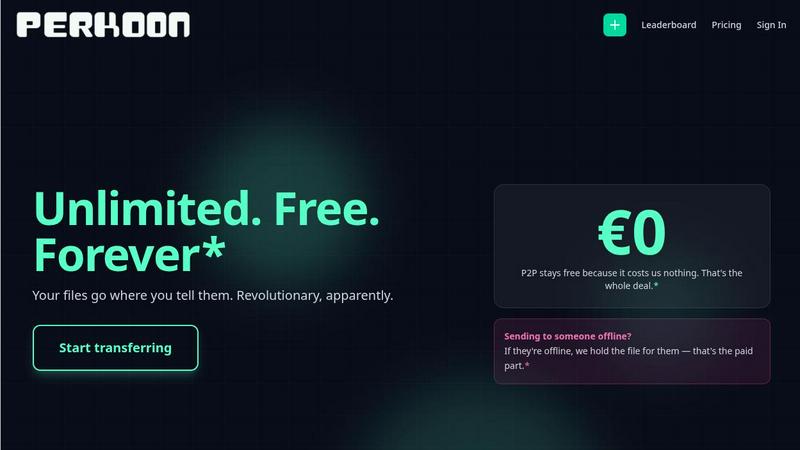
About Perkoon
Perkoon is a revolutionary file transfer service designed to simplify your digital life by providing a straightforward way to move files from one point to another without unnecessary complications. It is tailored for individuals and businesses alike who are weary of cumbersome restrictions, obligatory sign-ups, and services that commoditize personal data. At the heart of Perkoon are two fundamental methods for file transfer: a free peer-to-peer (P2P) system that enables users to send files directly between browsers in real time, and a secure cloud storage option for offline transfers. The P2P feature ensures that there are no size limitations and no need for accounts, making it a hassle-free experience. Your data remains private, as it never touches a central server, allowing Perkoon to operate at no cost to users. For offline recipients, the paid cloud storage service provides necessary encryption to keep your files secure. Perkoon is uniquely positioned for the AI age, featuring built-in automation tools and a simple command-line interface, making it an ideal solution for both everyday users and AI systems.
Features of Perkoon
Peer-to-Peer File Transfer
Perkoon’s flagship feature allows users to transfer files directly between browsers with no size limits and without creating accounts. This P2P method ensures that data privacy is maintained, as files do not pass through a central server, making file sharing seamless and secure.
Encrypted Cloud Storage
When sending files to offline recipients, Perkoon provides an encrypted cloud storage option. This feature is essential for securing your data while it is temporarily held until the recipient can access it, ensuring that privacy and security are never compromised.
Built-in Automation Tools
Designed for the modern user, Perkoon includes native automation tools that enable AI agents to interact with the service directly. This eliminates the need for screen-scraping and enhances the efficiency of file transfers, making it a powerful tool for tech-savvy users.
User-Friendly CLI Tool
Perkoon offers a simple command-line interface (CLI) tool that allows advanced users and developers to interact with the service effortlessly. This feature is perfect for those who prefer a more technical approach to file transfers, enhancing customization and control over the transfer process.
Use Cases of Perkoon
Everyday File Sharing
Perkoon is ideal for everyday users who need to send files quickly to friends or colleagues without the hassle of signing up for accounts. Whether it’s sharing vacation photos or work documents, Perkoon simplifies the process.
Large File Transfers
For professionals working with large files, such as designers or videographers, Perkoon’s P2P service allows for the transfer of hefty files without worries about size restrictions or costs, making it a reliable choice for creative industries.
Secure Business Communications
Businesses can utilize Perkoon for secure file transfers, ensuring that sensitive documents are sent privately and efficiently. The encrypted cloud storage feature provides an extra layer of security for important data.
Integration with AI Systems
Developers can leverage Perkoon’s built-in automation tools to integrate file transfer capabilities directly into their AI systems. This allows for streamlined workflows and enhances the productivity of AI-driven applications.
Frequently Asked Questions
Why is Perkoon free?
Perkoon operates its P2P transfer service free of charge because it incurs minimal costs. The cloud storage option, which is a paid feature, covers the necessary expenses for server maintenance, ensuring users can enjoy free transfers without hidden fees.
Can I transfer files if the recipient is offline?
Yes, Perkoon holds files for offline recipients using its encrypted cloud storage service. This allows users to send files even when the recipient is not currently available, ensuring that file transfers are convenient and flexible.
What browsers are compatible with Perkoon?
Perkoon works seamlessly with Chrome, Edge, and Brave browsers, which support unlimited file transfers. However, users of Firefox and Safari may experience certain restrictions due to browser limitations, so using a compatible browser is recommended for the best experience.
How does Perkoon ensure my privacy?
Perkoon prioritizes user privacy by employing a P2P model where files do not pass through central servers. In addition, the cloud storage service encrypts files, ensuring that even the company cannot see the contents of your transfers. Your data remains yours at all times.
Similar to Perkoon

JevModel
Bilingual Jev decision workbench with original guides for structured, AI-assisted decisions.

Novastart
Apps and files on an infinite canvas where people and AI agents work together.

ftak
Look up any word while you read: meaning, Wikipedia summary and map preview in one tooltip. Free Chrome extension.
Filler
Chrome extension that fills web forms from your saved profile: Google Forms, job applications, surveys, signups. Free, no account.

Memorable Contact
Memorable Contact helps you remember people, save conversation details, find contacts using AI-powered search, and share digital business cards

AI Email Filter
AI Email Filter sorts incoming mail into folders using plain-language prompts you write. Works with any IMAP mailbox; bring your own LLM if you want.

Product Launch Checklist
A free launch checklist for SaaS, apps, AI tools and more. Every step says why it matters and when you can skip it.

Kody Tools
Free collection of online developer utilities, code formatters, and digital converters designed to streamline your daily workflow.