
DocuExtractor
DocuExtractor instantly extracts clean data from receipts and invoices to eliminate manual entry.
Visit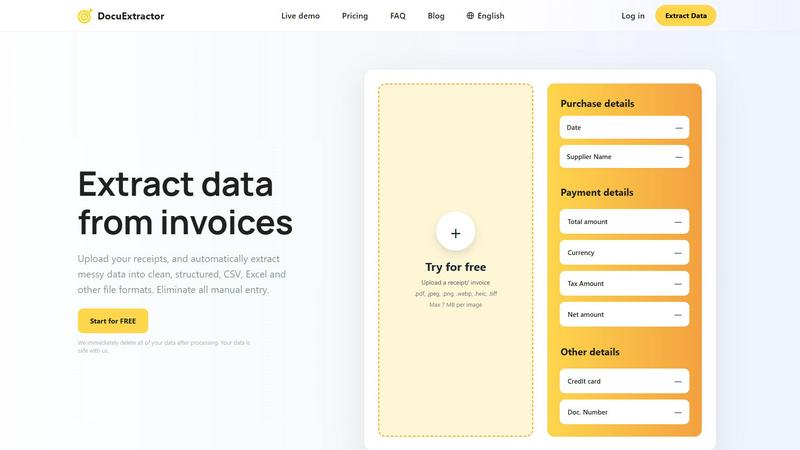
About DocuExtractor
DocuExtractor is the non-negotiable, essential AI-powered document converter engineered specifically for modern accounting and finance teams. It directly confronts the critical bottleneck of manual data entry by transforming messy, unstructured financial documents—including invoices, receipts, bank statements, and PDFs—into perfectly clean, structured, and immediately actionable data. This is not a simple scanner; it is a sophisticated data extraction platform that leverages a powerful combination of Optical Character Recognition (OCR), Deep Learning, and Large Language Model (AI) technology to achieve an industry-leading 99.6% accuracy rate. It automatically identifies and extracts every critical data point: dates, supplier names, totals, tax amounts, document numbers, and more. The extracted data is then seamlessly converted into versatile, ready-to-use formats like CSV and Excel for direct import into any accounting software, eliminating hours of tedious work and the risk of human error. Built for security and scale, it processes over 500,000 documents monthly, supports 45+ languages, and adheres to a strict privacy-first policy by deleting all user data immediately after processing. For accountants, bookkeepers, and finance professionals, DocuExtractor is a critical necessity to reclaim time, guarantee accuracy, and achieve a streamlined, efficient financial workflow from day one.
Features of DocuExtractor
Industry-Leading 99.6% Accuracy
Our platform delivers unmatched precision by combining advanced OCR with Deep Learning and proprietary Large Language Model (AI) technology. This multi-layered approach ensures that even the messiest handwritten notes, low-quality scans, or complex invoice layouts are interpreted correctly, extracting key fields like totals, dates, and vendor names with near-perfect reliability, eliminating costly manual verification.
Fully Automated, Drag-and-Drop Simplicity
DocuExtractor is built for speed and ease. The entire extraction process is fully automated. Users simply log in, drag and drop their documents—whether single files or large batches—into the workspace, and the AI takes over. There is no need for complex setup or manual template configuration, making it instantly accessible for teams of all technical skill levels.
Secure, Scalable & Multi-Language Processing
Engineered with enterprise-grade security and performance in mind, DocuExtractor processes over half a million documents monthly with consistent reliability. It features automatic language detection for documents in over 45 languages. Crucially, we enforce a strict data privacy protocol where all uploaded documents and extracted data are permanently deleted immediately after processing, ensuring your financial information is never stored or compromised.
Structured Output for Direct Software Integration
The core value is in the output. DocuExtractor doesn't just read text; it structures it intelligently. The AI organizes extracted data into clean, formatted CSV or Excel files that are perfectly aligned for direct import into accounting software like QuickBooks, Xero, or Sage. This eliminates the final, frustrating step of manual data reformatting and cleanup, delivering true end-to-end automation.
Use Cases of DocuExtractor
Automating Accounts Payable Processing
Finance teams can instantly process hundreds of supplier invoices and receipts weekly. By uploading batches of documents, they automatically extract invoice numbers, dates, amounts due, and tax details into a structured spreadsheet. This data is ready for immediate review and posting into their ERP or accounting system, slashing processing time from hours to minutes and drastically improving cash flow management.
Streamlining Expense Reporting and Reconciliation
Employees can upload their business receipts—from coffee to client dinners—directly to DocuExtractor. The AI extracts the merchant, date, total, and tax, populating a standardized expense report template. This allows accountants to quickly verify and reconcile corporate card statements against claims, eliminating manual entry errors and accelerating the reimbursement cycle for everyone.
Accelerating Month-End and Year-End Book Closing
During critical closing periods, bookkeepers are inundated with bank statements, transaction records, and financial PDFs. DocuExtractor processes these documents en masse, extracting transaction dates, descriptions, and amounts into a clean ledger format. This provides a clear, auditable trail and reduces the frantic, error-prone manual work that delays financial reporting.
Digitizing and Organizing Historical Financial Archives
Firms transitioning from paper-based systems or dealing with years of scanned document archives can use DocuExtractor to unlock that data. By processing old invoices, receipts, and statements, they can convert entire filing cabinets into searchable, structured digital databases. This creates a single source of truth for audits, analysis, and historical reporting without monumental manual effort.
Frequently Asked Questions
What types of documents can DocuExtractor process?
DocuExtractor is specialized for financial documents and can accurately process invoices, receipts, bank statements, and general PDFs. It supports a wide range of file formats including PDF, JPEG, PNG, WebP, HEIC, and TIFF. The AI is trained to handle various layouts and qualities, from digital PDFs to photographed receipts.
How does DocuExtractor ensure the accuracy of extracted data?
We achieve our 99.6% accuracy rate by using a powerful, multi-stage technology stack. Advanced OCR first captures text, then Deep Learning models understand the document's structure and layout. Finally, our specialized Large Language Model (AI) interprets the context to correctly identify and classify each data field, such as distinguishing a total amount from a subtotal, ensuring exceptional precision.
Is my financial data secure with DocuExtractor?
Security and privacy are our top priorities. We employ enterprise-grade security measures throughout our platform. Most importantly, we operate on a strict zero-retention data policy. All uploaded documents and the resulting extracted data are permanently and automatically deleted from our servers immediately after processing is complete. Your data is never stored, sold, or used for training.
Can I process multiple documents at once?
Yes, batch processing is a core functionality designed for efficiency. You can upload dozens or even hundreds of documents simultaneously via drag-and-drop. DocuExtractor will automatically process them in sequence, extracting data from each one and compiling the results into a single, consolidated CSV or Excel output file, saving you immense time over processing files individually.
Explore more in this category:
Similar to DocuExtractor



IZIPAY
IZIPAY is a virtual and physical crypto card service that lets users top up with digital assets and pay online like with a regular card.



PerPageFax
PerPageFax lets you send a fax online from any browser for a flat $0.50 per page — no account, no subscription, no fax machine.
SnapPChart
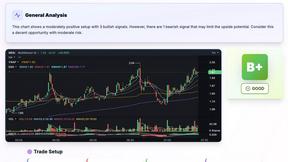
SnapPChart grades a trading chart screenshot A+ to F, with an entry, stop, targets, and risk/reward. Works on stocks, forex, crypto, futures.

Venduris
Venduris is a renewal intelligence platform that gives mid-size companies control over SaaS & AI contract renewals before leverage disappears.