
Shrinkpad
Shrinkpad compresses images and videos in bulk on your Mac, saving space and optimizing performance effortlessly.
Visit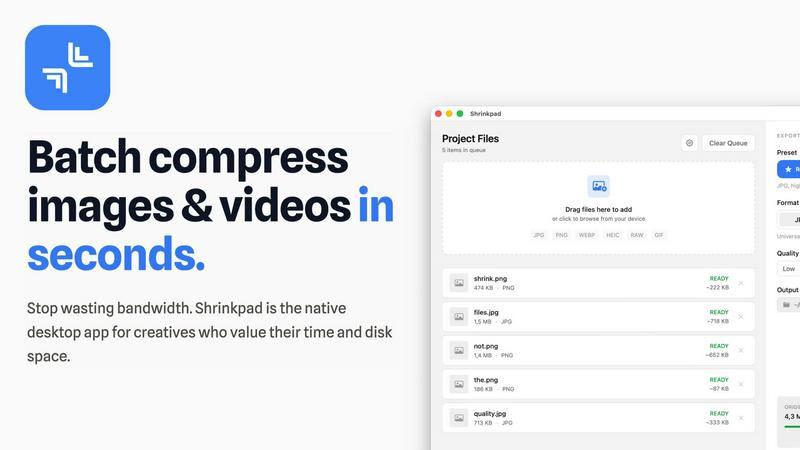
About Shrinkpad
Shrinkpad is the essential tool for Mac users grappling with oversized media files. This powerful native macOS application is engineered to batch compress images and videos quickly and efficiently, allowing users to reclaim precious storage space without compromising on quality. Whether you're a photographer, designer, content creator, or developer, Shrinkpad streamlines your workflow by enabling the processing of hundreds or even thousands of files in mere seconds. Its core value proposition centers on privacy; all operations are performed locally on your device, meaning your files never leave your Mac. This eliminates reliance on internet connections or cloud services, ensuring your sensitive assets remain secure. Supporting over 50 formats and featuring intelligent quality preservation, Shrinkpad helps you reduce file sizes by up to 90% while maintaining the visual integrity crucial for your projects.
Features of Shrinkpad
Batch Compression
Shrinkpad allows users to batch compress images and videos simultaneously, processing thousands of files in seconds. This feature is particularly beneficial for creatives who need to optimize large libraries efficiently without the hassle of manual exports.
Intelligent Quality Preservation
The application automatically analyzes the visual complexity of each file to apply the optimal compression ratio, ensuring high-quality results without artifacts. This means you can trust Shrinkpad to maintain the integrity of your visuals while achieving significant size reductions.
Folder Mode
With Shrinkpad's Folder Mode, users can simply drag and drop entire folders containing media files for compression. The app automatically detects and processes all supported files within that folder, saving time and effort by eliminating the need to select files individually.
Privacy-First Approach
Shrinkpad prioritizes user privacy by performing all processing locally on the user's device. Unlike web-based tools, there are no cloud uploads, ensuring your sensitive files remain on your Mac, thus protecting your creative assets from potential exposure.
Use Cases of Shrinkpad
Photographers Optimizing Portfolios
Photographers can utilize Shrinkpad to compress and optimize their portfolios, reducing file sizes significantly without sacrificing quality. This ensures faster loading times for online galleries, making their work more accessible to potential clients.
Designers Preparing Assets
Graphic designers can streamline their workflow by using Shrinkpad to batch process images and graphics before final export. By compressing assets for web use, designers can ensure that their projects load quickly and efficiently without compromising on visual fidelity.
Content Creators Managing Media Libraries
Content creators who manage extensive video libraries can benefit from Shrinkpad’s ability to compress large video files. This not only saves storage space but also enhances upload speeds to platforms, allowing for quicker content dissemination.
Developers Reducing App Bundle Sizes
Software developers can leverage Shrinkpad to minimize app bundle sizes by compressing images and videos used in applications. This not only improves application performance but also enhances user experience by reducing download times.
Frequently Asked Questions
Can I use Shrinkpad for free?
Yes, Shrinkpad offers a Free Starter plan that includes essential tools for casual use, allowing you to process up to 10 files per batch with standard compression.
What file formats does Shrinkpad support?
Shrinkpad supports a wide range of formats, including JPG, PNG, WEBP, AVIF, MP4, MOV, and various other native formats, making it a versatile tool for all your media compression needs.
Does Shrinkpad support video compression?
Absolutely. Shrinkpad not only compresses images but also efficiently handles video files, allowing users to optimize their entire media library in a single batch process.
How many files can I process at once?
With Shrinkpad, users can process thousands of files in one go, making it an ideal solution for those with large volumes of media to optimize quickly and efficiently.
Explore more in this category:
Similar to Shrinkpad

IsThisAIImage
Free AI image checker: upload a photo for AI-generated and deepfake scores, a clear verdict, and optional generator hints.

StopScroll
StopScroll is an AI thumbnail maker that generates YouTube thumbnail concepts from a URL, title, or prompt.


Best Face Swap
The essential AI tool for flawless face swaps in photos and videos, with dedicated workflows for video, free trials, and NSFW content.
HypeShare
HypeShare is the essential secure file transfer platform you need for fast, encrypted transfers up to 10GB with no signup required.

ComicsMaker
ComicsMaker is the essential AI tool you need to turn prompts into structured comic strips, manga panels, and export-ready drafts.

Art & See Custom Oil Painting Portraits
Transform cherished photos into stunning custom oil painting portraits, perfect for honoring loved ones with timeless art.

Nano Banana
Nano Banana is the essential AI tool that creates and edits stunning images through simple conversation.