
Opal
Opal is your essential visual workspace that instantly organizes all projects and notes, ensuring nothing is ever lost again.
Visit
About Opal
Opal is a cutting-edge visual knowledge and project management workspace tailored for individuals who think spatially. If traditional note-taking applications leave you frustrated with nested folders and lost ideas, Opal offers a revolutionary solution. It provides an infinite digital canvas where you can effortlessly drag and drop notes, documents, files, and links. This innovative design allows you to organize your information visually, much like a physical desk, making it easier to remember not just what you have, but where it is located. Designed specifically for solopreneurs, consultants, agency owners, and writers, Opal ensures that your active projects, client details, and creative ideas are always visible and easily accessible, allowing you to maintain your flow and focus on your best work without interruptions.
Features of Opal
Infinite Digital Canvas
Opal provides an expansive digital workspace that allows users to lay out all their active projects, notes, and ideas visually. This infinite canvas gives you the freedom to organize information in a way that suits your workflow, ensuring everything is in sight and easy to retrieve.
Drag and Drop Functionality
With Opal’s intuitive drag and drop feature, you can effortlessly move notes, documents, and files to where they belong. This functionality eliminates the need to click through endless folders, allowing for a seamless organization of your workspace, mimicking the natural flow of a physical desk.
Visual Memory Mapping
Opal’s unique approach to knowledge management enables your brain to form a map of where all your information is located. This spatial memory technique means you can recall details faster and with less effort, enhancing productivity and reducing the time wasted searching for lost notes or documents.
Collaborative Tools
Opal supports collaboration, making it easy for teams to work together on projects. You can share your workspace with colleagues or clients, allowing for real-time updates and communication, ensuring everyone is aligned and informed.
Use Cases of Opal
Freelance Project Management
Freelancers can utilize Opal to manage multiple client projects simultaneously. By visually organizing tasks, deadlines, and client notes, they can maintain clarity and focus, ensuring nothing falls through the cracks.
Content Creation Workflow
Writers and content creators can use Opal to plan and track their content strategies. By laying out ideas, drafts, and research on the digital canvas, they can easily see the bigger picture and connect various components of their content projects.
Client Consultation Organization
Consultants can leverage Opal to keep track of client details, meeting notes, and deliverables in one place. This visual organization method helps them stay on top of client needs and ensures that critical information is always at their fingertips.
Team Collaboration and Brainstorming
Teams can benefit from Opal by using it as a collaborative brainstorming tool. Team members can drop in ideas, feedback, and documents, creating a dynamic space for discussion and innovation, all while keeping everything organized visually.
Frequently Asked Questions
How does Opal improve productivity?
Opal improves productivity by eliminating the need to search through nested folders or dashboards. Its visual workspace allows you to see everything at a glance, reducing time spent searching for information and allowing you to focus on tasks that matter.
Is Opal suitable for team collaboration?
Yes, Opal is designed for both individual and team use. Its collaborative features allow for real-time sharing and communication, making it an excellent choice for teams working on projects together.
Can I customize my workspace in Opal?
Absolutely! Opal allows you to customize your digital canvas according to your workflow. You can arrange your notes, files, and documents in a way that makes the most sense to you, providing a personalized experience.
Is there a free trial available for Opal?
Yes, Opal offers a free trial with no credit card required. This allows you to explore all the features and functionalities of the workspace before committing to a paid plan.
Similar to Opal

JevModel
Bilingual Jev decision workbench with original guides for structured, AI-assisted decisions.
Novastart
Apps and files on an infinite canvas where people and AI agents work together.

ftak
Look up any word while you read: meaning, Wikipedia summary and map preview in one tooltip. Free Chrome extension.
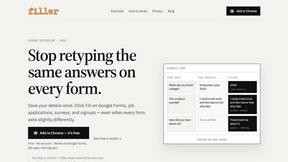
Filler
Chrome extension that fills web forms from your saved profile: Google Forms, job applications, surveys, signups. Free, no account.

Memorable Contact
Memorable Contact helps you remember people, save conversation details, find contacts using AI-powered search, and share digital business cards
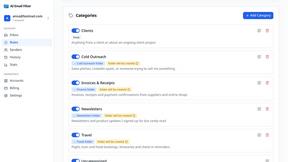
AI Email Filter
AI Email Filter sorts incoming mail into folders using plain-language prompts you write. Works with any IMAP mailbox; bring your own LLM if you want.
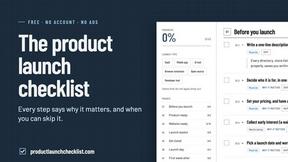
Product Launch Checklist
A free launch checklist for SaaS, apps, AI tools and more. Every step says why it matters and when you can skip it.
Kody Tools
Free collection of online developer utilities, code formatters, and digital converters designed to streamline your daily workflow.