LoadTester
LoadTester is the essential tool you need to run HTTP and API load tests with live analytics from your browser or CI/CD pipeline without managing any.
Visit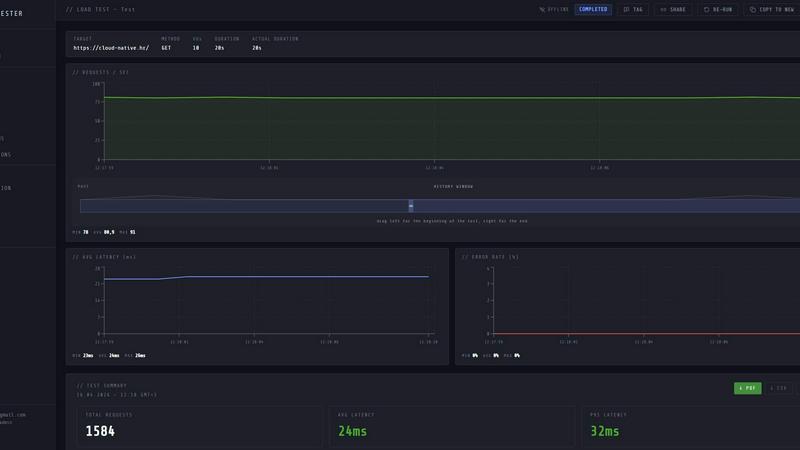
About LoadTester
LoadTester is a modern, cloud-native HTTP and API load testing tool built by Cloud Native d.o.o. that eliminates the most painful part of performance testing: infrastructure management. For engineering teams and developers who need repeatable, reliable performance checks, LoadTester provides a complete load testing platform that runs entirely without any servers, workers, or orchestration to set up or maintain. The core value proposition is simple: create a test, choose your target metrics, and start generating real traffic within seconds. LoadTester supports both virtual user (VU) mode and requests per second (RPS) mode, giving teams flexibility to simulate realistic user behavior or pure throughput scenarios. The platform delivers live telemetry during test execution, including real-time RPS, latency distributions at p50, p95, and p99, error rates, and active worker counts. After each run, comprehensive results are available for review, comparison against previous baselines, and export in PDF, CSV, or JSON formats. LoadTester is built for teams that need to catch performance regressions before users notice them, whether that means running tests from the browser, scheduling them nightly, or integrating directly into CI/CD pipelines via API access. With a cold start time under three seconds, support for up to 10,000 virtual users and 10,000 requests per second, and built-in auto-stop thresholds, LoadTester is an essential tool for any team serious about application performance and reliability.
Features of LoadTester
Instant Distributed Execution
LoadTester eliminates every infrastructure barrier to running a load test. From the moment you configure a test scenario, the platform dispatches distributed workers automatically, scaling to meet your target load without any manual provisioning or orchestration. Cold start to first request happens in under three seconds, and tests queue with zero milliseconds of delay. This means your team focuses entirely on test design and results analysis, never on worker management or scaling headaches. Whether you need 100 virtual users or 10,000, LoadTester handles the execution layer completely.
Live Real-Time Analytics
During any active load test, LoadTester streams live telemetry directly to your browser or API consumer. You watch throughput in requests per second, latency distributions at p50, p95, and p99, total request counts, error counts, and active user counts update in real time. This is not a five-minute delayed report; it is second-by-second visibility into how your application behaves under load. The live latency distribution chart shows all three percentile lines simultaneously, so you can immediately spot degradation or instability as it happens and make informed decisions about stopping or adjusting the test.
Intelligent Auto-Stop Thresholds
LoadTester provides built-in guardrails that automatically stop tests when performance degrades beyond acceptable limits. You configure thresholds for p95 latency, error rate percentage, and regression against baseline runs. When any threshold is breached, LoadTester halts the test immediately, preventing unnecessary load on your systems and saving valuable testing time. This feature is essential for teams running automated tests in CI/CD pipelines, where a runaway test could waste resources or, worse, degrade production performance. Auto-stop thresholds give you confidence that your performance checks are safe and self-limiting.
CI/CD Automation and Integrations
LoadTester is built for teams that want performance testing to be a seamless part of their development workflow. The platform provides a full API for triggering tests programmatically, fetching results, and managing configurations. Webhooks notify your release bots, Slack channels, or email recipients when tests complete or thresholds are breached. Scheduled tests run automatically at defined intervals, making nightly performance baselines or pre-release gates effortless. This integration layer means your team can enforce performance standards without manual intervention, catching regressions on every deploy, not just when someone remembers to run a test.
Use Cases of LoadTester
Pre-Release Performance Gating
Before any code change reaches production, engineering teams must verify that the new build does not introduce performance regressions. LoadTester enables teams to run automated performance tests as part of their CI/CD pipeline. By configuring thresholds for p95 latency and error rate, the platform can automatically fail a build if performance degrades beyond acceptable limits. This use case is essential for teams practicing continuous deployment, where every commit could potentially impact user experience. LoadTester provides the repeatability and automation needed to make performance gating a standard, mandatory step in the release process.
Capacity Planning and Spike Testing
When preparing for high-traffic events like product launches, marketing campaigns, or seasonal peaks, teams need to validate that their infrastructure can handle the expected load. LoadTester allows you to create spike tests that simulate sudden traffic surges, ramping up to thousands of requests per second within seconds. Live analytics show exactly how your application responds under stress, revealing bottlenecks in database queries, API endpoint latency, or third-party service dependencies. The results from these tests inform infrastructure scaling decisions, caching strategies, and architectural improvements before real users are affected.
Nightly Baseline Monitoring
Performance regressions often creep in gradually, becoming visible only after multiple deployments or configuration changes. LoadTester supports scheduled tests that run automatically at defined intervals, such as every night at 2 AM UTC. These scheduled runs establish performance baselines for critical endpoints, and the platform automatically compares each new run against historical data. When a regression of 15% or more is detected, LoadTester sends alerts via Slack or email, allowing the team to investigate and remediate before the degradation impacts users during business hours. This proactive monitoring is essential for maintaining consistent application performance over time.
Multi-Environment Validation
Modern applications deploy across development, staging, and production environments, each with different configurations, data sets, and infrastructure. LoadTester enables teams to run the same test scenarios against multiple environments and compare results side by side. This is critical for validating that staging environments accurately reflect production performance characteristics, and for ensuring that infrastructure changes in lower environments do not introduce unexpected behavior. The ability to export results in PDF, CSV, or JSON formats makes it easy to share findings across teams and document performance baselines for compliance or audit purposes.
Frequently Asked Questions
How quickly can I start my first load test with LoadTester?
You can start your first load test in less than three minutes. After creating a free account, simply navigate to the new test page, give your test a name, select the HTTP method (GET, POST, PUT, DELETE), enter your target URL, choose between virtual users or requests per second mode, set your desired rate and duration, and click run. LoadTester dispatches distributed workers automatically, and your test begins generating traffic within three seconds. No infrastructure setup, no configuration files, no learning curve.
Does LoadTester require any infrastructure setup or maintenance?
No. LoadTester is a fully managed, cloud-native platform that handles all infrastructure aspects of running load tests. You do not need to provision servers, configure load generators, manage worker pools, or handle scaling. The platform automatically dispatches and scales workers based on your test parameters, and it handles all execution, monitoring, and result collection. Your team focuses entirely on designing tests and analyzing results, not on maintaining testing infrastructure.
Can I integrate LoadTester with my existing CI/CD pipeline?
Yes, LoadTester provides a full REST API that allows you to trigger tests programmatically, retrieve results, and manage configurations. You can integrate LoadTester into any CI/CD tool, including Jenkins, GitHub Actions, GitLab CI, CircleCI, and others. The platform also supports webhooks that notify your release bots, Slack channels, or email recipients when tests complete or thresholds are breached. Scheduled tests run automatically at defined intervals, making nightly baselines or pre-release gates completely hands-off.
What happens if my application starts failing during a load test?
LoadTester includes intelligent auto-stop thresholds that protect your application from excessive load during performance degradation. You configure maximum acceptable p95 latency, error rate percentage, and regression against baseline runs. When any threshold is breached, LoadTester automatically stops the test, preventing further load on your systems. This is critical for automated testing scenarios where a failing application could otherwise be subjected to sustained load, potentially causing cascading failures or data corruption.
Pricing of LoadTester
LoadTester offers a free plan that allows you to run tests immediately without any upfront commitment. The free plan includes access to core features including live analytics, basic thresholds, and result exports. For teams that need higher throughput limits, longer test durations, scheduled tests, advanced integrations, or priority support, LoadTester provides paid plans with tiered pricing based on maximum requests per second, virtual user limits, and additional capabilities. Specific pricing details are available on the LoadTester pricing page, and all plans include a cold start time under three seconds and automatic worker scaling. There is no long-term contract required, and you can upgrade or downgrade your plan at any time.
Similar to LoadTester


Firma.dev
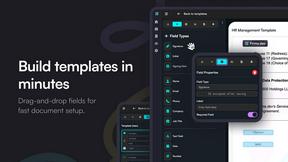
Pay-as-you-go e-signature API and no-code sending. €0.049 per envelope, no monthly minimums, legally valid in 55+ countries.
AIQualityHQ
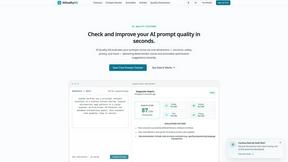
AIQualityHQ is an essential free tool that instantly scores and optimizes your prompts across six dimensions to prevent costly errors before they.