ProcessSpy
ProcessSpy is an essential tool for advanced monitoring of macOS processes, delivering real-time insights with powerful filtering and analysis.
Visit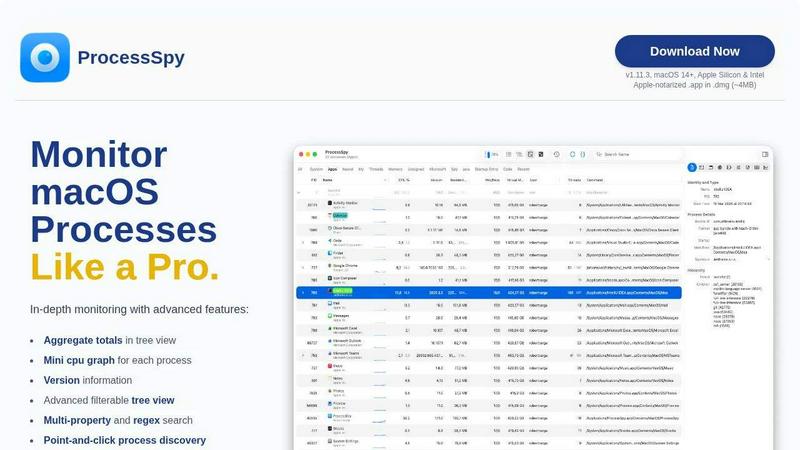
About ProcessSpy
ProcessSpy is an advanced macOS process monitoring tool that serves as a robust alternative to traditional utilities like Activity Monitor. Designed specifically for macOS, it provides users with a comprehensive view of system processes, revealing what Activity Monitor often conceals. With ProcessSpy, users can visualize process trees, inspect open files, view environment variables, and terminate stubborn applications with ease. It is especially valuable for developers and power users who require in-depth insights into their system's operations. By leveraging native APIs and UI elements, ProcessSpy ensures a seamless experience with optimal performance. Its powerful features, such as advanced filtering and real-time monitoring, equip users with the necessary tools to manage processes effectively. Whether you are troubleshooting applications or optimizing system performance, ProcessSpy is an essential tool for anyone looking to gain control over their macOS environment.
Features of ProcessSpy
Advanced Tree View
The Advanced Tree View in ProcessSpy provides a detailed representation of processes, complete with real-time filtering and search capabilities. This feature allows users to see aggregate totals for CPU, Memory, and Threads, making it easier to monitor resource usage at a glance.
Javascript Filters
ProcessSpy introduces advanced filtering options using Javascript, enabling users to create complex filters with multiple conditions. This feature allows for highly customized searches, helping users quickly locate specific processes based on intricate parameters.
Process History Recording
With the Process History Recording feature, users can track historical values for CPU, Memory, and Threads over time. This functionality is crucial for identifying trends and performance bottlenecks, and results can be conveniently exported to CSV for further analysis.
Multi-Property and Regex Search
The Multi-Property and Regex Search functionality allows users to perform quick searches across various process attributes. This feature supports regular expressions and enables users to find processes that match multiple criteria simultaneously, enhancing efficiency in process management.
Use Cases of ProcessSpy
Monitoring Resource Usage
Developers can use ProcessSpy to monitor resource consumption of their applications in real-time. By visualizing CPU and Memory usage, they can identify performance issues and optimize their applications effectively.
Troubleshooting Applications
When applications behave unexpectedly, ProcessSpy allows users to inspect open files and environment variables, providing critical insights that aid in troubleshooting. This capability is essential for diagnosing issues quickly.
Managing Background Processes
For users running multiple applications, ProcessSpy helps manage background processes that may consume resources unnecessarily. By visualizing process trees, users can easily identify and terminate unwanted applications.
Tracking Process History
IT professionals can leverage Process History Recording to track the performance of applications over time. By exporting this data, they can generate reports that help in analyzing trends and making informed decisions regarding software optimizations.
Frequently Asked Questions
Is ProcessSpy safe to install on my Mac?
Yes. ProcessSpy is Apple-notarized and distributed as a signed .app inside a .dmg. It has been thoroughly verified and is safe for installation on both Intel and Apple Silicon Macs.
Does ProcessSpy support older versions of macOS?
ProcessSpy is specifically designed for macOS 14 and newer versions, ensuring compatibility with the latest features and enhancements available in the operating system.
What is the license model?
The license for ProcessSpy is valid for one user across unlimited devices. It includes lifetime updates and access to new features, providing great value for ongoing usage.
How does ProcessSpy compare to Activity Monitor?
ProcessSpy offers features that Activity Monitor lacks, such as full command-line visibility, distinguishing between same-named processes, and advanced filtering options, making it a superior choice for users needing detailed process management.
Similar to ProcessSpy


Product Launch Checklist
A free launch checklist for SaaS, apps, AI tools and more. Every step says why it matters and when you can skip it.


laya.tools
A free directory of 950+ projects built on Laya, the open-source decision model. Updated daily.

Forms Plugin
The #1 Native Form Builder Plugin for Framer - No Code, No Embeds, No External Platforms.