TrafficClaw vs URL to Any
Side-by-side comparison to help you choose the right tool.

TrafficClaw
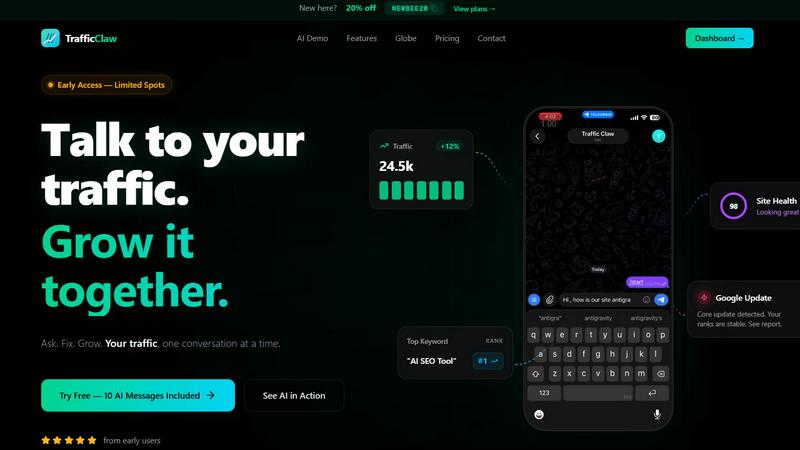
TrafficClaw transforms SEO and analytics data into actionable insights, empowering you to grow your traffic through intelligent conversations.
Last updated: April 13, 2026

URL to Any
URL to Any simplifies your content creation by converting web pages into multiple formats with just a few clicks.
Last updated: February 28, 2026
Visual Comparison
TrafficClaw
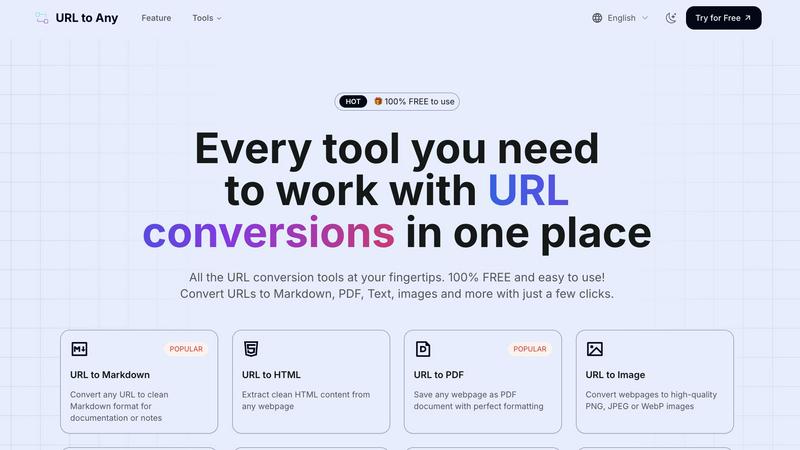
URL to Any
Feature Comparison
TrafficClaw
AI Chat
The AI chat feature allows users to ask questions about their analytics in natural language. This means anyone, regardless of technical expertise, can engage with their data and receive instant, actionable insights and charts without needing extensive knowledge of analytics tools.
SEO Intelligence
TrafficClaw’s SEO intelligence feature identifies keyword gaps, alerts users to content decay, and detects cannibalization issues. This ensures that users can optimize their SEO strategy effectively, allowing them to stay ahead of competitors and improve their organic search performance.
Analytics Dashboard
With a real-time analytics dashboard, users can monitor traffic trends, bounce rates, and conversion funnels all in one place. This comprehensive overview of website performance makes it easy to track growth and identify areas needing improvement without juggling multiple tools.
Site Audit
The site audit feature provides deep page-level audits, complete with performance scores and suggestions for auto-fixes. This allows users to enhance their website's performance based on solid data, ensuring that they address issues that could hinder their traffic and search rankings.
URL to Any
Multiple Conversion Options
URL to Any offers a comprehensive suite of conversion tools, allowing users to transform URLs into Markdown, PDF, images, text, JSON, XML, and more. Each conversion option is designed to cater to diverse needs, ensuring that users can efficiently save web content in the format that best suits their requirements.
Easy to Use Interface
The intuitive design of URL to Any makes converting web content effortless. Users can navigate the platform without difficulty, ensuring a smooth experience from start to finish. The straightforward layout allows for quick access to all tools, enabling users to focus on their tasks rather than grappling with complex software.
Instant Processing
With optimized processing capabilities, URL to Any delivers converted content in seconds. Users can enjoy the efficiency of rapid conversions, allowing them to save time and maintain productivity. The quick turnaround is particularly valuable for those who need immediate access to web content in various formats.
Secure & Private
URL to Any prioritizes user security and privacy. The tool processes data securely, ensuring that all conversions occur without storing any personal information on its servers. This commitment to user privacy fosters trust and confidence, making it a reliable choice for users concerned about data security.
Use Cases
TrafficClaw
Analyze Traffic Drops
When website traffic experiences a decline, TrafficClaw empowers users to investigate the issue quickly. By simply asking the AI analyst, users can receive a detailed analysis that pinpoints the cause, whether it be algorithm changes, technical errors, or content issues.
Optimize SEO Strategy
TrafficClaw helps users refine their SEO strategy by identifying keyword opportunities and content gaps. Users can discover what keywords to target for better ranking and how to optimize existing content to maintain their competitive edge.
Improve User Engagement
By analyzing bounce rates and conversion funnels, website owners can understand user behavior better. TrafficClaw provides insights that help improve user engagement through targeted content adjustments and strategic changes to the website layout.
Streamline Content Creation
With built-in content tools, TrafficClaw aids users in generating relevant content ideas and optimizing existing content for search engines. This feature simplifies the content creation process and ensures that all content aligns with SEO best practices.
URL to Any
Content Creation
Writers and bloggers can use URL to Any to convert web pages into Markdown or text, making it easier to compile research and notes for articles. This streamlined process enhances their ability to gather and organize information efficiently.
Academic Research
Students and researchers can benefit from converting web pages into PDF or text formats for easy citation and reference. URL to Any simplifies the process of collecting and preserving valuable online resources, aiding in the overall research process.
Social Media Sharing
Marketers can generate QR codes from URLs to promote content easily. By converting web pages into shareable formats, they can enhance engagement and reach wider audiences through social media platforms.
Data Extraction
Developers can utilize the URL Extractor feature to quickly gather all URLs from a website, exporting them in TXT or CSV formats. This functionality is invaluable for tasks such as web scraping and data analysis, allowing for efficient data collection.
Overview
About TrafficClaw
TrafficClaw is an innovative AI-powered tool designed to help website owners and digital marketers diagnose and resolve traffic issues effectively. When traffic drops, traditional analytics platforms like Google Analytics and Search Console may not provide the insights needed to identify the root cause. TrafficClaw changes this by allowing users to simply ask questions like "Why did my traffic drop?" and receive data-driven answers backed by real-time analytics. The platform seamlessly integrates with GA4 and Search Console, giving users a comprehensive view of their website's performance. Ideal for small business owners, SEO specialists, and content creators, TrafficClaw offers actionable insights that lead to tangible growth. With an intuitive chat interface, users can explore their data, identify problems, and implement solutions quickly, transforming how they manage their online presence.
About URL to Any
URL to Any is an essential tool that simplifies the conversion of web content into a variety of formats. Designed for content creators, developers, and anyone needing efficient web content conversion, this all-in-one tool allows users to convert any webpage into Markdown, PDF, images, text, and more—all at no cost. With a user-friendly interface and no registration required, users can quickly input URLs and receive their desired formats in mere seconds. The main value proposition of URL to Any lies in its ability to enhance productivity by preserving important web content across different platforms seamlessly. This versatility ensures that users can access and utilize web content in their preferred formats, making it an indispensable resource in today's fast-paced digital landscape.
Frequently Asked Questions
TrafficClaw FAQ
How does TrafficClaw integrate with my existing tools?
TrafficClaw seamlessly integrates with Google Analytics 4 and Google Search Console, allowing for a hassle-free setup where your data is automatically detected and displayed in one unified interface.
Is my data safe with TrafficClaw?
Yes, TrafficClaw prioritizes user privacy and data security. It employs read-only Google OAuth, ensuring that your data remains yours, and you maintain control over it at all times.
Can I try TrafficClaw for free?
Absolutely! TrafficClaw offers a free trial that includes 10 AI messages, allowing users to experience the platform’s capabilities and how it can help improve their website's performance.
What kind of support does TrafficClaw offer?
TrafficClaw provides comprehensive support through its help center, tutorials, and customer service. Users can access resources to better understand the platform and how to maximize its features for their specific needs.
URL to Any FAQ
What formats can I convert URLs into?
URL to Any supports a wide range of output formats, including Markdown, PDF, text, images (PNG, JPEG, WebP), JSON, XML, and more. This versatility allows users to choose the format that best suits their needs.
Is there a cost to use URL to Any?
No, URL to Any is completely free to use. Users can access all conversion tools without any hidden fees or registration requirements, making it an accessible option for everyone.
How quickly can I get my converted content?
The processing speed of URL to Any is optimized for instant results. Users can expect to receive their converted content in just seconds after initiating the conversion process.
Is my data secure when using URL to Any?
Yes, URL to Any prioritizes user security and privacy. All data is processed securely, and no personal information is stored on the servers, ensuring a safe and private user experience.
Alternatives
TrafficClaw Alternatives
TrafficClaw is an innovative tool that belongs to the category of AI Assistants, Analytics & Data, and SEO. It transforms the way users interact with their SEO and analytics data by enabling them to ask questions like "Why did my traffic drop?" and receive actionable insights based on real data. This unique approach addresses a common frustration: while traditional analytics platforms provide raw data, they often lack the context needed to make sense of it. Users often seek alternatives to TrafficClaw for various reasons, including pricing concerns, the need for additional features, or compatibility with specific platforms. When evaluating alternatives, it's essential to consider factors such as ease of use, the depth of insights provided, integration capabilities with existing tools, and the overall value offered. Finding a solution that meets your specific analytics needs and enhances your SEO strategy is crucial for achieving online success.
URL to Any Alternatives
URL to Any is an innovative tool designed for the seamless conversion of web content into various formats, making it a vital asset for content creators and developers alike. As a part of the AI Assistants category, it simplifies the task of transforming web pages into formats such as Markdown, PDF, and images with unparalleled ease. Users frequently seek alternatives to URL to Any for various reasons, including the need for additional features, compatibility with specific platforms, or concerns about pricing. When searching for an alternative, it is essential to consider the user interface, the range of formats supported, and whether the tool maintains a free model without hidden costs. Ultimately, the right choice should enhance productivity and fit well within your content workflow.