
URL to Any
URL to Any simplifies your content creation by converting web pages into multiple formats with just a few clicks.
Visit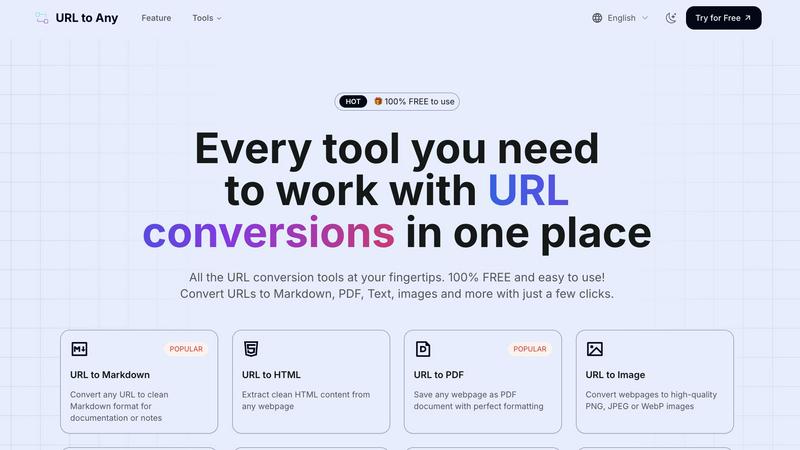
About URL to Any
URL to Any is an essential tool that simplifies the conversion of web content into a variety of formats. Designed for content creators, developers, and anyone needing efficient web content conversion, this all-in-one tool allows users to convert any webpage into Markdown, PDF, images, text, and more—all at no cost. With a user-friendly interface and no registration required, users can quickly input URLs and receive their desired formats in mere seconds. The main value proposition of URL to Any lies in its ability to enhance productivity by preserving important web content across different platforms seamlessly. This versatility ensures that users can access and utilize web content in their preferred formats, making it an indispensable resource in today's fast-paced digital landscape.
Features of URL to Any
Multiple Conversion Options
URL to Any offers a comprehensive suite of conversion tools, allowing users to transform URLs into Markdown, PDF, images, text, JSON, XML, and more. Each conversion option is designed to cater to diverse needs, ensuring that users can efficiently save web content in the format that best suits their requirements.
Easy to Use Interface
The intuitive design of URL to Any makes converting web content effortless. Users can navigate the platform without difficulty, ensuring a smooth experience from start to finish. The straightforward layout allows for quick access to all tools, enabling users to focus on their tasks rather than grappling with complex software.
Instant Processing
With optimized processing capabilities, URL to Any delivers converted content in seconds. Users can enjoy the efficiency of rapid conversions, allowing them to save time and maintain productivity. The quick turnaround is particularly valuable for those who need immediate access to web content in various formats.
Secure & Private
URL to Any prioritizes user security and privacy. The tool processes data securely, ensuring that all conversions occur without storing any personal information on its servers. This commitment to user privacy fosters trust and confidence, making it a reliable choice for users concerned about data security.
Use Cases of URL to Any
Content Creation
Writers and bloggers can use URL to Any to convert web pages into Markdown or text, making it easier to compile research and notes for articles. This streamlined process enhances their ability to gather and organize information efficiently.
Academic Research
Students and researchers can benefit from converting web pages into PDF or text formats for easy citation and reference. URL to Any simplifies the process of collecting and preserving valuable online resources, aiding in the overall research process.
Social Media Sharing
Marketers can generate QR codes from URLs to promote content easily. By converting web pages into shareable formats, they can enhance engagement and reach wider audiences through social media platforms.
Data Extraction
Developers can utilize the URL Extractor feature to quickly gather all URLs from a website, exporting them in TXT or CSV formats. This functionality is invaluable for tasks such as web scraping and data analysis, allowing for efficient data collection.
Frequently Asked Questions
What formats can I convert URLs into?
URL to Any supports a wide range of output formats, including Markdown, PDF, text, images (PNG, JPEG, WebP), JSON, XML, and more. This versatility allows users to choose the format that best suits their needs.
Is there a cost to use URL to Any?
No, URL to Any is completely free to use. Users can access all conversion tools without any hidden fees or registration requirements, making it an accessible option for everyone.
How quickly can I get my converted content?
The processing speed of URL to Any is optimized for instant results. Users can expect to receive their converted content in just seconds after initiating the conversion process.
Is my data secure when using URL to Any?
Yes, URL to Any prioritizes user security and privacy. All data is processed securely, and no personal information is stored on the servers, ensuring a safe and private user experience.
Similar to URL to Any


amaze.directory
Every AI tool here was opened and used on a real task before it went in. Free to submit.
benchmark.directory
We buy the tool, use it on real work for a week, then write down what the pricing page will not tell you. 146 listings so far.

saasgrow.ai
Growth software, filtered before you see it. Browse by problem, compare pricing, skip the twenty-tab research spiral.

Tools Network
Tools Network is a curated directory of the best AI tools across 25+ categories. Compare ratings, pricing, and features to find the right one, fast.To


Built2WinWeb AI Strength Scanner
Custom PHP websites, AI Indexing Pack ($599 one‑time), and WebAgentScan SaaS ($9/mo). MCP, A2A, llms.txt, full ownership.
SnapPChart
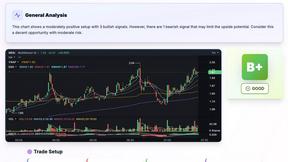
SnapPChart grades a trading chart screenshot A+ to F, with an entry, stop, targets, and risk/reward. Works on stocks, forex, crypto, futures.