Perkoon vs TinyFast
Side-by-side comparison to help you choose the right tool.

Perkoon enables free, unlimited peer-to-peer file transfers without signup, ensuring your files stay private and secure.
Last updated: March 4, 2026

TinyFast instantly and privately compresses your files on Mac without risky uploads.
Last updated: February 28, 2026
Visual Comparison
Perkoon

TinyFast
Feature Comparison
Perkoon
Peer-to-Peer File Transfer
Perkoon’s flagship feature allows users to transfer files directly between browsers with no size limits and without creating accounts. This P2P method ensures that data privacy is maintained, as files do not pass through a central server, making file sharing seamless and secure.
Encrypted Cloud Storage
When sending files to offline recipients, Perkoon provides an encrypted cloud storage option. This feature is essential for securing your data while it is temporarily held until the recipient can access it, ensuring that privacy and security are never compromised.
Built-in Automation Tools
Designed for the modern user, Perkoon includes native automation tools that enable AI agents to interact with the service directly. This eliminates the need for screen-scraping and enhances the efficiency of file transfers, making it a powerful tool for tech-savvy users.
User-Friendly CLI Tool
Perkoon offers a simple command-line interface (CLI) tool that allows advanced users and developers to interact with the service effortlessly. This feature is perfect for those who prefer a more technical approach to file transfers, enhancing customization and control over the transfer process.
TinyFast
100% Local & Private Compression
Your files never leave your Mac. TinyFast is engineered for total privacy by design, processing all compression tasks locally without any uploads to cloud servers. This is critical for handling confidential documents, client assets under NDA, or any sensitive material, providing peace of mind that your data remains completely under your control and is never stored or accessed by third parties.
Blazing-Fast Drag & Drop Workflow
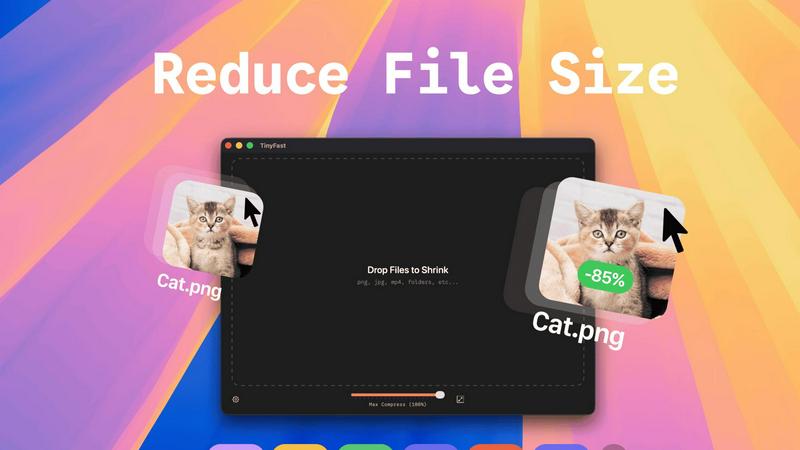
Experience instant file size reduction with an intentionally simple interface. The entire process is as straightforward as dragging your file or folder into the TinyFast window and dragging the optimized output out. This eliminates complex settings, lengthy upload queues, and slow downloads, delivering shrunk files in seconds and saving you invaluable time with every use.
Universal File Format Support
TinyFast is your single, go-to solution for compressing a vast range of file types. It comprehensively supports images (PNG, JPG, TIFF, HEIC, WEBP, GIF, BMP, SVG), videos (MP4, MOV, M4V), documents (PDF, DOCX), code files (JS, CSS, JSON), and audio (MP3). This universal support means you don't need multiple tools for different file types.
Batch Processing & Resolution Control
Boost your productivity by compressing entire folders of files at once. Drop a folder and get optimized output in seconds. Furthermore, TinyFast provides control over your output quality by allowing you to automatically resize image and video resolution during compression, giving you the flexibility to reduce file size precisely according to your needs.
Use Cases
Perkoon
Everyday File Sharing
Perkoon is ideal for everyday users who need to send files quickly to friends or colleagues without the hassle of signing up for accounts. Whether it’s sharing vacation photos or work documents, Perkoon simplifies the process.
Large File Transfers
For professionals working with large files, such as designers or videographers, Perkoon’s P2P service allows for the transfer of hefty files without worries about size restrictions or costs, making it a reliable choice for creative industries.
Secure Business Communications
Businesses can utilize Perkoon for secure file transfers, ensuring that sensitive documents are sent privately and efficiently. The encrypted cloud storage feature provides an extra layer of security for important data.
Integration with AI Systems
Developers can leverage Perkoon’s built-in automation tools to integrate file transfer capabilities directly into their AI systems. This allows for streamlined workflows and enhances the productivity of AI-driven applications.
TinyFast
For Developers & Coders
Developers constantly need to optimize assets for web and app deployment. TinyFast allows them to quickly compress project images, SVGs, and code files (like JS and CSS bundles) locally, ensuring no proprietary code or assets are exposed to online services. This integrates seamlessly into a development workflow, speeding up build times and protecting intellectual property.
For Designers & Creative Professionals
Designers working with high-resolution images, mockups, and video clips need to share proofs or final assets without compromising quality or confidentiality. TinyFast enables them to shrink large PSD exports, PNGs, JPEGs, and MOV files on the spot, facilitating quick client reviews and safe transfer of sensitive creative work directly from their Mac.
For Business & Legal Documentation
Professionals handling contracts, reports, and presentations in PDF or DOCX format often need to reduce file sizes for email attachments or secure portals. Using TinyFast ensures these confidential documents are compressed locally, adhering to strict data privacy policies and compliance requirements without ever risking exposure on an online server.
For Content Creators & Marketers
Bloggers, social media managers, and marketers regularly process large volumes of images and videos for publication. TinyFast streamlines this by allowing batch compression of media files, saving hours of upload time. They can maintain visual quality while meeting platform file size limits, all from the safety and speed of their desktop.
Overview
About Perkoon
Perkoon is a revolutionary file transfer service designed to simplify your digital life by providing a straightforward way to move files from one point to another without unnecessary complications. It is tailored for individuals and businesses alike who are weary of cumbersome restrictions, obligatory sign-ups, and services that commoditize personal data. At the heart of Perkoon are two fundamental methods for file transfer: a free peer-to-peer (P2P) system that enables users to send files directly between browsers in real time, and a secure cloud storage option for offline transfers. The P2P feature ensures that there are no size limitations and no need for accounts, making it a hassle-free experience. Your data remains private, as it never touches a central server, allowing Perkoon to operate at no cost to users. For offline recipients, the paid cloud storage service provides necessary encryption to keep your files secure. Perkoon is uniquely positioned for the AI age, featuring built-in automation tools and a simple command-line interface, making it an ideal solution for both everyday users and AI systems.
About TinyFast
TinyFast is the essential, non-negotiable tool for any Mac user who handles digital files. It is a native macOS application built to perform one critical task with unmatched efficiency: compressing files directly on your computer. In a digital landscape where data privacy is paramount and efficiency is currency, TinyFast eliminates the insecurity and sluggishness of online tools. It processes a wide array of formats—including PNG, JPEG, MP4, MOV, PDF, SVG, WebP, MP3, and GIF—locally on your Mac. Your files never leave your machine, ensuring total privacy and blazing-fast speed. The workflow is deliberately and powerfully simple: just drag your file in and drag the compressed version out. This tool is built for developers, designers, creators, and professionals who cannot afford to waste time uploading sensitive assets to unknown servers or compromise on confidentiality. TinyFast is not just an app; it's a necessary upgrade to your workflow, guaranteeing security, speed, and simplicity in every single compression, making it an indispensable asset for anyone serious about their digital productivity.
Frequently Asked Questions
Perkoon FAQ
Why is Perkoon free?
Perkoon operates its P2P transfer service free of charge because it incurs minimal costs. The cloud storage option, which is a paid feature, covers the necessary expenses for server maintenance, ensuring users can enjoy free transfers without hidden fees.
Can I transfer files if the recipient is offline?
Yes, Perkoon holds files for offline recipients using its encrypted cloud storage service. This allows users to send files even when the recipient is not currently available, ensuring that file transfers are convenient and flexible.
What browsers are compatible with Perkoon?
Perkoon works seamlessly with Chrome, Edge, and Brave browsers, which support unlimited file transfers. However, users of Firefox and Safari may experience certain restrictions due to browser limitations, so using a compatible browser is recommended for the best experience.
How does Perkoon ensure my privacy?
Perkoon prioritizes user privacy by employing a P2P model where files do not pass through central servers. In addition, the cloud storage service encrypts files, ensuring that even the company cannot see the contents of your transfers. Your data remains yours at all times.
TinyFast FAQ
Is TinyFast really completely private?
Yes, absolutely. TinyFast is a native macOS application that performs all compression processes locally on your Mac. Your files are never uploaded to the internet, sent to cloud servers, or stored by any third party. This local-first design is the core of the app, guaranteeing total privacy and security for all your data.
What file types does TinyFast support?
TinyFast supports a wide range of common file formats. This includes images (PNG, JPG, TIFF, HEIC, WEBP, GIF, BMP, SVG), videos (MP4, MOV, M4V), documents (PDF, DOCX), code files (JS, CSS, JSON), and audio files (MP3). It is designed to be a universal compression tool for most digital file needs.
How does the pricing work?
TinyFast offers a free tier that allows you to compress up to 5 files per day with access to all features. For unlimited use, you can choose a monthly subscription or a one-time lifetime purchase. The lifetime plan provides unlimited local compressions, all features, lifetime updates, and supports future development with a single payment.
Can I compress multiple files or folders at once?
Yes, you can. One of TinyFast's key features is batch processing. You can drag and drop an entire folder containing multiple files into the app, and it will compress all supported files within it, outputting the optimized versions in seconds. This is ideal for processing large batches of photos, videos, or documents efficiently.
Alternatives
Perkoon Alternatives
Perkoon is a pioneering file transfer service that embraces simplicity and user-centric design in the realm of productivity and management. It allows individuals to send files directly between browsers using peer-to-peer technology, eliminating the need for signups and bypassing artificial limitations. This straightforward approach appeals to users frustrated with conventional file transfer services that impose restrictions or treat user data as a commodity. Many users seek alternatives to Perkoon due to various reasons, including pricing, specific feature sets, and compatibility with different platforms. When evaluating alternatives, it’s essential to consider factors such as data privacy, ease of use, transfer speeds, and the presence of essential functionalities that meet your unique needs. The right alternative should prioritize user experience while ensuring robust security and reliability.
TinyFast Alternatives
TinyFast is a native macOS application for local file compression, a critical tool in the tech utility category. It stands apart by processing files directly on your Mac, ensuring privacy and speed without risky uploads to external servers. Users may explore alternatives for various reasons, such as budget constraints, a need for cross-platform compatibility, or specific feature requirements not covered by a single tool. The search often stems from a desire to balance core functionality with other practical considerations. When evaluating any alternative, the non-negotiable priorities should be privacy (does it process files locally?), speed, and format support. The ideal tool must handle your specific file types efficiently while fitting seamlessly into your existing workflow without compromising security.