Playwriter vs Tailride
Side-by-side comparison to help you choose the right tool.

Playwriter
Playwriter empowers agents to control their existing Chrome browser seamlessly with AI, utilizing full Playwright capabilities without extra overhead.
Last updated: March 18, 2026

Tailride
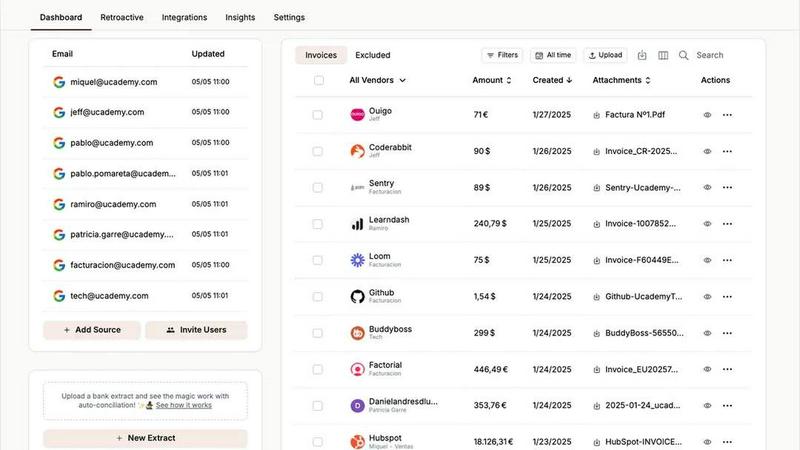
Tailride automates invoice and receipt collection from your inbox and portals, saving you hundreds of hours.
Last updated: February 28, 2026
Visual Comparison
Playwriter

Tailride
Feature Comparison
Playwriter
Real Browser Access
Playwriter provides AI agents with direct access to your actual browser session, complete with all logins, extensions, and cookies. This eliminates issues with bot detection and redundancy, allowing for seamless automation in a familiar environment.
Comprehensive Automation API
The tool offers the full Playwright API through a single execute command, enabling any Playwright code to be run without cumbersome wrappers. This simplifies the development process, allowing users to focus on creating efficient scripts without worrying about context switching.
Debugger and Live Editing
Playwriter includes a powerful debugger with breakpoints and live code editing features. This allows for real-time adjustments and debugging as the agent operates in the browser, ensuring that any issues can be swiftly identified and resolved.
Accessibility Snapshots
With accessibility snapshots that are significantly smaller in size (5-20KB), Playwriter enhances performance and efficiency. These snapshots provide essential insights without the bloat of larger screenshots, making it easier to analyze and understand web content.
Tailride
Inbox Scanning & Monitoring
Tailride's inbox scanning is a fundamental feature that connects directly to your email client to automatically detect and extract every invoice and receipt. It monitors your inbox and your colleagues' inboxes in real-time, ensuring no document is ever missed. The system handles all formats—PDFs, images, and even text within the email body—and allows you to retroactively search for past invoices from any time period. This eliminates the frantic, end-of-quarter scramble to find missing documents and provides complete visibility over all incoming financial data without ever having to forward emails manually.
Chrome Extension for Online Portals
The Tailride Chrome extension is a non-negotiable time-saver for modern businesses. With a single click, you can extract invoices directly from over 20 essential online services and SaaS platforms, including Amazon, Meta Ads, Adobe, Notion, Microsoft, and ChatGPT. This feature is critical because many of these companies do not send invoices via email, creating a major gap in your records. The extension ensures that every subscription, ad spend, and online purchase is automatically captured and fed into your centralized document dashboard.
AI Processing & Custom Rules
Beyond simple extraction, Tailride employs intelligent document recognition AI to accurately read and process the data on each invoice. This is paired with fully customizable AI rules that allow you to automate categorization, tagging, and routing based on your company's specific needs. You can set rules to automatically forward invoices to your accountant, file them in specific Google Drive folders, or apply custom labels, transforming raw documents into organized, actionable financial data without any manual intervention.
Bank Reconciliation & Integrations
Tailride completes the automation cycle with robust bank reconciliation features. It matches bank transactions with the corresponding extracted invoices and receipts, instantly identifying any missing documents or discrepancies. This feature is indispensable for maintaining accurate books. Furthermore, Tailride's seamless integrations with accounting software like QuickBooks and Xero, and cloud storage like Google Drive, ensure your financial ecosystem is connected and that data flows automatically to where it is needed most.
Use Cases
Playwriter
Streamlined Testing
QA teams can utilize Playwriter to automate the testing of web applications more effectively. By providing agents with direct access to the browser, they can execute tests using actual user sessions, leading to more accurate and reliable results.
Enhanced Collaboration
Development teams can work alongside AI agents in real-time. When an agent encounters obstacles such as captchas or consent walls, team members can intervene and assist, ensuring that the workflow remains uninterrupted and efficient.
Efficient Data Scraping
Playwriter is ideal for data scraping tasks, allowing users to automate the collection of information from websites without the risks associated with bot detection. The tool's access to real browser sessions ensures that data retrieval mimics human behavior.
Real-time Performance Monitoring
With the ability to intercept network requests and analyze performance on-the-fly, Playwriter aids developers in monitoring the efficiency of their web applications. This capability helps in identifying bottlenecks and optimizing user experience swiftly.
Tailride
Automating Accounts Payable for SMBs
For small and medium-sized businesses, manually processing supplier invoices from emails is a massive time sink. Tailride automates the entire accounts payable workflow by capturing every incoming invoice automatically, extracting key data, and categorizing it. This use case eliminates manual data entry, reduces human error, and ensures bills are paid on time, freeing up the team to focus on core business activities instead of administrative tasks.
Streamlining Expense Management for Teams
Companies with remote employees or those with business expenses struggle with collecting receipts. Tailride solves this by allowing employees to simply take pictures of physical receipts and send them via a Telegram or WhatsApp bot. All receipts are processed and centralized in the Tailride dashboard. This use case provides finance teams with complete, real-time visibility into company spending and simplifies the reimbursement process, making it an essential tool for operational efficiency.
Empowering Accounting Firms
Accounting firms managing multiple clients face the chaos of inconsistent document submission. Tailride allows accountants to invite each client to connect their own inbox, creating a standardized, automated pipeline for all financial documents. This use case transforms the client-accountant relationship, eliminating the need for clients to manually forward emails and ensuring the accountant always has an organized, up-to-date set of documents for filing taxes and closing the books.
Centralizing SaaS & Online Subscriptions
Modern businesses use dozens of SaaS tools, but invoices often live only in online portals. Tailride's Chrome extension is critical for this use case, as it enables one-click extraction of invoices from platforms like Notion, ChatGPT, and Meta Ads. This ensures all subscription costs are captured, preventing missed deductions and providing a complete picture of software expenditures for accurate budgeting and financial reporting.
Overview
About Playwriter
Playwriter is a revolutionary tool designed to enhance the capabilities of AI agents by providing them direct access to your actual browser environment. Unlike conventional AI tools that operate in isolated or headless environments, Playwriter leverages your existing Chrome session. This means that all your logins, extensions, and cookies are readily available, allowing AI agents to function more efficiently and effectively. With features like a full automation API, accessibility snapshots, and a robust debugger, Playwriter is tailored for developers, QA engineers, and teams looking to streamline their workflows. Its unique collaboration features allow users to intervene in real-time, ensuring that complex tasks requiring human oversight can be easily managed. Overall, Playwriter transforms the way AI interacts with the web, making automation smoother and more reliable.
About Tailride
Tailride is an essential AI-powered accounting automation platform designed to eliminate the manual chaos of invoice and receipt management. It is a must-have solution for business owners, finance teams, and accountants who are tired of wasting hundreds of hours each month on tedious data entry and document chasing. The platform's core value proposition is its ability to completely automate the capture, extraction, and organization of financial documents from the very sources where they already exist: your email inbox and online accounts. By connecting natively to email clients like Gmail and Outlook, Tailride continuously scans for invoices and receipts, whether they are in PDFs, images, email bodies, or behind URLs. Its powerful Chrome extension is a critical tool for instantly extracting invoices from over 20 online platforms such as Amazon, Meta Ads, and Notion. With intelligent AI processing, automatic categorization rules, and seamless integrations with QuickBooks, Xero, and Google Drive, Tailride ensures every document is accounted for and reconciled. For any fast-growing company, this platform is not just a convenience; it is a necessary foundation for accurate, efficient, and stress-free financial operations.
Frequently Asked Questions
Playwriter FAQ
How does Playwriter improve automation?
Playwriter enhances automation by allowing AI agents to operate directly within your existing browser session, utilizing all current logins and extensions, which reduces detection risks and increases operational efficiency.
Is Playwriter difficult to set up?
Not at all. Getting started with Playwriter involves simple steps: install the Chrome extension, set up the CLI, and connect your agent to the local WebSocket relay. This straightforward process ensures you can begin browsing in no time.
Can multiple agents use Playwriter simultaneously?
Yes, Playwriter supports multiplexed sessions, allowing multiple agents or CLI instances to work with the same browser concurrently. This feature is particularly beneficial for teams that need collaborative automation.
What security measures does Playwriter implement?
Playwriter operates entirely on your local machine, meaning no data is sent to remote servers. The connection is secured through a local WebSocket relay, ensuring that your browsing session remains private and secure.
Tailride FAQ
How does Tailride connect to my email, and is it secure?
Tailride establishes a native, secure connection with your email provider (like Gmail or Outlook) using OAuth, the same secure protocol used by other trusted apps. Your emails never leave your inbox; Tailride only scans for and extracts data from emails identified as invoices or receipts. We do not store your email login credentials, and all data transmission is encrypted, ensuring your information remains private and secure.
Can Tailride find and process old invoices from my inbox?
Yes, absolutely. When you first connect your inbox, Tailride gives you the option to perform a retroactive scan. You can choose to search for past invoices from specific time ranges, such as "This Month," "This Quarter," "This Year," or a custom date range. This feature is essential for catching up on backlogged documents and ensuring your financial records are complete from day one.
What if an invoice is not in an email but on a website?
This is a common gap that Tailride directly addresses with its Chrome extension. For invoices that only exist within online portals (e.g., your Amazon Seller Central, Meta Ads Manager, or Notion account), you simply navigate to the page and click the Tailride extension. It will instantly detect, extract, and process the invoice, ensuring no financial document is missed, regardless of its source.
Does Tailride integrate with my existing accounting software?
Yes, Tailride offers seamless integrations with major accounting platforms including QuickBooks and Xero. Once processed, invoices and their extracted data can be automatically synced to your accounting software. It also integrates with Google Drive for organized document storage. These integrations are vital for creating a fully automated workflow from document capture to reconciled bookkeeping.
Alternatives
Playwriter Alternatives
Playwriter is an innovative tool that enables users to control Chrome through AI via Command Line Interface (CLI) or Managed Control Protocol (MCP). As a formidable player in the automation category, it addresses the limitations faced by AI agents, such as restricted browsing capabilities and issues with bot detection. By providing a seamless connection to your actual browser session, Playwriter enhances automation while retaining user credentials, extensions, and more. Users often seek alternatives to Playwriter for various reasons, including pricing, specific feature requirements, or compatibility with different platforms. When exploring alternatives, it is essential to consider factors such as ease of use, integration capabilities, performance, and the extent of automation features offered. Finding a solution that aligns with your needs can greatly enhance your productivity and streamline your workflows.
Tailride Alternatives
Tailride is an AI-powered accounting automation platform in the business and finance category. It specializes in automatically extracting and processing invoices and receipts from emails, web portals, and attachments, streamlining bookkeeping and reconciliation. Users often seek alternatives for various reasons. These can include budget constraints, the need for different feature sets, or specific integration requirements with other business software. The ideal solution must align with your company's workflow and financial scale. When evaluating an alternative, prioritize core functionality like accurate data extraction, seamless integration with your accounting stack, and robust automation rules. Security, ease of use, and reliable customer support are also non-negotiable factors for protecting and managing your financial data.