
conceptviz vs SimpleDraw
Side-by-side comparison to help you choose the right tool.

conceptviz
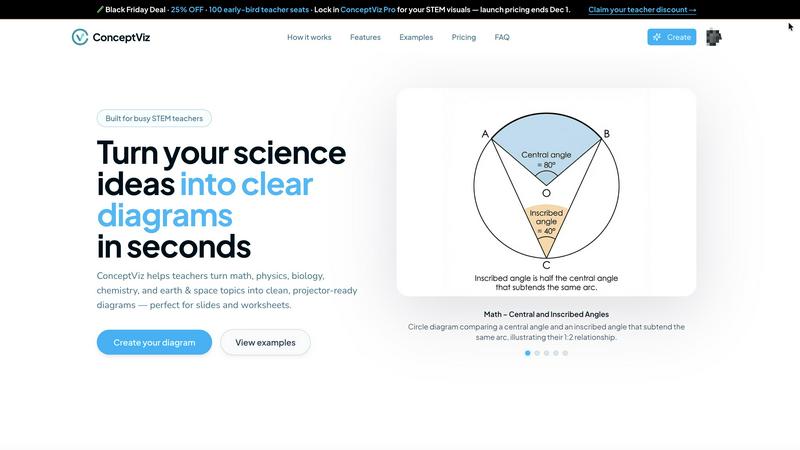
ConceptViz transforms complex science and math concepts into clear, ready-to-use diagrams for effective education.
Last updated: February 28, 2026

SimpleDraw
Create precise floor plans and scale drawings easily online with SimpleDraw's intuitive and powerful web tool.
Last updated: March 1, 2026
Visual Comparison
conceptviz
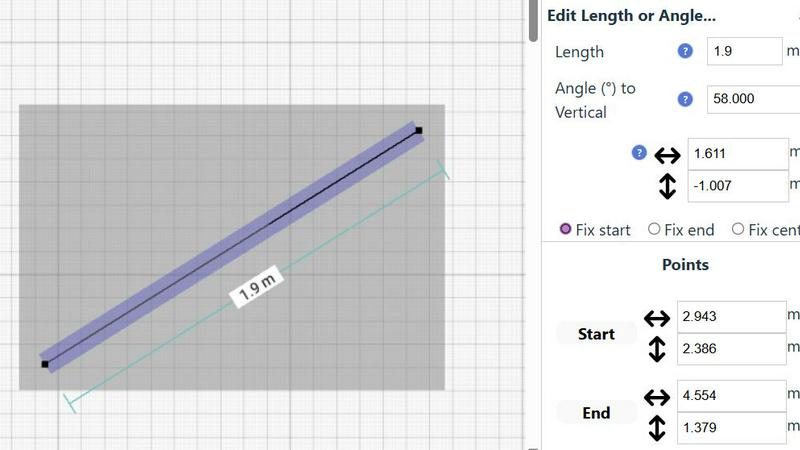
SimpleDraw
Feature Comparison
conceptviz
User-Friendly Interface
The intuitive design of ConceptViz allows users of all skill levels to create diagrams easily. Educators and students can navigate the platform effortlessly, which means you can focus on teaching rather than struggling with complicated tools.
Diagram Generation from Plain English
ConceptViz uniquely enables users to generate diagrams by simply typing a description in plain English. This feature eliminates the need for artistic skills and allows users to focus on the content, making it accessible for everyone.
Projector-Ready and Print-Friendly Visuals
All diagrams created with ConceptViz are designed with clarity in mind. They are high-resolution, suitable for projectors, and optimized for printing, ensuring that visuals remain sharp and legible in any educational setting.
Subject and Grade Presets
ConceptViz offers specific presets tailored for various subjects and grade levels. This feature allows users to quickly select from categories such as physics, biology, and chemistry, ensuring that the generated diagrams align perfectly with educational standards.
SimpleDraw
Floor Plan Mode
SimpleDraw offers a dedicated Floor Plan Mode designed specifically for creating accurate floor plans of various spaces. Users can effortlessly draw walls, add windows and doors with a single click, and view real-time measurements as they make adjustments, ensuring precision at every step.
Smart Alignment System
The Smart Alignment System assists users in placing points and lines exactly where they want them. By simply positioning the mouse in the desired area, SimpleDraw helps to accurately position elements with clear visual indications, allowing for precise adjustments when necessary.
Flexible Zoom and Variable Precision
SimpleDraw provides a flexible zoom feature that enables users to zoom in and out easily, targeting any part of their drawing. The precision of the alignment system adapts to the zoom level, while users can also control precision independently, giving them complete control over their drawings.
Comprehensive Measurement System
The Comprehensive Measurement System allows users to choose between metric or standard US units while providing fine controls over which measurements are displayed. Dynamic contextual measurements appear as users work, aiding in the creation of drawings that meet their exact specifications.
Use Cases
conceptviz
Creating K-12 Lesson Plans
Teachers can utilize ConceptViz to develop engaging lesson plans by generating diagrams that clearly explain scientific concepts, enhancing student comprehension and retention.
Designing Graduate-Level Research Graphics
Researchers can leverage ConceptViz to create detailed and accurate diagrams for presentations and papers, ensuring that complex ideas are conveyed effectively to their audience.
Crafting Worksheets and Study Materials
Educators can produce tailored worksheets that include customized diagrams, allowing students to practice and reinforce their learning through visual aids aligned with their curriculum.
Developing Interactive Classroom Presentations
ConceptViz can be used to create visuals that enhance classroom presentations, making lectures more engaging and informative. Teachers can easily integrate these diagrams into their slideshows for a more dynamic teaching experience.
SimpleDraw
Kitchen and Bathroom Renovations
Homeowners planning kitchen or bathroom renovations can utilize SimpleDraw to create accurate plans that visualize layouts before starting any work. This helps in making informed decisions about design and functionality.
Room Layouts and Furniture Planning
Whether designing a bedroom, living room, or office space, SimpleDraw makes it easy to plan furniture layouts. Users can visualize how furniture will fit in a room, preventing costly mistakes when purchasing.
House and Apartment Plans
Real estate professionals and homeowners can create complete floor plans for houses and apartments. SimpleDraw’s features enable detailed planning for home projects, rental listings, or space optimization.
Community-Driven Development
SimpleDraw is constantly evolving based on user feedback. Those who join the SimpleDraw community can influence future features, ensuring the tool continues to meet the needs of its users effectively.
Overview
About conceptviz
ConceptViz is a groundbreaking tool designed to revolutionize the creation of classroom-ready diagrams specifically for STEM education. It caters to teachers, students, and researchers by enabling them to generate precise and visually appealing graphics that simplify the understanding of complex scientific concepts. Whether you are developing K-12 lesson plans or creating intricate diagrams for university-level research, ConceptViz streamlines the process to ensure efficiency and effectiveness. Users can simply describe their desired diagram in plain English, and the tool will produce high-quality visuals that are ready for projection and printing. With its user-friendly interface and emphasis on clarity, ConceptViz is an essential resource for educators striving to convey scientific information effectively and efficiently. This tool not only saves time but also enhances the learning experience, making it indispensable in educational settings.
About SimpleDraw
SimpleDraw is an innovative online tool specifically designed for individuals who need to create precise and accurate scale drawings without the complexities associated with traditional drafting tools. It serves a diverse audience, including DIY enthusiasts, homeowners planning renovations, and professionals seeking to draft technical drawings. With its user-friendly interface, SimpleDraw allows users to dive right into their projects without the need for registrations or software downloads, making it accessible directly through web browsers. The core value proposition of SimpleDraw is its ability to combine simplicity with powerful drawing capabilities. Users can leverage a limited yet intuitive set of tools to produce high-quality drawings, ensuring that their visions are not only realized but done so with efficiency and effectiveness. Whether you are designing floor plans, planning room layouts, or creating architectural drawings, SimpleDraw equips you with the necessary tools to make your projects a success.
Frequently Asked Questions
conceptviz FAQ
What subjects can I create diagrams for using ConceptViz?
ConceptViz supports a wide range of subjects, including physics, biology, chemistry, earth and space science, and mathematics, catering to various educational levels from elementary to university.
Is there a free trial available for ConceptViz?
Yes, ConceptViz offers a free 4K Ultra HD trial version that does not require a credit card, allowing users to explore its features and capabilities before committing to a purchase.
How do I save my diagrams after creating them?
Once you've generated a diagram, you can easily download it in high-resolution PNG format, making it simple to insert the visuals into PowerPoint, Google Slides, or printed materials.
Can I reuse diagram prompts for different classes?
Absolutely! ConceptViz allows you to save and reuse prompts across various classes and sections, making it a time-efficient tool for educators who teach multiple topics or grades.
SimpleDraw FAQ
How can I start using SimpleDraw?
You can start using SimpleDraw immediately in your web browser without the need for any software installation or account registration. Just visit the website and begin drawing.
Is SimpleDraw completely free to use?
Yes, SimpleDraw is a completely free tool that allows users to create accurate scale drawings without any hidden fees or subscription costs.
What types of measurements can I use in SimpleDraw?
SimpleDraw offers a comprehensive measurement system that allows users to choose between metric and standard US units, providing flexibility based on personal preferences or project requirements.
Can I collaborate with others using SimpleDraw?
While SimpleDraw is primarily designed for individual use, users are encouraged to join the community on Discord, where they can share ideas, seek assistance, and provide feedback to shape future developments of the tool.
Alternatives
conceptviz Alternatives
ConceptViz is an innovative tool in the realm of educational technology, specifically designed to create clear, ready-to-use diagrams for STEM education. This platform allows users to transform complex scientific and mathematical concepts into visually appealing graphics, making it an essential resource for teachers, students, and researchers. Users often seek alternatives to ConceptViz due to factors such as pricing, specific feature sets, or compatibility with different platforms and devices. When looking for an alternative, it is crucial to consider ease of use, the quality of visuals produced, integration capabilities, and the range of subjects and educational levels supported.
SimpleDraw Alternatives
SimpleDraw is an innovative online tool that falls under the category of design tools, specifically for creating precise scale drawings and floor plans. This user-friendly web application caters to a wide range of users, from DIY enthusiasts to professionals, allowing them to draft technical drawings without the complexities of traditional drafting tools. Users commonly seek alternatives to SimpleDraw for various reasons, including pricing, feature sets, and platform compatibility. Some may desire more advanced functionalities, while others might be looking for tools that better suit their specific project needs. When choosing an alternative, it is essential to consider factors such as ease of use, the availability of specialized features, customer support, and the capability to work seamlessly on different devices or operating systems.