
conceptviz
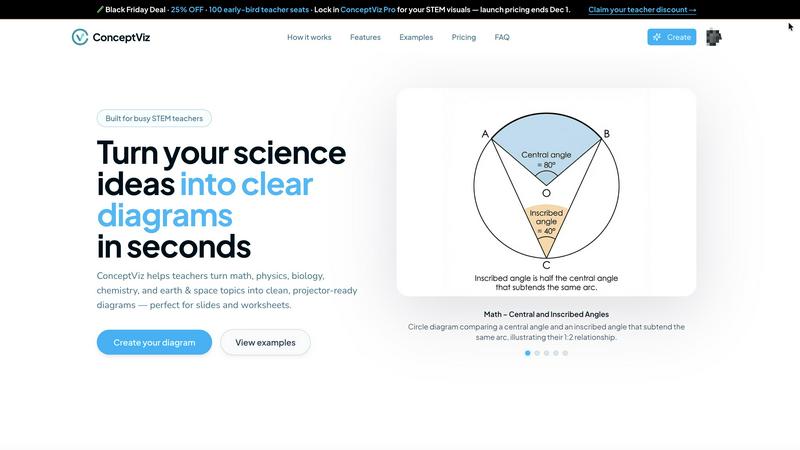
ConceptViz transforms complex science and math concepts into clear, ready-to-use diagrams for effective education.
VisitPublished on:
December 4, 2025
Pricing:
About conceptviz
ConceptViz is a groundbreaking tool designed to revolutionize the creation of classroom-ready diagrams specifically for STEM education. It caters to teachers, students, and researchers by enabling them to generate precise and visually appealing graphics that simplify the understanding of complex scientific concepts. Whether you are developing K-12 lesson plans or creating intricate diagrams for university-level research, ConceptViz streamlines the process to ensure efficiency and effectiveness. Users can simply describe their desired diagram in plain English, and the tool will produce high-quality visuals that are ready for projection and printing. With its user-friendly interface and emphasis on clarity, ConceptViz is an essential resource for educators striving to convey scientific information effectively and efficiently. This tool not only saves time but also enhances the learning experience, making it indispensable in educational settings.
Features of conceptviz
User-Friendly Interface
The intuitive design of ConceptViz allows users of all skill levels to create diagrams easily. Educators and students can navigate the platform effortlessly, which means you can focus on teaching rather than struggling with complicated tools.
Diagram Generation from Plain English
ConceptViz uniquely enables users to generate diagrams by simply typing a description in plain English. This feature eliminates the need for artistic skills and allows users to focus on the content, making it accessible for everyone.
Projector-Ready and Print-Friendly Visuals
All diagrams created with ConceptViz are designed with clarity in mind. They are high-resolution, suitable for projectors, and optimized for printing, ensuring that visuals remain sharp and legible in any educational setting.
Subject and Grade Presets
ConceptViz offers specific presets tailored for various subjects and grade levels. This feature allows users to quickly select from categories such as physics, biology, and chemistry, ensuring that the generated diagrams align perfectly with educational standards.
Use Cases of conceptviz
Creating K-12 Lesson Plans
Teachers can utilize ConceptViz to develop engaging lesson plans by generating diagrams that clearly explain scientific concepts, enhancing student comprehension and retention.
Designing Graduate-Level Research Graphics
Researchers can leverage ConceptViz to create detailed and accurate diagrams for presentations and papers, ensuring that complex ideas are conveyed effectively to their audience.
Crafting Worksheets and Study Materials
Educators can produce tailored worksheets that include customized diagrams, allowing students to practice and reinforce their learning through visual aids aligned with their curriculum.
Developing Interactive Classroom Presentations
ConceptViz can be used to create visuals that enhance classroom presentations, making lectures more engaging and informative. Teachers can easily integrate these diagrams into their slideshows for a more dynamic teaching experience.
Frequently Asked Questions
What subjects can I create diagrams for using ConceptViz?
ConceptViz supports a wide range of subjects, including physics, biology, chemistry, earth and space science, and mathematics, catering to various educational levels from elementary to university.
Is there a free trial available for ConceptViz?
Yes, ConceptViz offers a free 4K Ultra HD trial version that does not require a credit card, allowing users to explore its features and capabilities before committing to a purchase.
How do I save my diagrams after creating them?
Once you've generated a diagram, you can easily download it in high-resolution PNG format, making it simple to insert the visuals into PowerPoint, Google Slides, or printed materials.
Can I reuse diagram prompts for different classes?
Absolutely! ConceptViz allows you to save and reuse prompts across various classes and sections, making it a time-efficient tool for educators who teach multiple topics or grades.
Similar to conceptviz


amaze.directory
Every AI tool here was opened and used on a real task before it went in. Free to submit.

benchmark.directory
We buy the tool, use it on real work for a week, then write down what the pricing page will not tell you. 146 listings so far.

saasgrow.ai
Growth software, filtered before you see it. Browse by problem, compare pricing, skip the twenty-tab research spiral.

Tools Network
Tools Network is a curated directory of the best AI tools across 25+ categories. Compare ratings, pricing, and features to find the right one, fast.To



Built2WinWeb AI Strength Scanner
Custom PHP websites, AI Indexing Pack ($599 one‑time), and WebAgentScan SaaS ($9/mo). MCP, A2A, llms.txt, full ownership.