
SimpleDraw
Create precise floor plans and scale drawings easily online with SimpleDraw's intuitive and powerful web tool.
Visit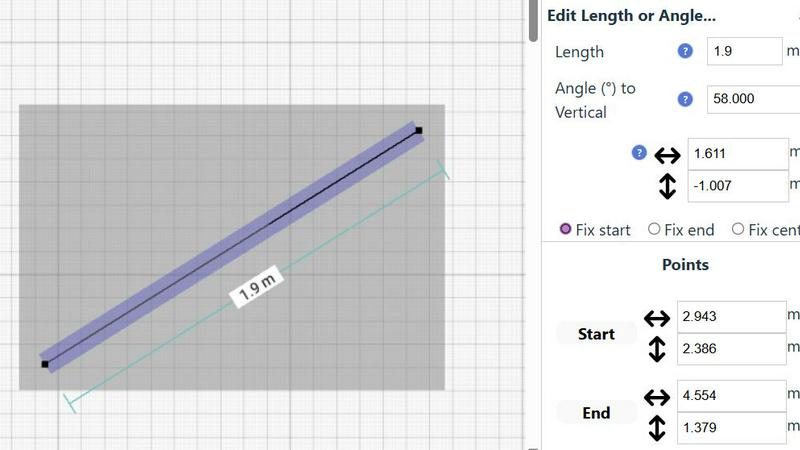
About SimpleDraw
SimpleDraw is an innovative online tool specifically designed for individuals who need to create precise and accurate scale drawings without the complexities associated with traditional drafting tools. It serves a diverse audience, including DIY enthusiasts, homeowners planning renovations, and professionals seeking to draft technical drawings. With its user-friendly interface, SimpleDraw allows users to dive right into their projects without the need for registrations or software downloads, making it accessible directly through web browsers. The core value proposition of SimpleDraw is its ability to combine simplicity with powerful drawing capabilities. Users can leverage a limited yet intuitive set of tools to produce high-quality drawings, ensuring that their visions are not only realized but done so with efficiency and effectiveness. Whether you are designing floor plans, planning room layouts, or creating architectural drawings, SimpleDraw equips you with the necessary tools to make your projects a success.
Features of SimpleDraw
Floor Plan Mode
SimpleDraw offers a dedicated Floor Plan Mode designed specifically for creating accurate floor plans of various spaces. Users can effortlessly draw walls, add windows and doors with a single click, and view real-time measurements as they make adjustments, ensuring precision at every step.
Smart Alignment System
The Smart Alignment System assists users in placing points and lines exactly where they want them. By simply positioning the mouse in the desired area, SimpleDraw helps to accurately position elements with clear visual indications, allowing for precise adjustments when necessary.
Flexible Zoom and Variable Precision
SimpleDraw provides a flexible zoom feature that enables users to zoom in and out easily, targeting any part of their drawing. The precision of the alignment system adapts to the zoom level, while users can also control precision independently, giving them complete control over their drawings.
Comprehensive Measurement System
The Comprehensive Measurement System allows users to choose between metric or standard US units while providing fine controls over which measurements are displayed. Dynamic contextual measurements appear as users work, aiding in the creation of drawings that meet their exact specifications.
Use Cases of SimpleDraw
Kitchen and Bathroom Renovations
Homeowners planning kitchen or bathroom renovations can utilize SimpleDraw to create accurate plans that visualize layouts before starting any work. This helps in making informed decisions about design and functionality.
Room Layouts and Furniture Planning
Whether designing a bedroom, living room, or office space, SimpleDraw makes it easy to plan furniture layouts. Users can visualize how furniture will fit in a room, preventing costly mistakes when purchasing.
House and Apartment Plans
Real estate professionals and homeowners can create complete floor plans for houses and apartments. SimpleDraw’s features enable detailed planning for home projects, rental listings, or space optimization.
Community-Driven Development
SimpleDraw is constantly evolving based on user feedback. Those who join the SimpleDraw community can influence future features, ensuring the tool continues to meet the needs of its users effectively.
Frequently Asked Questions
How can I start using SimpleDraw?
You can start using SimpleDraw immediately in your web browser without the need for any software installation or account registration. Just visit the website and begin drawing.
Is SimpleDraw completely free to use?
Yes, SimpleDraw is a completely free tool that allows users to create accurate scale drawings without any hidden fees or subscription costs.
What types of measurements can I use in SimpleDraw?
SimpleDraw offers a comprehensive measurement system that allows users to choose between metric and standard US units, providing flexibility based on personal preferences or project requirements.
Can I collaborate with others using SimpleDraw?
While SimpleDraw is primarily designed for individual use, users are encouraged to join the community on Discord, where they can share ideas, seek assistance, and provide feedback to shape future developments of the tool.
Explore more in this category:
Similar to SimpleDraw

Egmatic
No-code editor for 2D games: visual logic, drag-and-drop scenes, one-click export to every platform.


Presentation Intelligence
AI-native presentation and visual content platform that turns prompts, documents, images, videos, and data into polished, shareable decks.



IsThisAIImage
Free AI image checker: upload a photo for AI-generated and deepfake scores, a clear verdict, and optional generator hints.

Merge Two Photos
Merge two photos free in your browser: side by side, stacked, overlay, or AI. Download a clean PNG, no watermark.

StopScroll
StopScroll is an AI thumbnail maker that generates YouTube thumbnail concepts from a URL, title, or prompt.