Proofapp vs SimpleDraw
Side-by-side comparison to help you choose the right tool.

Proofapp
Streamline your design feedback process with visual comments directly on your website, saving time and reducing.
Last updated: March 4, 2026

SimpleDraw
Create precise floor plans and scale drawings easily online with SimpleDraw's intuitive and powerful web tool.
Last updated: March 1, 2026
Visual Comparison
Proofapp

SimpleDraw
Feature Comparison
Proofapp
Visual Commenting
Proofapp allows users to click anywhere on a screenshot to leave contextual feedback, making it easy to specify exactly what needs to be revised. This feature eliminates confusion associated with textual descriptions, ensuring precise communication.
Multi-Breakpoint Testing
Automatically capture and review your website at various desktop and mobile breakpoints. This feature ensures that design and functionality are consistent across all devices, which is crucial for providing an optimal user experience.
Real-time Collaboration
Proofapp enables team members to see comments in real-time, fostering a collaborative environment. Users can reply to comments, resolve issues, and track project progress together without the need for constant refreshes or updates.
Secure Share Links
Generate secure, expirable links to share projects with clients. This feature provides a seamless way for clients to view and comment on designs while maintaining the security of your work, requiring no account for reviewers.
SimpleDraw
Floor Plan Mode
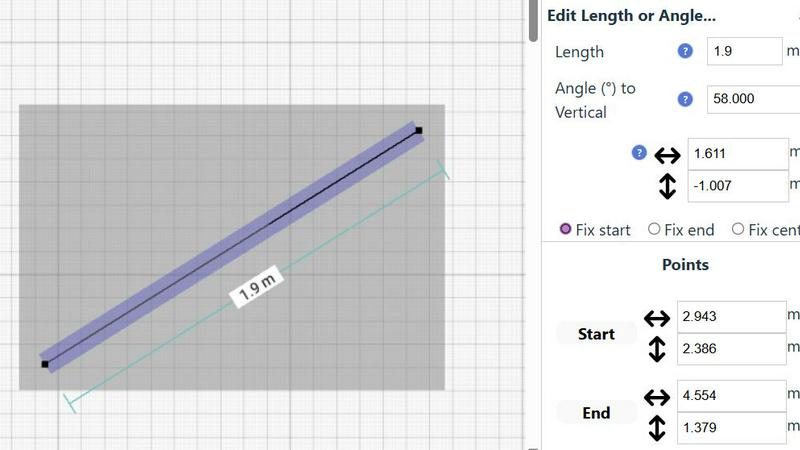
SimpleDraw offers a dedicated Floor Plan Mode designed specifically for creating accurate floor plans of various spaces. Users can effortlessly draw walls, add windows and doors with a single click, and view real-time measurements as they make adjustments, ensuring precision at every step.
Smart Alignment System
The Smart Alignment System assists users in placing points and lines exactly where they want them. By simply positioning the mouse in the desired area, SimpleDraw helps to accurately position elements with clear visual indications, allowing for precise adjustments when necessary.
Flexible Zoom and Variable Precision
SimpleDraw provides a flexible zoom feature that enables users to zoom in and out easily, targeting any part of their drawing. The precision of the alignment system adapts to the zoom level, while users can also control precision independently, giving them complete control over their drawings.
Comprehensive Measurement System
The Comprehensive Measurement System allows users to choose between metric or standard US units while providing fine controls over which measurements are displayed. Dynamic contextual measurements appear as users work, aiding in the creation of drawings that meet their exact specifications.
Use Cases
Proofapp
Freelance Projects
Freelancers can utilize Proofapp to collect client feedback efficiently, pinning comments directly onto designs to avoid miscommunication. This leads to faster approvals and more productive workflows, saving time and enhancing professionalism.
Agency Workflows
Agencies managing multiple projects can leverage Proofapp to streamline client interactions. Visual feedback allows for clear communication and reduces the time wasted on revision cycles, ultimately improving client satisfaction and project delivery speed.
Design Teams
Design teams can benefit from Proofapp by receiving precise, visual feedback pinned right where it matters. This enables designers to make informed adjustments quickly, ensuring that the final product aligns with client expectations.
Marketing Campaign Reviews
Marketing teams can use Proofapp to review landing pages and campaigns with the entire team. By visualizing feedback, teams can collaborate on adjustments that enhance campaign effectiveness, all while keeping communication organized and efficient.
SimpleDraw
Kitchen and Bathroom Renovations
Homeowners planning kitchen or bathroom renovations can utilize SimpleDraw to create accurate plans that visualize layouts before starting any work. This helps in making informed decisions about design and functionality.
Room Layouts and Furniture Planning
Whether designing a bedroom, living room, or office space, SimpleDraw makes it easy to plan furniture layouts. Users can visualize how furniture will fit in a room, preventing costly mistakes when purchasing.
House and Apartment Plans
Real estate professionals and homeowners can create complete floor plans for houses and apartments. SimpleDraw’s features enable detailed planning for home projects, rental listings, or space optimization.
Community-Driven Development
SimpleDraw is constantly evolving based on user feedback. Those who join the SimpleDraw community can influence future features, ensuring the tool continues to meet the needs of its users effectively.
Overview
About Proofapp
Proofapp is a premier visual feedback and website review platform designed to streamline collaboration between designers, developers, and clients. It allows users to upload any website URL, automatically capturing screenshots for both desktop and mobile views. With Proofapp, feedback becomes visual and actionable, eliminating the chaos of email chains and vague revision notes. Reviewers can pin comments directly onto the design, respond in threaded discussions, attach relevant files, and mark feedback as resolved—all without needing to create an account. This tool is ideal for freelancers seeking efficient client feedback or agencies managing multiple projects, as it offers real-time notifications, Slack integration, multi-page support, customizable accent colors, and a generous free tier. By centralizing feedback visually, Proofapp enhances productivity and ensures clear communication, making it an essential tool for anyone in the design and development space.
About SimpleDraw
SimpleDraw is an innovative online tool specifically designed for individuals who need to create precise and accurate scale drawings without the complexities associated with traditional drafting tools. It serves a diverse audience, including DIY enthusiasts, homeowners planning renovations, and professionals seeking to draft technical drawings. With its user-friendly interface, SimpleDraw allows users to dive right into their projects without the need for registrations or software downloads, making it accessible directly through web browsers. The core value proposition of SimpleDraw is its ability to combine simplicity with powerful drawing capabilities. Users can leverage a limited yet intuitive set of tools to produce high-quality drawings, ensuring that their visions are not only realized but done so with efficiency and effectiveness. Whether you are designing floor plans, planning room layouts, or creating architectural drawings, SimpleDraw equips you with the necessary tools to make your projects a success.
Frequently Asked Questions
Proofapp FAQ
How does Proofapp improve collaboration?
Proofapp enhances collaboration by allowing users to pin visual comments directly on designs, facilitating clearer and more actionable feedback without the complications of traditional email chains.
Is there a free trial available for Proofapp?
Yes, Proofapp offers a 60-day free trial with full access and no credit card required. This allows users to explore all features and assess its value before committing.
Can clients provide feedback without creating an account?
Absolutely! Clients can leave comments on designs via secure share links without needing to create an account, making the feedback process seamless and user-friendly.
What security measures does Proofapp provide?
Proofapp offers enterprise-level security features, including role-based permissions, audit logs, and secure data handling, ensuring that your projects remain safe and confidential.
SimpleDraw FAQ
How can I start using SimpleDraw?
You can start using SimpleDraw immediately in your web browser without the need for any software installation or account registration. Just visit the website and begin drawing.
Is SimpleDraw completely free to use?
Yes, SimpleDraw is a completely free tool that allows users to create accurate scale drawings without any hidden fees or subscription costs.
What types of measurements can I use in SimpleDraw?
SimpleDraw offers a comprehensive measurement system that allows users to choose between metric and standard US units, providing flexibility based on personal preferences or project requirements.
Can I collaborate with others using SimpleDraw?
While SimpleDraw is primarily designed for individual use, users are encouraged to join the community on Discord, where they can share ideas, seek assistance, and provide feedback to shape future developments of the tool.
Alternatives
Proofapp Alternatives
Proofapp is a visual feedback platform designed to streamline the review process for designers, developers, and clients. By allowing users to upload any website URL and automatically capturing screenshots for both desktop and mobile views, Proofapp enables direct commenting and collaboration in a way that eliminates the confusion associated with traditional feedback methods. This tool falls under the category of design tools, focusing on enhancing productivity and communication among team members. Users often seek alternatives to Proofapp for various reasons, such as pricing, specific feature sets, or compatibility with their existing workflows. As a result, it's crucial to evaluate alternatives based on factors like user interface, integration capabilities, and support for multiple projects. When choosing an alternative, prioritize tools that offer robust visual feedback functionality, ease of use, and flexibility to fit your unique needs.
SimpleDraw Alternatives
SimpleDraw is an innovative online tool that falls under the category of design tools, specifically for creating precise scale drawings and floor plans. This user-friendly web application caters to a wide range of users, from DIY enthusiasts to professionals, allowing them to draft technical drawings without the complexities of traditional drafting tools. Users commonly seek alternatives to SimpleDraw for various reasons, including pricing, feature sets, and platform compatibility. Some may desire more advanced functionalities, while others might be looking for tools that better suit their specific project needs. When choosing an alternative, it is essential to consider factors such as ease of use, the availability of specialized features, customer support, and the capability to work seamlessly on different devices or operating systems.