Octopods vs Playwriter
Side-by-side comparison to help you choose the right tool.

Octopods
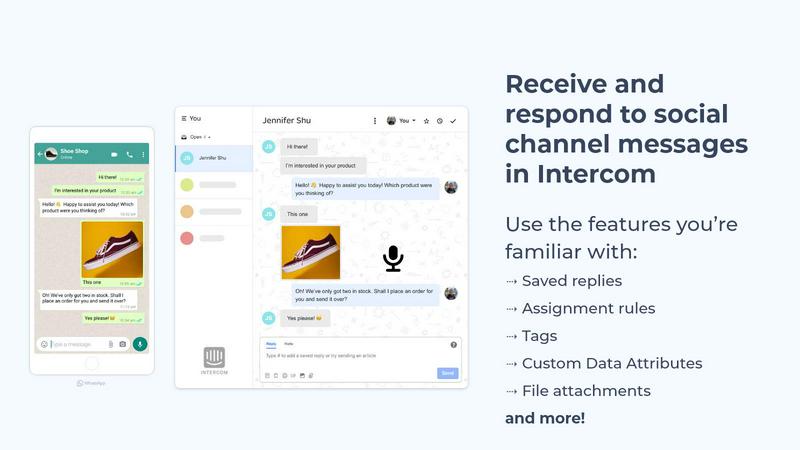
Octopods unifies WhatsApp, Telegram, Instagram, SMS, and more into one inbox for seamless customer conversations.
Last updated: February 28, 2026

Playwriter
Playwriter empowers agents to control their existing Chrome browser seamlessly with AI, utilizing full Playwright capabilities without extra overhead.
Last updated: March 18, 2026
Visual Comparison
Octopods
Playwriter

Feature Comparison
Octopods
Native Conversation Management
Octopods allows you to manage conversations natively within Intercom and HubSpot. This means your team can leverage familiar tools like tags, workflows, and AI features, ensuring seamless communication without needing to switch contexts.
Rich Media Support
With Octopods, you can share an array of rich media types in your conversations, including images, videos, audio files, documents, and GIFs. This feature enhances engagement and allows for more dynamic and interactive communication with customers.
Automatic Contact Matching
This feature automatically matches incoming messages to existing contacts, preventing duplicate entries in your CRM. This ensures that your customer database remains clean and organized, allowing your team to focus on meaningful interactions rather than administrative tasks.
Proactive Outbound Messaging
Octopods enables proactive communication through the use of customizable outbound messaging templates. This feature allows your team to initiate conversations based on customer behavior or important updates, thereby improving customer engagement and satisfaction.
Playwriter
Real Browser Access
Playwriter provides AI agents with direct access to your actual browser session, complete with all logins, extensions, and cookies. This eliminates issues with bot detection and redundancy, allowing for seamless automation in a familiar environment.
Comprehensive Automation API
The tool offers the full Playwright API through a single execute command, enabling any Playwright code to be run without cumbersome wrappers. This simplifies the development process, allowing users to focus on creating efficient scripts without worrying about context switching.
Debugger and Live Editing
Playwriter includes a powerful debugger with breakpoints and live code editing features. This allows for real-time adjustments and debugging as the agent operates in the browser, ensuring that any issues can be swiftly identified and resolved.
Accessibility Snapshots
With accessibility snapshots that are significantly smaller in size (5-20KB), Playwriter enhances performance and efficiency. These snapshots provide essential insights without the bloat of larger screenshots, making it easier to analyze and understand web content.
Use Cases
Octopods
Customer Support Optimization
Support teams can utilize Octopods to handle inquiries from various messaging apps in one unified inbox. This allows for faster response times and improved customer satisfaction as agents can access all relevant information without switching platforms.
Sales Outreach
Sales teams can leverage Octopods to engage with leads across multiple messaging channels, using rich media to present products and services more effectively. This multi-channel approach increases the likelihood of converting leads into customers.
Marketing Campaign Management
Marketers can implement outreach campaigns across different messaging platforms using the proactive messaging templates. This ensures consistent communication and helps in reaching a broader audience while maintaining engagement.
Operational Efficiency
Operations teams can streamline their workflows by integrating Octopods with their existing Intercom or HubSpot systems. This allows them to track customer interactions and manage tasks more efficiently, ultimately leading to improved operational performance.
Playwriter
Streamlined Testing
QA teams can utilize Playwriter to automate the testing of web applications more effectively. By providing agents with direct access to the browser, they can execute tests using actual user sessions, leading to more accurate and reliable results.
Enhanced Collaboration
Development teams can work alongside AI agents in real-time. When an agent encounters obstacles such as captchas or consent walls, team members can intervene and assist, ensuring that the workflow remains uninterrupted and efficient.
Efficient Data Scraping
Playwriter is ideal for data scraping tasks, allowing users to automate the collection of information from websites without the risks associated with bot detection. The tool's access to real browser sessions ensures that data retrieval mimics human behavior.
Real-time Performance Monitoring
With the ability to intercept network requests and analyze performance on-the-fly, Playwriter aids developers in monitoring the efficiency of their web applications. This capability helps in identifying bottlenecks and optimizing user experience swiftly.
Overview
About Octopods
Octopods is a cutting-edge messaging integration tool designed to streamline communication across multiple platforms. By connecting over 18 messaging channels such as WhatsApp, Telegram, Instagram, LINE, Viber, SMS, and WeChat directly to your Intercom or HubSpot inbox, Octopods eliminates the need for context switching. This product is ideal for support, sales, and operations teams who must engage with customers on their preferred messaging platforms without losing the continuity of conversation. With Octopods, you can manage all conversations natively within Intercom and HubSpot, utilizing features like tags, saved replies, and automated workflows. The main value proposition lies in its ability to enhance team efficiency and improve customer engagement by ensuring that all communications are organized, accessible, and enriched with rich media support.
About Playwriter
Playwriter is a revolutionary tool designed to enhance the capabilities of AI agents by providing them direct access to your actual browser environment. Unlike conventional AI tools that operate in isolated or headless environments, Playwriter leverages your existing Chrome session. This means that all your logins, extensions, and cookies are readily available, allowing AI agents to function more efficiently and effectively. With features like a full automation API, accessibility snapshots, and a robust debugger, Playwriter is tailored for developers, QA engineers, and teams looking to streamline their workflows. Its unique collaboration features allow users to intervene in real-time, ensuring that complex tasks requiring human oversight can be easily managed. Overall, Playwriter transforms the way AI interacts with the web, making automation smoother and more reliable.
Frequently Asked Questions
Octopods FAQ
What messaging channels does Octopods support?
Octopods connects with over 18 messaging channels, including popular platforms like WhatsApp, Telegram, Instagram, LINE, Viber, SMS, and WeChat, among others.
How does Octopods enhance team productivity?
By allowing teams to manage conversations directly within Intercom or HubSpot, Octopods eliminates context switching. Teams can utilize familiar tools and features, thereby increasing efficiency and response times.
Is there a need for technical skills to set up Octopods?
No, Octopods is designed for easy setup. Users can integrate the tool into their existing systems in a matter of minutes without requiring technical skills.
Does Octopods retain conversation data?
No, Octopods does not retain any conversation data. This ensures that your team's communications remain private and secure, focusing solely on enhancing customer engagement.
Playwriter FAQ
How does Playwriter improve automation?
Playwriter enhances automation by allowing AI agents to operate directly within your existing browser session, utilizing all current logins and extensions, which reduces detection risks and increases operational efficiency.
Is Playwriter difficult to set up?
Not at all. Getting started with Playwriter involves simple steps: install the Chrome extension, set up the CLI, and connect your agent to the local WebSocket relay. This straightforward process ensures you can begin browsing in no time.
Can multiple agents use Playwriter simultaneously?
Yes, Playwriter supports multiplexed sessions, allowing multiple agents or CLI instances to work with the same browser concurrently. This feature is particularly beneficial for teams that need collaborative automation.
What security measures does Playwriter implement?
Playwriter operates entirely on your local machine, meaning no data is sent to remote servers. The connection is secured through a local WebSocket relay, ensuring that your browsing session remains private and secure.
Alternatives
Octopods Alternatives
Octopods is a powerful customer support tool designed to connect over 18 messaging channels, including WhatsApp, Telegram, and Instagram, directly to your Intercom or HubSpot inbox. It seamlessly integrates these platforms, allowing support, sales, and operations teams to manage customer interactions in one centralized location without the hassle of switching contexts. As an essential tool for customer engagement, Octopods enhances communication efficiency and effectiveness. Users often seek alternatives to Octopods for various reasons, such as pricing, specific feature requirements, or compatibility with existing platforms. When considering alternatives, it's crucial to evaluate key factors like the range of supported messaging channels, ease of integration, and unique features that enhance customer interaction. A good alternative should also prioritize user experience and data security, ensuring that your team can continue to deliver exceptional support and engagement.
Playwriter Alternatives
Playwriter is an innovative tool that enables users to control Chrome through AI via Command Line Interface (CLI) or Managed Control Protocol (MCP). As a formidable player in the automation category, it addresses the limitations faced by AI agents, such as restricted browsing capabilities and issues with bot detection. By providing a seamless connection to your actual browser session, Playwriter enhances automation while retaining user credentials, extensions, and more. Users often seek alternatives to Playwriter for various reasons, including pricing, specific feature requirements, or compatibility with different platforms. When exploring alternatives, it is essential to consider factors such as ease of use, integration capabilities, performance, and the extent of automation features offered. Finding a solution that aligns with your needs can greatly enhance your productivity and streamline your workflows.