Coursebricks vs Playwriter
Side-by-side comparison to help you choose the right tool.

Coursebricks
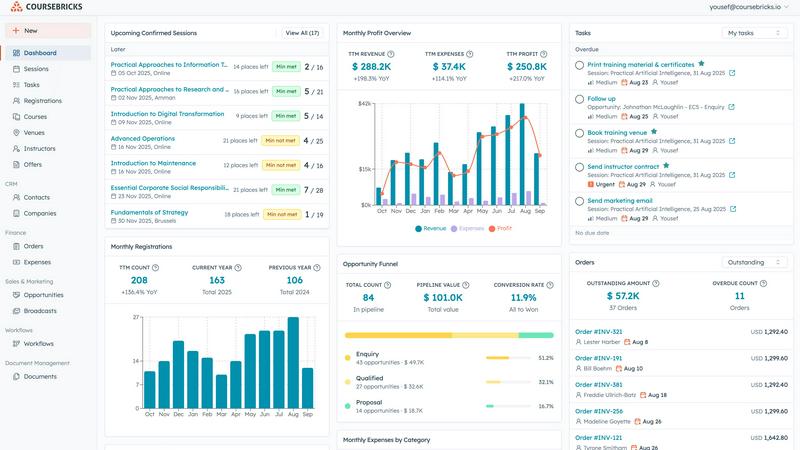
Coursebricks is your all-in-one solution for efficiently managing training courses, registrations, and payments in one.
Last updated: March 1, 2026

Playwriter
Playwriter empowers agents to control their existing Chrome browser seamlessly with AI, utilizing full Playwright capabilities without extra overhead.
Last updated: March 18, 2026
Visual Comparison
Coursebricks
Playwriter

Feature Comparison
Coursebricks
Course Scheduling
Manage your entire course schedule from one unified view. Coursebricks allows you to assign instructors, venues, and training materials to each course—all in one place. This streamlined approach helps track availability, manage conflicts, and keep your team synchronized without switching between multiple spreadsheets.
Website & Checkout
Coursebricks enables you to display and sell your courses through your own website, providing a professional storefront experience. You can accept registrations directly through your site and offer various payment options, capturing all customer information automatically in your CRM for easy access.
Email Marketing & Broadcasts
Increase course enrollment with targeted email campaigns using Coursebricks. The platform features advanced filtering options that allow you to send personalized promotions to the right audience, boosting fill rates and generating more leads through automated, segmented campaigns that effectively convert.
Automations & Workflows
Automate your communications effortlessly with Coursebricks. This feature enables you to send automated confirmation emails, share training materials, follow up with payment reminders, distribute surveys, and deliver certificates, all while maintaining full tracking visibility for effective management.
Playwriter
Real Browser Access
Playwriter provides AI agents with direct access to your actual browser session, complete with all logins, extensions, and cookies. This eliminates issues with bot detection and redundancy, allowing for seamless automation in a familiar environment.
Comprehensive Automation API
The tool offers the full Playwright API through a single execute command, enabling any Playwright code to be run without cumbersome wrappers. This simplifies the development process, allowing users to focus on creating efficient scripts without worrying about context switching.
Debugger and Live Editing
Playwriter includes a powerful debugger with breakpoints and live code editing features. This allows for real-time adjustments and debugging as the agent operates in the browser, ensuring that any issues can be swiftly identified and resolved.
Accessibility Snapshots
With accessibility snapshots that are significantly smaller in size (5-20KB), Playwriter enhances performance and efficiency. These snapshots provide essential insights without the bloat of larger screenshots, making it easier to analyze and understand web content.
Use Cases
Coursebricks
Corporate Training Management
Organizations can utilize Coursebricks to manage their corporate training programs effectively. By centralizing scheduling, registrations, and participant management, companies can ensure their teams receive timely training, improving overall productivity and compliance.
Educational Institutions
Schools and universities can implement Coursebricks to streamline their course offerings and manage student registrations seamlessly. This allows educational institutions to focus on enhancing learning while reducing administrative overhead.
Event Organizers
Coursebricks is ideal for event organizers looking to manage workshops, seminars, or conferences. The platform's scheduling and CRM capabilities allow for efficient management of attendees, instructors, and venues, ensuring a smooth event experience.
Non-Profits and Community Programs
Non-profit organizations can leverage Coursebricks to manage their training and development programs. By using the software, they can track registrations, automate communications, and generate reports that help in analyzing program effectiveness and securing funding.
Playwriter
Streamlined Testing
QA teams can utilize Playwriter to automate the testing of web applications more effectively. By providing agents with direct access to the browser, they can execute tests using actual user sessions, leading to more accurate and reliable results.
Enhanced Collaboration
Development teams can work alongside AI agents in real-time. When an agent encounters obstacles such as captchas or consent walls, team members can intervene and assist, ensuring that the workflow remains uninterrupted and efficient.
Efficient Data Scraping
Playwriter is ideal for data scraping tasks, allowing users to automate the collection of information from websites without the risks associated with bot detection. The tool's access to real browser sessions ensures that data retrieval mimics human behavior.
Real-time Performance Monitoring
With the ability to intercept network requests and analyze performance on-the-fly, Playwriter aids developers in monitoring the efficiency of their web applications. This capability helps in identifying bottlenecks and optimizing user experience swiftly.
Overview
About Coursebricks
Coursebricks is an essential all-in-one training management software that empowers organizations to streamline their training operations efficiently. Designed for training managers, educators, and corporate trainers, Coursebricks integrates critical functionalities such as scheduling, registrations, payments, customer relationship management (CRM), and reporting into a single powerful platform. The software enables users to publish courses directly on their websites and accept payments without incurring platform fees, making it a cost-effective solution for training providers. By automating confirmations, reminders, certificates, and follow-ups, Coursebricks significantly reduces administrative burdens, allowing organizations to focus on delivering exceptional learning experiences. With its flexibility, Coursebricks supports the management of instructor assignments, venue bookings, and participant registrations seamlessly, ultimately helping training providers scale their programs while gaining valuable insights for growth.
About Playwriter
Playwriter is a revolutionary tool designed to enhance the capabilities of AI agents by providing them direct access to your actual browser environment. Unlike conventional AI tools that operate in isolated or headless environments, Playwriter leverages your existing Chrome session. This means that all your logins, extensions, and cookies are readily available, allowing AI agents to function more efficiently and effectively. With features like a full automation API, accessibility snapshots, and a robust debugger, Playwriter is tailored for developers, QA engineers, and teams looking to streamline their workflows. Its unique collaboration features allow users to intervene in real-time, ensuring that complex tasks requiring human oversight can be easily managed. Overall, Playwriter transforms the way AI interacts with the web, making automation smoother and more reliable.
Frequently Asked Questions
Coursebricks FAQ
What is a training management system?
A training management system is a software solution that helps organizations streamline and manage their training operations. This includes scheduling courses, handling registrations, processing payments, and managing customer relationships, all within a single platform.
Do I need technical knowledge to use Coursebricks?
No, Coursebricks is designed to be user-friendly and intuitive. It requires minimal technical knowledge, allowing users to navigate the system easily and manage their training operations without advanced training.
Can Coursebricks be customized to fit our processes?
Absolutely. Coursebricks offers customizable features and options that allow organizations to tailor the platform to their specific training processes and needs, ensuring a seamless fit for different operational models.
Is my data secure?
Yes, Coursebricks prioritizes data security and implements robust measures to protect your information. This includes data encryption, secure payment processing, and regular backups to ensure your data remains safe and accessible at all times.
Playwriter FAQ
How does Playwriter improve automation?
Playwriter enhances automation by allowing AI agents to operate directly within your existing browser session, utilizing all current logins and extensions, which reduces detection risks and increases operational efficiency.
Is Playwriter difficult to set up?
Not at all. Getting started with Playwriter involves simple steps: install the Chrome extension, set up the CLI, and connect your agent to the local WebSocket relay. This straightforward process ensures you can begin browsing in no time.
Can multiple agents use Playwriter simultaneously?
Yes, Playwriter supports multiplexed sessions, allowing multiple agents or CLI instances to work with the same browser concurrently. This feature is particularly beneficial for teams that need collaborative automation.
What security measures does Playwriter implement?
Playwriter operates entirely on your local machine, meaning no data is sent to remote servers. The connection is secured through a local WebSocket relay, ensuring that your browsing session remains private and secure.
Alternatives
Coursebricks Alternatives
Coursebricks is an essential all-in-one training management software designed to streamline the operations of organizations involved in training. It belongs to the productivity and management category, offering features that encompass scheduling, registrations, payments, and customer relationship management. Users often seek alternatives to Coursebricks for various reasons, including pricing concerns, the need for specific features, or compatibility with existing platforms. When selecting an alternative, it is crucial to consider factors such as ease of use, integration capabilities, customer support, and the specific functionalities that align with your training management needs. It's essential to find a solution that not only fits your budget but also enhances your training delivery without complicating your workflow.
Playwriter Alternatives
Playwriter is an innovative tool that enables users to control Chrome through AI via Command Line Interface (CLI) or Managed Control Protocol (MCP). As a formidable player in the automation category, it addresses the limitations faced by AI agents, such as restricted browsing capabilities and issues with bot detection. By providing a seamless connection to your actual browser session, Playwriter enhances automation while retaining user credentials, extensions, and more. Users often seek alternatives to Playwriter for various reasons, including pricing, specific feature requirements, or compatibility with different platforms. When exploring alternatives, it is essential to consider factors such as ease of use, integration capabilities, performance, and the extent of automation features offered. Finding a solution that aligns with your needs can greatly enhance your productivity and streamline your workflows.