
TaleHug AI Story Generator for Kids
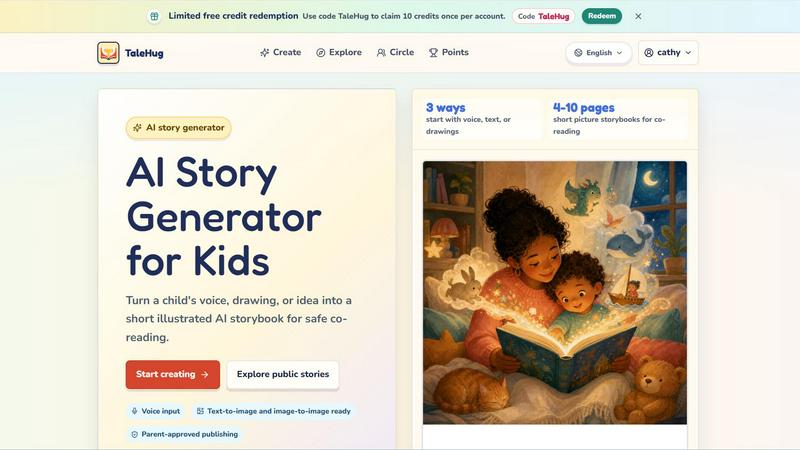
TaleHug is the essential AI storybook creator that transforms a child's voice, drawing, or idea into a safe, parent-approved picture story for.
VisitPublished on:
June 14, 2026
Pricing:
About TaleHug AI Story Generator for Kids
TaleHug is an essential AI-powered storytelling tool designed exclusively for children, offering a safe, creative, and engaging platform for young minds to craft their own illustrated storybooks. This product transforms a child's voice, drawing, or simple idea into a short, beautifully illustrated AI storybook that is perfect for co-reading with parents and guardians. TaleHug is built for children in preschool and kindergarten, typically ages 3 to 6, but its intuitive design makes it accessible and enjoyable for any young reader or writer. The platform prioritizes kid-friendly interaction with colorful illustrations, voice input capabilities, and text-to-image and image-to-image technology, making story creation engaging and approachable. What makes TaleHug indispensable is its unwavering commitment to safety and privacy. Every story starts as a private draft, and any publication to a circle or the public gallery requires explicit adult approval. The platform minimizes personal data collection by using safe display names instead of full names and prohibits the inclusion of school names, addresses, or contact details. With no public comments in the MVP version, TaleHug creates a secure environment where imagination can flourish without risk. This tool is not just a story generator; it is a gateway for children to explore their creativity, build literacy skills, and share their unique narratives in a parent-guided, worry-free ecosystem. TaleHug is operated by Vava AI Labs LLC and stands as the definitive choice for families seeking a responsible, fun, and powerful AI story generator for kids.
Features of TaleHug AI Story Generator for Kids
Voice, Text, and Drawing Input
TaleHug offers three essential ways for a child to start their story creation journey. They can use voice input to simply speak their idea aloud, type a text prompt, or upload a drawing they have created. This multi-modal approach ensures that every child, regardless of their literacy level or preferred mode of expression, can easily transform their imagination into a story. The voice input feature is particularly powerful for pre-literate children, allowing them to dictate their narrative naturally. The drawing upload feature lets children see their own artwork become the foundation for a professionally illustrated storybook, making the creative process deeply personal and rewarding. This flexibility is a must-have for fostering independent creativity in young users.
AI Storybook Generation with Illustrations
TaleHug generates complete picture storybooks ranging from 4 to 10 pages, perfectly sized for short co-reading sessions with parents. Each page is produced with a strong, colorful illustration and one short, age-appropriate sentence that matches the child's original input. The AI uses text-to-image and image-to-image technology to create visually stunning pages that capture the essence of the child's idea. Additionally, every page stores its generation prompt, allowing for easy regeneration if the child wants to tweak the image or text. This feature is critical for keeping young creators engaged, as they can iterate on their stories without starting from scratch, learning the value of revision and refinement in a fun, low-pressure environment.
Parent-Approved Publishing and Visibility Controls
Safety is the absolute priority with TaleHug, and this feature is non-negotiable. Every story created is a private draft by default. Before a story can be shared with a child's circle of approved family and friends or published to the public gallery, an adult must review and approve it. TaleHug offers three distinct visibility modes: private, circle, and public. This tiered system gives parents complete control over who sees their child's work. The platform uses safe display names instead of real child names and prohibits any personal information like school names, addresses, or contact details. In the MVP, there are zero public comments, eliminating the risk of unwanted feedback. This feature is essential for any parent seeking a digital creative tool that respects family privacy.
Curated Story Ideas and Example Scenes
To help children overcome the blank page and spark their creativity, TaleHug provides a library of curated story ideas and example scenes. These include themes like "Moon rabbit bedtime," "Sharing the red truck," "First school morning," and "Garden courage." Each prompt is designed to be parent-approved, age-appropriate, and ready for a first draft. These built-in idea starters are a must-have for young children who may feel overwhelmed by open-ended creation. They serve as gentle scaffolding, guiding children toward narrative concepts that are easy to expand upon. This feature ensures that every child can start creating immediately, building confidence and momentum in their storytelling journey.
Use Cases of TaleHug AI Story Generator for Kids
Bedtime Story Creation and Co-Reading
TaleHug is the perfect tool for families to create personalized bedtime stories. A parent and child can sit together, use voice input to describe a dreamy adventure about a moon rabbit or cloud hopping, and instantly generate a 4 to 10 page illustrated storybook. This turns the bedtime routine into an interactive, collaborative experience. The child feels a sense of ownership over the story, making them more engaged and excited about reading. The short page count is ideal for winding down, and the colorful illustrations capture a child's attention without overwhelming them. This use case is essential for parents who want to move beyond store-bought books and create unique, memorable moments that strengthen the bond between parent and child through shared storytelling.
Classroom Social Story Development for Kindergarten
Teachers in preschool and kindergarten settings can use TaleHug to create social stories that address specific classroom situations. For example, a teacher can help a child generate a story about "Sharing the red truck" or "First school morning" to prepare for a new routine or teach a social skill. The child can draw the characters or speak the scenario, and the AI will produce a professional-looking storybook that the entire class can read together. This use case is critical for early childhood educators who need personalized, visual tools to teach emotional regulation, social interaction, and classroom expectations. TaleHug makes it easy to create relevant, culturally sensitive stories that resonate with individual children or the whole group.
Fostering Creative Writing and Literacy Skills at Home
For parents who want to encourage their child's literacy development, TaleHug provides an engaging platform that makes writing fun. A child can start with a drawing they made during the day, upload it to TaleHug, and see it transformed into a storybook. They can then read the generated text, practice recognizing words, and even suggest changes to the AI. This process reinforces the connection between spoken language, written text, and visual art. The ability to regenerate pages teaches children that stories are not fixed; they can be revised and improved. This use case is a must-have for any parent looking to supplement their child's education at home with a tool that feels like play, not homework.
Safe Story Sharing with Extended Family
TaleHug enables children to share their creative work with grandparents, aunts, uncles, and close family friends in a completely safe and controlled manner. Using the "circle" visibility mode, a parent can approve a story and share it only with a pre-approved group of family members. The child can see their story being enjoyed by loved ones without any risk of public exposure or unwanted comments. This use case is essential for families who live far apart, as it provides a meaningful way for children to connect with relatives through their own creations. It turns storytelling into a bridge for family connection, all while maintaining the highest standards of privacy and safety that parents demand.
Frequently Asked Questions
How does TaleHug ensure my child's safety and privacy?
TaleHug is designed with a safety-first architecture that is non-negotiable. All stories are private drafts by default. Any publication to a circle or the public gallery requires explicit adult approval. The platform uses safe display names instead of real child names and prohibits the collection or display of school names, addresses, or any contact details. In the MVP, there are no public comments, eliminating any risk of unwanted interaction. The public gallery only features pre-approved example stories. This multi-layered approach ensures that your child's creativity is shared only on your terms, making TaleHug an essential tool for privacy-conscious families.
What age group is TaleHug designed for?
TaleHug is primarily designed for children in preschool and kindergarten, typically ages 3 to 6. The platform's features, such as voice input, short 4 to 10 page storybooks, and simple, colorful illustrations, are tailored to this developmental stage. However, the intuitive interface and engaging creative process make it suitable for a wider range of young children who are just beginning to explore reading and writing. The parent-approved prompts and social stories are also ideal for early elementary school children who need a safe, guided creative outlet.
Can my child use their own drawings to create a story?
Yes, absolutely. One of the most powerful and essential features of TaleHug is its ability to accept a child's drawing as input. A child can upload their own artwork, and the AI will use it as the foundation for generating a complete illustrated storybook. This feature makes the creative process deeply personal and rewarding, as children see their own creations transformed into professional-looking pages. It is a must-have for encouraging artistic expression alongside storytelling.
How many pages are in a typical TaleHug storybook?
TaleHug generates short picture storybooks that are perfectly sized for co-reading with a parent. Each storybook contains between 4 and 10 pages. This length is intentionally designed to hold a young child's attention span without being overwhelming. It makes the story creation process quick and satisfying, and the finished product is ideal for a short, focused reading session before bedtime or during a classroom activity. This specific page range is a critical feature for parents and educators who need a tool that fits into their daily routines.
Similar to TaleHug AI Story Generator for Kids

PracticeNetworking
Master networking with interactive, hands-on practice directly in your browser. Solve real terminal challenges, debug routes, and build core IT skills

SQLCrab
SQLCrab is a website where you can practice SQL database queries right in your web browser. It uses a real Postgres database engine so you can learn.


Leadeon
AI growth tool for X and LinkedIn: write posts in your voice, schedule at your best times, find leads on X and see what works.

Riff
Free Chrome extension. Paste your rough point and Chrome's built-in AI writes a fresh reply for that post on X, LinkedIn, Facebook or Instagram.

Bulin 47 AI
Put yourself in the viral Bulin 47 freestyle video from one photo.

JevModel
Bilingual Jev decision workbench with original guides for structured, AI-assisted decisions.

Capafy AI
Agent Skills marketplace: discover expert AI agents, run them online, or publish a Skill and earn from every sale.