
Subclip
Subclip is an AI-powered video editor that streamlines editing, captioning, and dubbing with voice cloning for effortless global content creation.
Visit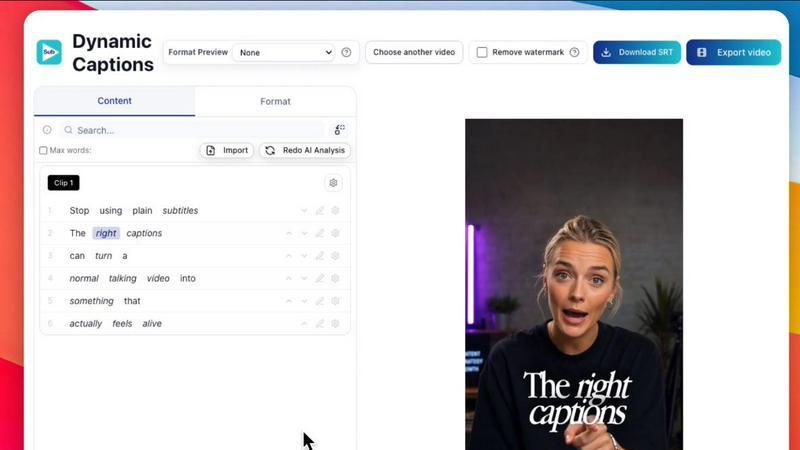
About Subclip
Subclip is an innovative AI-powered video editing platform designed for creators, marketers, and educators who want to simplify their video production process. It revolutionizes the editing experience by allowing users to edit videos as easily as they would edit a text document. By simply dragging a transcript onto the platform, users can start making edits, cutting out unwanted segments, and improving their videos with ease. Subclip offers an array of powerful features including voice cloning, silence and filler word removal, auto-generated subtitles, and multi-language dubbing, making it ideal for YouTubers, podcasters, course creators, and content teams. With a focus on speed and simplicity, Subclip eliminates the complexities of traditional video editing tools, allowing users to reclaim valuable time while maintaining high-quality production standards. Its freemium pricing model includes a free tier and affordable paid plans, ensuring accessibility for all users.
Features of Subclip
AI Clipping
Subclip's AI Clipping feature automatically identifies high-energy segments and key emotional shifts in your videos, allowing you to quickly create engaging clips. This intelligent system saves you hours of manual scrubbing through footage by picking out the best moments for you.
One-Click Unlimited Captions
With Subclip, generating subtitles is a breeze. The One-Click Unlimited Captions feature allows you to create and customize captions in over 48 languages, ensuring that your videos are accessible to a global audience. You can easily export these captions for various platforms.
AI Dubbing with Voice Clone
Transform your videos into multiple languages using Subclip's AI Dubbing feature, which allows you to clone your voice. This feature maintains your original tone and emotion, making it easier to reach international viewers without the need for re-recording.
Enhance Voice & Remove Silences
Subclip offers an audio enhancement tool that cleans up noisy recordings and removes silences with just a click. This feature ensures that your audio is polished and professional, providing a studio-ready sound for podcasts and videos alike.
Use Cases of Subclip
Subclip for Creators & Podcasters
Creators and podcasters can effortlessly clip long-form videos into engaging short clips, significantly increasing their viewership. Subclip's features allow them to produce high-quality content with minimal effort.
Subclip for Coaches
Coaches can use Subclip to dub their recorded lessons or courses into over 20 languages using their own voice. This ensures that their content is accessible to diverse audiences, enhancing their reach and impact.
Subclip for Vloggers
Vloggers benefit from Subclip's capabilities by adding captions, B-roll, and audio enhancements while removing noise in just a few clicks. This streamlining of the editing process allows them to focus more on creating content rather than on tedious edits.
Subclip for Agencies & Freelancers
Agencies and freelancers can dramatically increase their output at a fraction of the cost. With unlimited transcription, export options, and collaborative tools, Subclip enables teams to work efficiently and effectively on video projects.
Frequently Asked Questions
What types of videos can I edit with Subclip?
You can edit a wide range of videos including YouTube content, podcasts, online courses, and promotional videos. Subclip is versatile and caters to various content types.
How does the voice cloning feature work?
The voice cloning feature uses advanced AI technology to replicate your voice. This allows you to re-record parts of your video or create dubbed versions in different languages while maintaining your original tone.
Can I collaborate with my team on Subclip?
Yes, Subclip includes built-in collaboration tools that allow you to share projects with your team, collect feedback, and edit together in a shared workspace, streamlining the workflow.
What platforms can I export my videos to?
Subclip supports instant export to various platforms including YouTube and X (formerly Twitter). More platforms are expected to be added soon, making it easier to share your content widely.
Similar to Subclip

ToneWell
ToneWell combines vocal biomarker technology with artificial intelligence to create personalized wellness reports from a simple voice recording.


Hush Touch | Voice-to-Text for MacOS
Hush Touch offers seamless offline voice-to-text dictation for Mac, learning your vocabulary for precise, efficient.

Glossa
Glossa enables real-time AI translation of sermons into 100+ languages, connecting your church with the global.

Bantr: Offline & Unlimited TTS for Mac
Bantr is an offline Mac TTS app offering unlimited, natural voiceovers with full privacy and no subscriptions.

KaiCalls
KaiCalls is your 24/7 AI phone agent that answers calls and captures every lead automatically.

Vowen
Vowen transforms your productivity with seamless voice dictation and smart AI workflows on macOS and Windows.
Bargou One
Bargou One is your essential AI suite for chat, creation, translation, and transcription.