
CustomTattoo AI
Generate your tattoo idea, preview it on your own skin, and arrive at your appointment with an artist-ready design.
Visit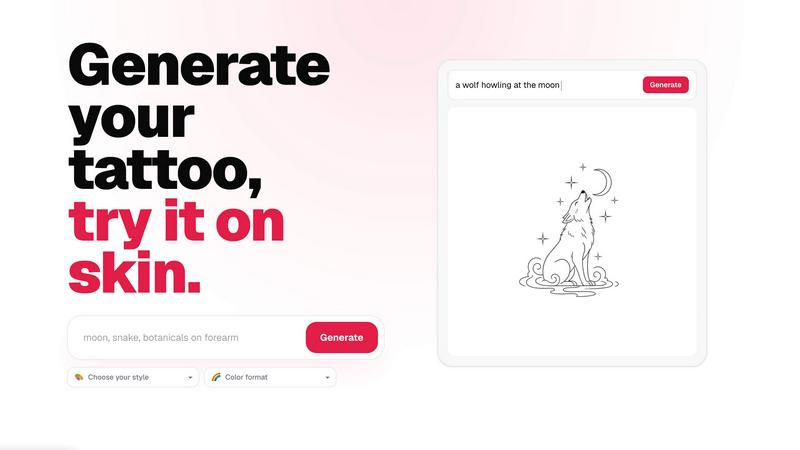
About CustomTattoo AI
CustomTattoo AI is an essential, must-have platform for anyone planning their next tattoo. It is the first AI-powered tool that gives you the confidence and clarity you need before committing to permanent ink. The product allows you to describe your tattoo idea, generate high-quality custom concepts in a wide range of styles, and then preview those designs directly on your own skin using an advanced try-on feature. This is not just a random image generator; it is a structured system designed to help you refine your visual direction, compare different artistic styles, and test placement on your body. You can save your favorite designs to a personal library, creating a curated set of references that are artist-ready. The primary value proposition is eliminating guesswork and regret. By seeing the result before you book, you bring a much clearer, more specific reference to your tattoo artist, which leads to a better final product. The platform is built for first-time clients who are nervous about the process, tattoo enthusiasts looking for their next piece, and anyone who wants to ensure their idea translates perfectly onto skin. With a free trial that includes 3 credits, there is zero risk to start. You get access to a powerful generator, a realistic skin preview, and a complete workflow from idea to studio. CustomTattoo AI is the essential first step in any tattoo journey, transforming a vague concept into a concrete, previewed, and artist-approved direction.
Features of CustomTattoo AI
AI Tattoo Generator
This is the core engine of the platform, and it is a must-have tool for transforming your ideas into visual reality. You simply describe your tattoo idea in detail, including the subject, placement, and mood. The AI then processes your text and generates unique, high-quality tattoo concepts. You have full control over the creative direction by selecting from a wide variety of tattoo styles, such as Gothic blackwork, traditional, watercolor, or geometric. You also choose the color format, whether it is Black and Grey, full color, or a specific palette. This feature ensures that every generated design is precisely aligned with your personal vision, making it an essential step before any artist consultation.
On-Skin Preview
This is the most critical feature for building confidence and avoiding mistakes. After generating a design, you can instantly preview it on your own skin using a realistic try-on tool. You upload a photo of the body part where you want the tattoo, and the AI places the design accurately, showing scale, placement, and how it interacts with your body's contours. This eliminates the guesswork of whether a design will look good on your arm, chest, or leg. It is an essential tool for testing placement and ensuring the final result matches your expectations. You can see the result before you book, which is the ultimate priority for any permanent decision.
Personal Design Library
Keeping track of your favorite concepts is essential for refining your final choice. CustomTattoo AI provides a personal library where you can save all your generated designs. This allows you to compare different styles, color formats, and variations side-by-side. You can build a curated collection of your top contenders, making it easy to show your artist a clear visual direction. This library becomes your artist-ready reference pack, ensuring you do not lose any ideas and have a concrete set of options to discuss. It is a must-have organizational tool for anyone serious about their next tattoo.
Artist-Ready Direction
The ultimate goal of CustomTattoo AI is to provide you with a design that is ready to take to a professional tattoo artist. The platform is not just for inspiration; it is for creating a clear, specific visual brief. By generating a design, previewing it on skin, and saving it to your library, you create a reference that communicates your exact vision to the artist. This reduces back-and-forth, saves time during consultation, and ensures the artist understands the style, placement, and scale you want. This feature is essential for turning a vague idea into a professional, actionable plan that leads to a better tattoo.
Use Cases of CustomTattoo AI
First-Time Tattoo Client
For someone getting their first tattoo, the anxiety is real. This use case is essential for building confidence. A first-time client can use the generator to explore different styles without commitment. They can describe a simple idea, like a crescent moon with botanicals, and see it in multiple styles. The on-skin preview is a must-have for them, as it removes the fear of the unknown. They can see exactly how a design will look on their forearm or shoulder before stepping into a studio. This process turns a stressful decision into an exciting, controlled exploration, ensuring they feel 100% sure before making a permanent choice.
Tattoo Enthusiast Planning Their Next Piece
Experienced collectors often have complex ideas that require precise execution. This use case is a priority for refining a specific vision. An enthusiast can use the generator to visualize a detailed concept, such as a gothic dragon with wide wings, in a specific style like blackwork. They can then use the preview to test placement on a crowded area, ensuring the new piece complements their existing tattoos. The personal library allows them to compare multiple variations of the same idea, choosing the strongest composition. This ensures they bring an artist-ready direction that is both creative and technically sound.
Comparing Styles and Artists
Choosing the right style for an idea is a critical decision. This use case is essential for making an informed choice. A user can generate the same subject, like a lion portrait, in multiple styles: traditional, realism, neo-traditional, and geometric. By saving these to their library and previewing them on skin, they can visually compare which aesthetic resonates most. This helps them decide which artist to book, as different artists specialize in different styles. It is a must-have tool for ensuring the final tattoo matches the artistic direction they truly want, preventing the common regret of choosing the wrong style.
Testing Placement and Scale
The size and location of a tattoo dramatically affect its appearance. This use case is a priority for ensuring the design fits the body perfectly. A user can generate a design and then use the on-skin preview to test it on different body parts, such as the bicep, chest, or back. They can see how the design wraps around a curve or fits within a specific area. This prevents the common mistake of a design being too small or too large for the intended spot. It is an essential step for planning a tattoo that looks intentional and well-proportioned on the body.
Frequently Asked Questions
Is CustomTattoo AI free to try?
Yes, it is completely free to start. When you sign up, you are automatically given 3 free credits. You can use these credits to generate your first tattoo designs and use the on-skin preview feature. There is no need to enter a credit card to claim these free credits. This allows you to test the generator, see the quality of the designs, and experience the preview tool before making any commitment. It is the essential, risk-free way to see if the platform works for your idea.
How does the on-skin preview work?
The on-skin preview is a simple and essential tool. First, you generate a tattoo design using the AI generator. Then, you upload a clear photo of the body part where you want the tattoo. The AI automatically detects the body in the photo and places the generated design onto your skin. You can adjust the size, rotation, and position of the design to see exactly how it will look. This gives you a realistic, visual representation of the final tattoo on your own body, which is a must-have for making a confident decision.
Will there be hidden subscriptions?
No, there are no hidden subscriptions. The platform is transparent about its pricing. You start with 3 free credits at signup. If you want to generate more designs or use the tool further, you can purchase additional credits as needed. There are no automatic renewals or surprise charges. You are always in control of your spending. The priority is to give you a clear, upfront experience without any hidden fees, ensuring you only pay for what you use.
Can I take the design to my tattoo artist?
Absolutely. This is the primary purpose of the platform. The designs you generate and save in your personal library are intended to be used as a visual reference for your tattoo artist. You can show your artist the generated design, the style you selected, and the on-skin preview to clearly communicate your vision. This provides an essential, clear direction that helps the artist understand exactly what you want, leading to a more accurate and satisfying final tattoo. It is a tool for collaboration, not a replacement for the artist's skill.
Similar to CustomTattoo AI

Presentation Intelligence
AI-native presentation and visual content platform that turns prompts, documents, images, videos, and data into polished, shareable decks.



IsThisAIImage
Free AI image checker: upload a photo for AI-generated and deepfake scores, a clear verdict, and optional generator hints.
Merge Two Photos
Merge two photos free in your browser: side by side, stacked, overlay, or AI. Download a clean PNG, no watermark.
StopScroll
StopScroll is an AI thumbnail maker that generates YouTube thumbnail concepts from a URL, title, or prompt.
HubVanta AI
HubVanta AI helps creators generate images and videos with advanced AI tools for visual content workflows.