
AECharts
AECharts is the essential tool you must have to instantly turn any chart into an animated video for powerful presentations.
Visit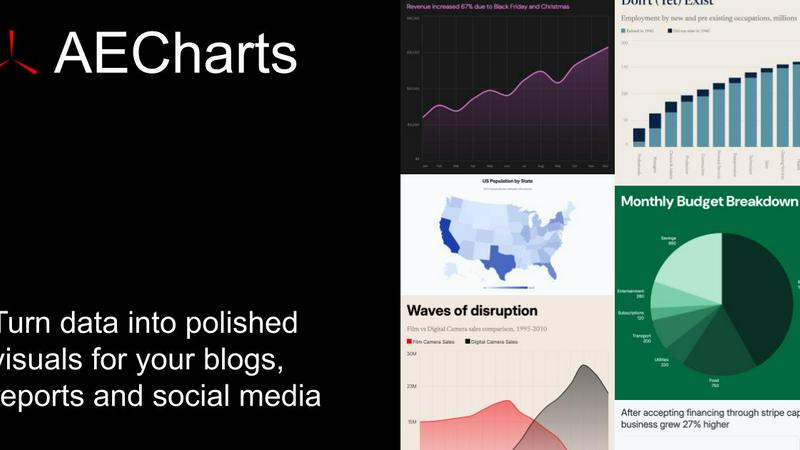
About AECharts
AECharts is an essential, browser-based tool designed for creating high-impact animated chart videos without any prior design skills, software installations, or video editing experience. This platform is a necessity for anyone who needs to transform raw data into compelling visual stories quickly and efficiently. By simply uploading a spreadsheet, pasting data directly, or connecting a Google Sheet, AECharts converts your information into a polished, animated video in minutes. The tool supports a wide array of chart types, including bar charts, line charts, pie charts, and dynamic bar chart races, ensuring you have the right visual for every data set. Every chart comes with professional, customizable templates, allowing you to adjust colors, fonts, sizing, and branding to match your unique style. The priority of AECharts is to make data visualization effortless and accessible, enabling users to export their creations as MP4 files for sharing across YouTube, LinkedIn, Instagram Reels, TikTok, presentations, newsletters, or pitch decks. Given that animated charts consistently outperform static images for audience engagement, AECharts is a must-have tool for marketers, educators, business analysts, and content creators who need to make their data stand out and drive results.
Features of AECharts
Instant Animation
Every chart you create with AECharts is automatically turned into a video, requiring no additional tools or software. This feature is a priority for users who need to produce engaging, dynamic content in the shortest time possible. The animation is built into the creation process, saving you the necessity of learning complex video editing software. You can instantly preview your animated chart, ensuring it conveys your message with impact, and then export it directly. This makes AECharts an essential solution for anyone who values speed and efficiency in their data storytelling workflow.
Brand Kit Integration
AECharts offers a Brand Kit feature that automatically applies your brand's fonts, colors, and logo to every chart you create. This is a must-have for maintaining consistent visual identity across all your presentations, reports, and social media content. The necessity of brand consistency is handled effortlessly, eliminating the manual work of adjusting each element individually. With the Brand Kit, you can set your preferences once and ensure every future chart aligns with your company's style guide. This feature is a priority for marketing teams and businesses that require a professional, unified look for all their data visualizations.
Flexible Export Options
The tool provides flexible export options, allowing you to download your charts as JPEG, PNG, and MP4 files. This is essential for adapting your content to different platforms and formats. You can choose from presets optimized for reports, decks, and social media, with aspect ratios including 16:9, 4:5, and 1:1. This feature is a necessity for content creators who need to repurpose a single chart for a variety of uses, from a detailed PDF report to an Instagram Reel. The priority is ensuring your data looks perfect in every context, without any additional resizing or editing.
Extensive Chart Type Library
AECharts supports 14 chart types and growing, including bar, line, area, pie, donut, horizontal bar, bar chart race, line chart race, scatter, waffle, treemap, waterfall, gauge, and animated number charts. This extensive library is a must-have for any data professional who needs to represent diverse data sets accurately. The variety ensures you can always choose the most effective visual for your specific story, from simple comparisons to complex trends and distributions. This feature is a priority for users who require more than just basic charting capabilities, providing the versatility needed for advanced data analysis and presentation.
Use Cases of AECharts
Marketing and Social Media Content
Marketers can use AECharts to create animated, engaging content for social media platforms like Instagram Reels, TikTok, LinkedIn, and YouTube. Animated charts consistently outperform static images, making this tool a necessity for driving higher engagement and click-through rates. You can quickly turn quarterly sales data, market trends, or campaign performance metrics into visually appealing videos that capture audience attention. This use case is a priority for any marketing team looking to stand out in a crowded digital landscape and communicate data-driven stories effectively.
Business Presentations and Reports
For business analysts and executives, AECharts is essential for creating professional, animated charts for internal presentations, pitch decks, and quarterly reports. The ability to export as MP4 or high-resolution images ensures your data is presented with maximum impact during meetings. The Brand Kit feature guarantees that all charts align with corporate identity, a must-have for maintaining professionalism. This use case is a priority for anyone who needs to communicate complex business insights clearly and persuasively, turning static slides into dynamic narratives.
Educational Content and Tutorials
Educators and content creators can leverage AECharts to produce animated charts for online courses, tutorials, and explainer videos. The tool’s simplicity is a necessity for teachers who lack design or video editing skills but need to create compelling visual aids. By animating data trends, historical events, or scientific findings, you can enhance student understanding and retention. This use case is a priority for making learning more interactive and engaging, transforming dry data into a powerful teaching tool.
Data Journalism and Reporting
Journalists and data analysts can use AECharts to create animated visualizations for news articles, blog posts, and investigative reports. The ability to quickly import data from spreadsheets or Google Sheets is a must-have for tight deadlines. Animated charts help tell a more compelling story, illustrating changes over time or comparisons between groups in a way that static charts cannot. This use case is a priority for any newsroom or publication that wants to present data-driven stories with clarity and impact, keeping readers engaged.
Frequently Asked Questions
What is AECharts?
AECharts is a browser-based tool for creating animated chart videos. It is designed for users without design skills, software installations, or video editing experience. You can upload a spreadsheet, paste data, or connect a Google Sheet, and AECharts will turn your data into a polished animated video in minutes. The tool supports 14 chart types and offers professional, customizable templates.
Who is this tool designed for?
AECharts is designed for marketers, business analysts, educators, content creators, journalists, and anyone who needs to present data in an engaging, animated format. It is a must-have for professionals who want to create high-impact visual content quickly without learning complex design or video editing software. The tool is accessible to beginners yet powerful enough for advanced users.
Do I need coding or design skills to use it?
No, you do not need any coding or design skills to use AECharts. The tool is built for ease of use, with a simple interface that guides you through selecting a chart type, pasting your data, and customizing the look. All templates are pre-built and can be adjusted with simple clicks. This makes it an essential tool for anyone who wants to create professional animated charts without technical expertise.
Can I customize colors, fonts, and branding?
Yes, you can fully customize colors, fonts, sizing, and branding to match your style. AECharts includes a Brand Kit feature that automatically applies your brand’s fonts, colors, and logo to every chart. This is a priority for maintaining consistent visual identity across all your content. Changes preview instantly, allowing you to fine-tune every detail.
What export formats are available?
AECharts offers flexible export options, including JPEG, PNG, and MP4 formats. You can also choose from presets for different aspect ratios such as 16:9, 4:5, and 1:1, optimized for reports, decks, and social media. This feature is a necessity for adapting your charts to various platforms without additional editing.
Is there a free plan?
Yes, AECharts offers a free plan that allows you to try the tool without logging in. You can create charts and explore the features. For more advanced capabilities, such as unlimited exports or Brand Kit integration, you may need to upgrade to a paid plan. Specific pricing details are available on the AECharts website.
How fast can I create an animated chart?
You can create an animated chart in minutes. The process is streamlined: pick a chart type, paste your data, customize the design, and download. Changes preview instantly, and the animation is built into the creation process. This speed is a must-have for professionals working under tight deadlines.
What chart types are supported?
AECharts supports 14 chart types, including bar, line, area, pie, donut, horizontal bar, bar chart race, line chart race, scatter, waffle, treemap, waterfall, gauge, and animated number charts. This extensive library is a priority for ensuring you have the right visual for any data set. More chart types are being added regularly.
Similar to AECharts

ImageGenerator
Create and edit AI images online with multiple models, text-to-image, image-to-image, background removal, and upscaling.

Capafy AI
Agent Skills marketplace: discover expert AI agents, run them online, or publish a Skill and earn from every sale.
EditTextPhoto
AI-powered image text editor to edit, replace, fix, or translate text in images while preserving the original font, color, size, and style.

ideogram-45
AI image generation and editing with sharp typography, native 2K output, and localized visual edits.

Image to Layers AI
Turn any image into editable transparent PNG/PSD layers with AI

Egmatic
No-code editor for 2D games: visual logic, drag-and-drop scenes, one-click export to every platform.


Presentation Intelligence
AI-native presentation and visual content platform that turns prompts, documents, images, videos, and data into polished, shareable decks.