TinyFast vs WA Reminders
Side-by-side comparison to help you choose the right tool.

TinyFast instantly and privately compresses your files on Mac without risky uploads.
Last updated: February 28, 2026

WA Reminders
WA Reminders lets you effortlessly schedule WhatsApp messages for your business, ensuring timely communication with clients and seamless management.
Last updated: April 4, 2026
Visual Comparison
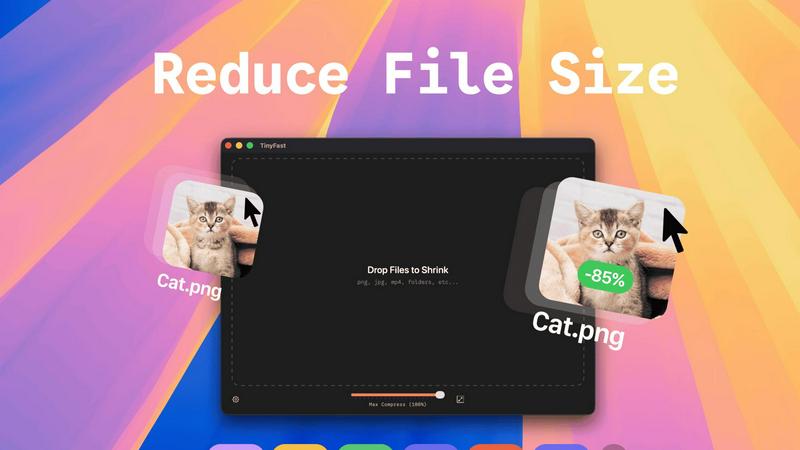
TinyFast
WA Reminders

Feature Comparison
TinyFast
100% Local & Private Compression
Your files never leave your Mac. TinyFast is engineered for total privacy by design, processing all compression tasks locally without any uploads to cloud servers. This is critical for handling confidential documents, client assets under NDA, or any sensitive material, providing peace of mind that your data remains completely under your control and is never stored or accessed by third parties.
Blazing-Fast Drag & Drop Workflow
Experience instant file size reduction with an intentionally simple interface. The entire process is as straightforward as dragging your file or folder into the TinyFast window and dragging the optimized output out. This eliminates complex settings, lengthy upload queues, and slow downloads, delivering shrunk files in seconds and saving you invaluable time with every use.
Universal File Format Support
TinyFast is your single, go-to solution for compressing a vast range of file types. It comprehensively supports images (PNG, JPG, TIFF, HEIC, WEBP, GIF, BMP, SVG), videos (MP4, MOV, M4V), documents (PDF, DOCX), code files (JS, CSS, JSON), and audio (MP3). This universal support means you don't need multiple tools for different file types.
Batch Processing & Resolution Control
Boost your productivity by compressing entire folders of files at once. Drop a folder and get optimized output in seconds. Furthermore, TinyFast provides control over your output quality by allowing you to automatically resize image and video resolution during compression, giving you the flexibility to reduce file size precisely according to your needs.
WA Reminders
QR Code Linking
Link your WhatsApp account with ease by scanning a QR code on your phone, similar to WhatsApp Web. This feature allows for quick access to your WhatsApp account, enabling you to manage messages directly from your business profile.
Google Calendar Integration
WA Reminders lets you schedule messages directly from Google Calendar events. Simply include an internationally formatted phone number in the event details, and the app takes care of the rest, ensuring that your clients receive reminders automatically.
Automatic Contact Sync
When scheduling messages from the app, your full contact list is automatically imported from your phone. This feature eliminates the hassle of manual entry and ensures that you can reach all your clients effortlessly.
Custom Message Delivery
Messages sent through WA Reminders appear to come from your own WhatsApp phone number, maintaining your brand's identity. This allows for seamless follow-ups and ongoing conversations, enhancing client relationships.
Use Cases
TinyFast
For Developers & Coders
Developers constantly need to optimize assets for web and app deployment. TinyFast allows them to quickly compress project images, SVGs, and code files (like JS and CSS bundles) locally, ensuring no proprietary code or assets are exposed to online services. This integrates seamlessly into a development workflow, speeding up build times and protecting intellectual property.
For Designers & Creative Professionals
Designers working with high-resolution images, mockups, and video clips need to share proofs or final assets without compromising quality or confidentiality. TinyFast enables them to shrink large PSD exports, PNGs, JPEGs, and MOV files on the spot, facilitating quick client reviews and safe transfer of sensitive creative work directly from their Mac.
For Business & Legal Documentation
Professionals handling contracts, reports, and presentations in PDF or DOCX format often need to reduce file sizes for email attachments or secure portals. Using TinyFast ensures these confidential documents are compressed locally, adhering to strict data privacy policies and compliance requirements without ever risking exposure on an online server.
For Content Creators & Marketers
Bloggers, social media managers, and marketers regularly process large volumes of images and videos for publication. TinyFast streamlines this by allowing batch compression of media files, saving hours of upload time. They can maintain visual quality while meeting platform file size limits, all from the safety and speed of their desktop.
WA Reminders
Appointment Reminders
For clinics and independent professionals, WA Reminders can be used to send appointment reminders to clients, reducing the likelihood of no-shows and ensuring that schedules are adhered to.
Payment Notifications
Businesses can utilize WA Reminders to schedule payment notifications, ensuring that clients are reminded of upcoming payments or due dates, thus improving cash flow and reducing late payments.
Event Reminders
WA Reminders is perfect for small shops and service providers who need to inform clients about special events, sales, or promotions, helping to drive attendance and engagement.
Recurring Messages
The app supports recurring message scheduling, making it easy for businesses to send regular reminders or updates without having to manually set each one, thus saving time and effort.
Overview
About TinyFast
TinyFast is the essential, non-negotiable tool for any Mac user who handles digital files. It is a native macOS application built to perform one critical task with unmatched efficiency: compressing files directly on your computer. In a digital landscape where data privacy is paramount and efficiency is currency, TinyFast eliminates the insecurity and sluggishness of online tools. It processes a wide array of formats—including PNG, JPEG, MP4, MOV, PDF, SVG, WebP, MP3, and GIF—locally on your Mac. Your files never leave your machine, ensuring total privacy and blazing-fast speed. The workflow is deliberately and powerfully simple: just drag your file in and drag the compressed version out. This tool is built for developers, designers, creators, and professionals who cannot afford to waste time uploading sensitive assets to unknown servers or compromise on confidentiality. TinyFast is not just an app; it's a necessary upgrade to your workflow, guaranteeing security, speed, and simplicity in every single compression, making it an indispensable asset for anyone serious about their digital productivity.
About WA Reminders
WA Reminders is a powerful scheduling tool designed to optimize communication for clinics and small businesses by enabling users to schedule WhatsApp messages effortlessly. This innovative application allows you to set reminders and messages in advance, ensuring that clients receive timely notifications about appointments, payments, and other important updates. Ideal for independent professionals, clinics, and small shops that depend on appointments, WA Reminders helps minimize no-shows and enhances operational efficiency. By integrating seamlessly with both WhatsApp Business and regular WhatsApp, users can manage their messages directly from their accounts. The main value proposition lies in its ability to consolidate your scheduling and reminder processes within a single platform, saving you time and improving client engagement.
Frequently Asked Questions
TinyFast FAQ
Is TinyFast really completely private?
Yes, absolutely. TinyFast is a native macOS application that performs all compression processes locally on your Mac. Your files are never uploaded to the internet, sent to cloud servers, or stored by any third party. This local-first design is the core of the app, guaranteeing total privacy and security for all your data.
What file types does TinyFast support?
TinyFast supports a wide range of common file formats. This includes images (PNG, JPG, TIFF, HEIC, WEBP, GIF, BMP, SVG), videos (MP4, MOV, M4V), documents (PDF, DOCX), code files (JS, CSS, JSON), and audio files (MP3). It is designed to be a universal compression tool for most digital file needs.
How does the pricing work?
TinyFast offers a free tier that allows you to compress up to 5 files per day with access to all features. For unlimited use, you can choose a monthly subscription or a one-time lifetime purchase. The lifetime plan provides unlimited local compressions, all features, lifetime updates, and supports future development with a single payment.
Can I compress multiple files or folders at once?
Yes, you can. One of TinyFast's key features is batch processing. You can drag and drop an entire folder containing multiple files into the app, and it will compress all supported files within it, outputting the optimized versions in seconds. This is ideal for processing large batches of photos, videos, or documents efficiently.
WA Reminders FAQ
Do you offer a free plan?
No, WA Reminders does not offer a free plan. However, a 14-day money-back guarantee is available. If the service does not meet your needs, you can request a full refund without any questions.
Can I import or use the contacts from my phone or account to send reminders?
Yes, WA Reminders allows you to automatically import your full contact list from your phone, making it easy to send reminders to your clients without manual entry.
How will my WhatsApp reminder messages look?
Messages sent via WA Reminders will appear to come from your own WhatsApp number, maintaining your brand's identity and allowing for continued conversation directly from your account.
Do you support more languages than English for the messages?
Currently, the primary language for messages is English. However, the team is continuously working on expanding language support to cater to a broader audience in the future.
Alternatives
TinyFast Alternatives
TinyFast is a native macOS application for local file compression, a critical tool in the tech utility category. It stands apart by processing files directly on your Mac, ensuring privacy and speed without risky uploads to external servers. Users may explore alternatives for various reasons, such as budget constraints, a need for cross-platform compatibility, or specific feature requirements not covered by a single tool. The search often stems from a desire to balance core functionality with other practical considerations. When evaluating any alternative, the non-negotiable priorities should be privacy (does it process files locally?), speed, and format support. The ideal tool must handle your specific file types efficiently while fitting seamlessly into your existing workflow without compromising security.
WA Reminders Alternatives
WA Reminders is an essential tool designed for businesses and clinics, allowing users to schedule WhatsApp messages efficiently. This productivity and management application is particularly beneficial for independent professionals and small shops that depend on appointment-based services. By enabling users to manage reminders and communications in one place, WA Reminders helps reduce no-shows and optimizes time management. Users often seek alternatives to WA Reminders for various reasons, including pricing, additional features, or specific platform compatibility needs. When exploring alternatives, it is critical to evaluate factors such as user interface, integration capabilities with existing tools like Google Calendar, and overall functionality to ensure that the chosen solution aligns with business requirements.