StatPecker vs Video Database
Side-by-side comparison to help you choose the right tool.

StatPecker
StatPecker gives leaders secure AI insights from company data without leaks.
Last updated: March 1, 2026

Video Database
Video Database is the essential curated library of winning short-form videos for creators to analyze and replicate success.
Last updated: April 13, 2026
Visual Comparison
StatPecker
Video Database

Feature Comparison
StatPecker
Local SQL Agent for Private CSV Analysis
This is a critical feature for data security and immediate insight. You can upload a CSV file up to 50 MB, and StatPecker's local engine processes everything directly on your device. This guarantees your sensitive business data remains completely private. You can then explore your data with simple questions and receive answers as clean, ready-to-share charts and visuals, eliminating the hassle and risk of using external spreadsheets or cloud services for preliminary analysis.
AI-Powered Query for Instant Insights
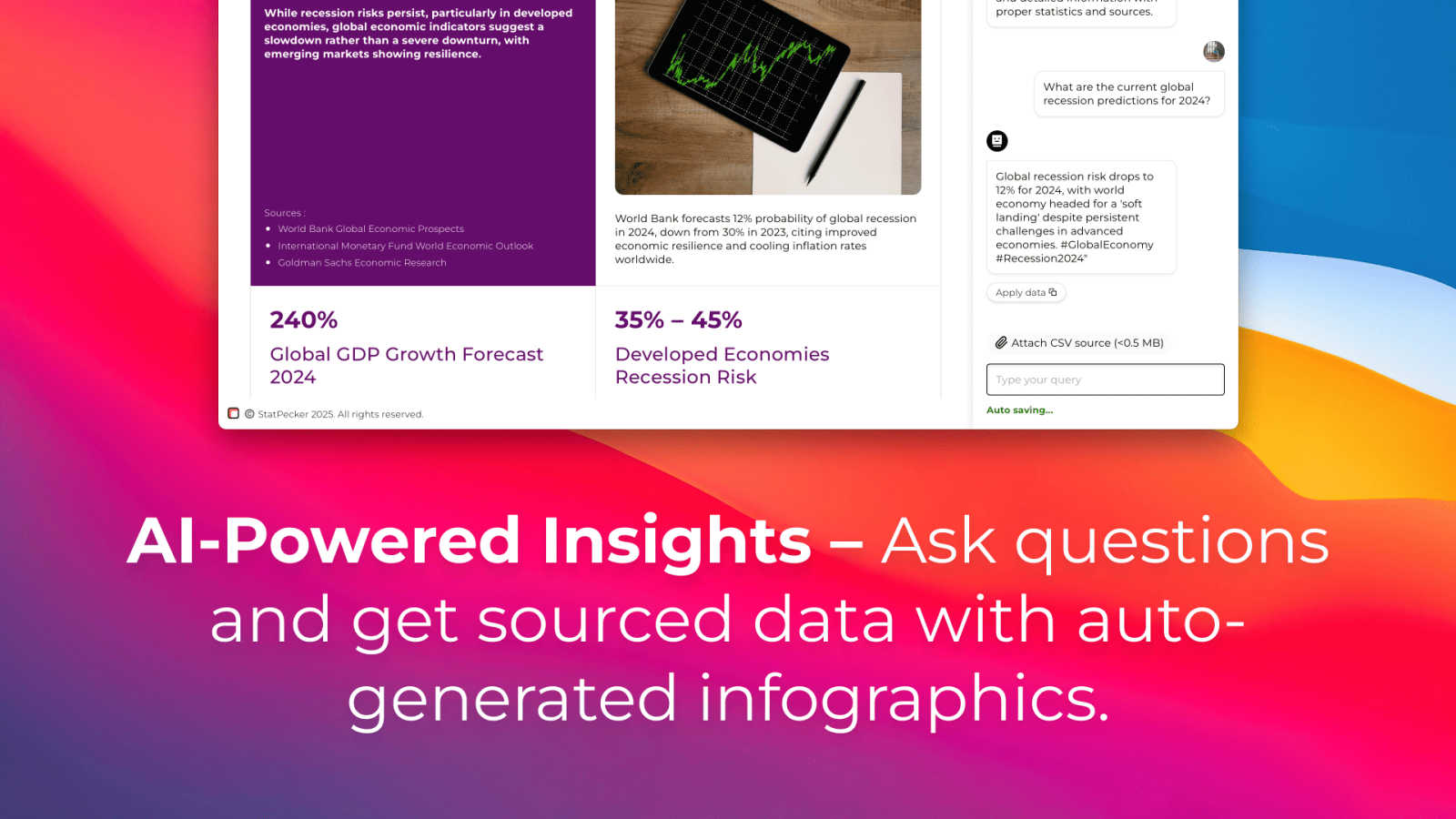
Stop wrestling with complex data tools. StatPecker's core functionality allows you to get instant insights by simply asking questions in plain language. The AI queries validated sources and generates clear, credible answers, transforming your curiosity into professional visuals without any need for coding, complex formulas, or data science expertise. This feature is essential for rapid analysis and decision-making.
Publish & Embed Interactive Visuals
Your data stories need to live where your audience is. StatPecker enables you to seamlessly publish your generated infographics and make them interactive. You can embed these visuals directly into blogs, articles, websites, or internal wikis, providing dynamic and engaging content that enhances your narrative and keeps readers engaged with the data, a must-have for content creators and modern reporting.
Download & Use Anywhere
Flexibility is non-negotiable. Once your visual is created, you are not locked into the platform. StatPecker allows you to export your infographics as high-quality images for immediate use in reports, presentations, social media, or print materials. This ensures your compelling data visuals can be integrated into any workflow or medium, maximizing the utility and reach of your analysis.
Video Database
Hand-Curated Video Library
The database is built on a foundation of thousands of videos that are manually selected and categorized, not algorithmically suggested. This ensures every reference is a genuine example of effective short-form content, spanning all major platforms and formats. The curation process prioritizes quality and educational value, providing a reliable repository of inspiration free from the noise and inconsistency of typical social media feeds. You gain access to a pre-vetted collection that represents the current best practices in digital video storytelling.
Advanced Filtering and Search
This feature provides granular control over your research. You can search and filter the entire database by multiple critical dimensions including video format (like One Shot or Carousel), core concept (like Product Demo or Expectation vs. Reality), specific visual or audio elements, topic, and account type (Personal Brand, Business, etc.). This precise filtering is a necessity for finding exactly the right reference to solve a specific creative challenge or to study a particular technique in isolation, making your research process highly efficient and targeted.
Performance Metrics and Analysis
Every video in the database is displayed with key performance indicators (KPIs) such as view counts, like counts, and a calculated engagement multiplier. More importantly, each entry includes a "Deep Analysis" that breaks down why the video works, highlighting its hook, structure, and audience appeal. This transforms simple viewing into a strategic learning session, giving you the concrete data and contextual understanding needed to reverse-engineer success and apply those lessons directly to your content strategy.
Save, Organize, and Export Tools
The platform allows you to actively manage your research. You can save individual videos to personal collections or "Swipefiles" for easy access later. For team collaboration or deeper analysis, higher-tier plans include the ability to share these collections and export data via CSV. This functionality is essential for building a persistent, personalized knowledge base of references that can inform ongoing campaigns and streamline the content creation workflow for individuals and teams.
Use Cases
StatPecker
Content Creators & Bloggers
For creators, compelling visuals are essential for engagement and authority. StatPecker is a necessity for transforming research data, surveys, or industry statistics into stunning, embeddable infographics that elevate blog posts and articles. It allows them to quickly create credible, shareable content that explains complex topics simply, saving hours of design work and making their content more persuasive and professional.
Business Analysts & Data Teams
Analysts under constant pressure to deliver reports need to communicate findings effectively. StatPecker is critical for rapidly converting CSV exports and SQL query results into clear charts and visuals for stakeholder presentations. It automates the tedious visualization step, allowing analysts to focus on insight generation and ensuring their messages are understood and acted upon quickly.
Marketing Professionals
Marketers must prove campaign ROI and present market research persuasively. StatPecker is indispensable for creating impactful charts and infographics from performance data (like sales figures or engagement metrics) for reports, client decks, and social media content. It turns dry numbers into compelling visual stories that demonstrate value and drive strategic decisions.
Educators & Trainers
Explaining data-driven concepts requires clarity. Educators and trainers can use StatPecker as an essential tool to create easy-to-understand visual aids and infographics from educational data or historical trends. This enhances learning materials, presentations, and coursework, helping students grasp complex information through clear, professional visuals without needing design skills.
Video Database
Content Creator Research and Inspiration
Individual creators, influencers, and videographers use the database to break creative blocks and find proven formats. Instead of wasting hours scrolling aimlessly, they can filter by their niche or a desired format (like "Relatable One Shot") to instantly access a stream of successful examples. Studying the associated metrics and analysis helps them understand audience preferences, allowing them to craft their next video with a data-informed creative strategy that prioritizes engagement and growth.
Brand and Marketing Team Campaign Planning
Marketing teams and brand managers utilize the tool to plan and justify video campaign concepts. They can search for "Product Demo" or "Brand" account videos to see how similar companies present their offerings effectively. This provides tangible references for stakeholder meetings and guides the creative brief process with real-world examples of what resonates, ensuring that campaign ideas are grounded in proven performance rather than guesswork.
Agency Strategist Competitive Analysis
Digital agencies and content strategists employ the database for competitive analysis and trend forecasting. By filtering for specific industries or tracking new videos from top creators, they can identify emerging formats and narrative techniques before they become mainstream. This allows agencies to offer cutting-edge, strategic advice to their clients and develop innovative content frameworks that provide a competitive advantage in crowded social feeds.
Educational and Training Resource
Coaches, educators, and bootcamp instructors (like Cut30 itself) use the platform as a structured teaching aid. The categorized videos serve as perfect case studies for lessons on hook writing, pacing, or editing. The "Extract Video DNA" feature can generate markdown breakdowns of a video's structure, creating ready-made lesson materials that help students deconstruct and learn from excellence in a systematic, repeatable way.
Overview
About StatPecker
StatPecker is an essential, non-negotiable tool for anyone who needs to communicate data with clarity and impact. It solves the critical, time-draining problem of manual data reporting and the prohibitive cost of hiring professional designers by automating the entire data storytelling process. This AI-powered platform transforms raw, complex data into professional, publication-ready visuals and infographics in seconds. It is an absolute necessity for creators, analysts, marketers, and educators who must turn spreadsheets and numbers into engaging, persuasive, and easy-to-understand narratives without any technical expertise. The core value proposition is undeniable: save significant time, cut costs dramatically, and boost the impact of your communications by making data visually compelling and instantly shareable. From analyzing uploaded CSV files with its private, on-device Local SQL Agent to generating insights through simple AI queries, StatPecker delivers credible answers as stunning visuals you can embed, download, and use anywhere, making it the indispensable solution for modern data-driven communication.
About Video Database
Video Database is the essential solution for content creators, strategists, and marketers who need to analyze and understand high-performing short-form video content. It eliminates the inefficient and time-consuming process of endlessly scrolling through social media algorithms by providing a centralized, hand-curated library of winning Instagram and TikTok videos. Born from the internal needs of Cut30's short-form video bootcamp, this tool organizes hundreds of valuable reference videos with deep analysis, transforming scattered inspiration into a structured, searchable strategic asset. It is specifically designed for anyone who creates video content, from individual creators and influencers to brand managers and agency strategists. The core value proposition is absolute necessity: direct access to proven video formats and concepts, complete with performance metrics and analytical insights, so you can study what genuinely works and apply those winning patterns to your own content with precision and confidence.
Frequently Asked Questions
StatPecker FAQ
How does the Local SQL Agent ensure my data is private?
Privacy is the foundational principle of the Local SQL Agent. When you upload a CSV file, the entire processing and analysis engine runs locally on your own device. Your data is never sent to or stored on StatPecker's servers. The system prepares the data, generates SQL queries, and creates the visuals entirely on your machine, ensuring complete confidentiality for sensitive business or personal information.
What kind of questions can I ask the AI to get insights?
You can ask a wide range of practical, business-oriented questions in plain English. For example, you can ask for trends over time ("Show sales growth last quarter"), comparisons ("Which product category has the highest revenue?"), summarizations ("What is the average customer spend?"), or rankings ("List the top 5 regions by performance"). The AI interprets your intent and generates the appropriate query to return a clear visual answer.
Can I edit the visuals after StatPecker generates them?
Yes, maintaining control over your final output is essential. StatPecker provides options for manual edits on your generated visuals, especially for embeds. This allows you to adjust colors, and labels, or tweak the design to ensure the visual perfectly aligns with your brand guidelines or presentation style before publishing or sharing it widely.
What are the limits of the Free Tier?
The Free Tier is designed for essential, regular use. It includes unlimited projects and embeds, 25 AI queries, and 10 CSV uploads. This is sufficient for individuals or small teams to start creating impactful data stories immediately. For high-volume needs with unlimited AI queries and CSV uploads, the Lifetime Access plan provides a complete, one-time solution.
Video Database FAQ
What makes Video Database different from just browsing TikTok or Instagram?
The critical difference is curation and analysis. Social media platforms are designed for consumption, not study, and their algorithms may not show you the most instructive content. Video Database provides a hand-picked library of proven winners, each accompanied by performance data and a deep analytical breakdown. This transforms passive scrolling into active, strategic research, saving you immense time and giving you focused insights you cannot get from a standard feed.
How often is the video library updated?
The database is updated daily with new, high-performing videos. The platform actively tracks trends and successful creators to ensure the library reflects the latest techniques and formats that are currently engaging audiences. This constant refresh is a necessity for staying relevant in the fast-paced world of short-form video, providing you with timely inspiration rather than outdated examples.
Can I submit my own videos or videos I find for analysis?
Yes, on the Creator plan and above, users have the ability to submit videos for analysis. This feature allows you to get the same deep performance breakdown and "Video DNA" extraction on any video URL you provide, whether it's your own content for review or a competitor's video you want to understand better. It extends the power of the platform's analytical framework to virtually any video on the internet.
What is the "Creator Panel" and how does it work?
The Creator Panel is an AI-powered toolkit available in the Creator and Strategist plans. It allows you to input your content focus and desired style to generate personalized assets. You can use it to get multiple hook ideas in your brand's voice, brainstorm video concepts inspired by a reference, write full scripts, or extract a structured "DNA" breakdown of any video. It is designed to bridge the gap between inspiration and execution, providing essential creative support.
Alternatives
StatPecker Alternatives
StatPecker is an essential AI-powered analytics and data visualization tool. It is a necessity for leaders and creators who must transform raw data into professional, impactful visuals and insights without delay or security risks. Users often seek alternatives to find a solution that aligns perfectly with their specific budget, required feature set, or integration needs with other platforms. When evaluating other options, the critical factors to prioritize are core capabilities. You must have robust AI-driven analysis, seamless data import functionality, and secure, embeddable output. The right tool will eliminate manual reporting, cut costs dramatically, and make your data communications instantly more persuasive and shareable.
Video Database Alternatives
Video Database is a specialized tool in the content creation category, designed to monitor and organize high-value creator videos. It solves the problem of endless, inefficient scrolling by providing a centralized hub for curated video examples and analysis. Users often seek alternatives for various reasons, including budget constraints, the need for different feature sets, or compatibility with other platforms in their workflow. The search for a different solution is a normal part of finding the right fit for specific creative or strategic processes. When evaluating an alternative, prioritize tools that offer organized curation beyond basic bookmarking. Look for systems that enable deep analysis, categorization, and seamless integration into your learning or production workflow. The core necessity is a platform that transforms inspiration into actionable insight without algorithmic distraction.