StatPecker vs TrafficClaw
Side-by-side comparison to help you choose the right tool.

StatPecker
StatPecker gives leaders secure AI insights from company data without leaks.
Last updated: March 1, 2026

TrafficClaw
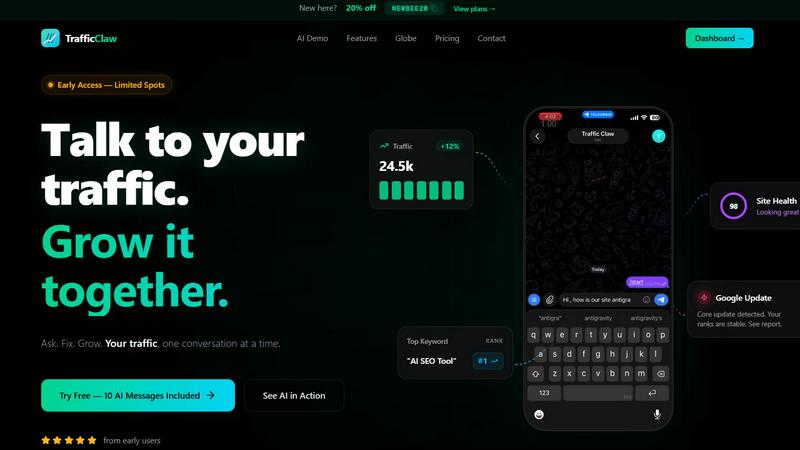
TrafficClaw transforms SEO and analytics data into actionable insights, empowering you to grow your traffic through intelligent conversations.
Last updated: April 13, 2026
Visual Comparison
StatPecker

TrafficClaw
Feature Comparison
StatPecker
Local SQL Agent for Private CSV Analysis
This is a critical feature for data security and immediate insight. You can upload a CSV file up to 50 MB, and StatPecker's local engine processes everything directly on your device. This guarantees your sensitive business data remains completely private. You can then explore your data with simple questions and receive answers as clean, ready-to-share charts and visuals, eliminating the hassle and risk of using external spreadsheets or cloud services for preliminary analysis.
AI-Powered Query for Instant Insights
Stop wrestling with complex data tools. StatPecker's core functionality allows you to get instant insights by simply asking questions in plain language. The AI queries validated sources and generates clear, credible answers, transforming your curiosity into professional visuals without any need for coding, complex formulas, or data science expertise. This feature is essential for rapid analysis and decision-making.
Publish & Embed Interactive Visuals
Your data stories need to live where your audience is. StatPecker enables you to seamlessly publish your generated infographics and make them interactive. You can embed these visuals directly into blogs, articles, websites, or internal wikis, providing dynamic and engaging content that enhances your narrative and keeps readers engaged with the data, a must-have for content creators and modern reporting.
Download & Use Anywhere
Flexibility is non-negotiable. Once your visual is created, you are not locked into the platform. StatPecker allows you to export your infographics as high-quality images for immediate use in reports, presentations, social media, or print materials. This ensures your compelling data visuals can be integrated into any workflow or medium, maximizing the utility and reach of your analysis.
TrafficClaw
AI Chat
The AI chat feature allows users to ask questions about their analytics in natural language. This means anyone, regardless of technical expertise, can engage with their data and receive instant, actionable insights and charts without needing extensive knowledge of analytics tools.
SEO Intelligence
TrafficClaw’s SEO intelligence feature identifies keyword gaps, alerts users to content decay, and detects cannibalization issues. This ensures that users can optimize their SEO strategy effectively, allowing them to stay ahead of competitors and improve their organic search performance.
Analytics Dashboard
With a real-time analytics dashboard, users can monitor traffic trends, bounce rates, and conversion funnels all in one place. This comprehensive overview of website performance makes it easy to track growth and identify areas needing improvement without juggling multiple tools.
Site Audit
The site audit feature provides deep page-level audits, complete with performance scores and suggestions for auto-fixes. This allows users to enhance their website's performance based on solid data, ensuring that they address issues that could hinder their traffic and search rankings.
Use Cases
StatPecker
Content Creators & Bloggers
For creators, compelling visuals are essential for engagement and authority. StatPecker is a necessity for transforming research data, surveys, or industry statistics into stunning, embeddable infographics that elevate blog posts and articles. It allows them to quickly create credible, shareable content that explains complex topics simply, saving hours of design work and making their content more persuasive and professional.
Business Analysts & Data Teams
Analysts under constant pressure to deliver reports need to communicate findings effectively. StatPecker is critical for rapidly converting CSV exports and SQL query results into clear charts and visuals for stakeholder presentations. It automates the tedious visualization step, allowing analysts to focus on insight generation and ensuring their messages are understood and acted upon quickly.
Marketing Professionals
Marketers must prove campaign ROI and present market research persuasively. StatPecker is indispensable for creating impactful charts and infographics from performance data (like sales figures or engagement metrics) for reports, client decks, and social media content. It turns dry numbers into compelling visual stories that demonstrate value and drive strategic decisions.
Educators & Trainers
Explaining data-driven concepts requires clarity. Educators and trainers can use StatPecker as an essential tool to create easy-to-understand visual aids and infographics from educational data or historical trends. This enhances learning materials, presentations, and coursework, helping students grasp complex information through clear, professional visuals without needing design skills.
TrafficClaw
Analyze Traffic Drops
When website traffic experiences a decline, TrafficClaw empowers users to investigate the issue quickly. By simply asking the AI analyst, users can receive a detailed analysis that pinpoints the cause, whether it be algorithm changes, technical errors, or content issues.
Optimize SEO Strategy
TrafficClaw helps users refine their SEO strategy by identifying keyword opportunities and content gaps. Users can discover what keywords to target for better ranking and how to optimize existing content to maintain their competitive edge.
Improve User Engagement
By analyzing bounce rates and conversion funnels, website owners can understand user behavior better. TrafficClaw provides insights that help improve user engagement through targeted content adjustments and strategic changes to the website layout.
Streamline Content Creation
With built-in content tools, TrafficClaw aids users in generating relevant content ideas and optimizing existing content for search engines. This feature simplifies the content creation process and ensures that all content aligns with SEO best practices.
Overview
About StatPecker
StatPecker is an essential, non-negotiable tool for anyone who needs to communicate data with clarity and impact. It solves the critical, time-draining problem of manual data reporting and the prohibitive cost of hiring professional designers by automating the entire data storytelling process. This AI-powered platform transforms raw, complex data into professional, publication-ready visuals and infographics in seconds. It is an absolute necessity for creators, analysts, marketers, and educators who must turn spreadsheets and numbers into engaging, persuasive, and easy-to-understand narratives without any technical expertise. The core value proposition is undeniable: save significant time, cut costs dramatically, and boost the impact of your communications by making data visually compelling and instantly shareable. From analyzing uploaded CSV files with its private, on-device Local SQL Agent to generating insights through simple AI queries, StatPecker delivers credible answers as stunning visuals you can embed, download, and use anywhere, making it the indispensable solution for modern data-driven communication.
About TrafficClaw
TrafficClaw is an innovative AI-powered tool designed to help website owners and digital marketers diagnose and resolve traffic issues effectively. When traffic drops, traditional analytics platforms like Google Analytics and Search Console may not provide the insights needed to identify the root cause. TrafficClaw changes this by allowing users to simply ask questions like "Why did my traffic drop?" and receive data-driven answers backed by real-time analytics. The platform seamlessly integrates with GA4 and Search Console, giving users a comprehensive view of their website's performance. Ideal for small business owners, SEO specialists, and content creators, TrafficClaw offers actionable insights that lead to tangible growth. With an intuitive chat interface, users can explore their data, identify problems, and implement solutions quickly, transforming how they manage their online presence.
Frequently Asked Questions
StatPecker FAQ
How does the Local SQL Agent ensure my data is private?
Privacy is the foundational principle of the Local SQL Agent. When you upload a CSV file, the entire processing and analysis engine runs locally on your own device. Your data is never sent to or stored on StatPecker's servers. The system prepares the data, generates SQL queries, and creates the visuals entirely on your machine, ensuring complete confidentiality for sensitive business or personal information.
What kind of questions can I ask the AI to get insights?
You can ask a wide range of practical, business-oriented questions in plain English. For example, you can ask for trends over time ("Show sales growth last quarter"), comparisons ("Which product category has the highest revenue?"), summarizations ("What is the average customer spend?"), or rankings ("List the top 5 regions by performance"). The AI interprets your intent and generates the appropriate query to return a clear visual answer.
Can I edit the visuals after StatPecker generates them?
Yes, maintaining control over your final output is essential. StatPecker provides options for manual edits on your generated visuals, especially for embeds. This allows you to adjust colors, and labels, or tweak the design to ensure the visual perfectly aligns with your brand guidelines or presentation style before publishing or sharing it widely.
What are the limits of the Free Tier?
The Free Tier is designed for essential, regular use. It includes unlimited projects and embeds, 25 AI queries, and 10 CSV uploads. This is sufficient for individuals or small teams to start creating impactful data stories immediately. For high-volume needs with unlimited AI queries and CSV uploads, the Lifetime Access plan provides a complete, one-time solution.
TrafficClaw FAQ
How does TrafficClaw integrate with my existing tools?
TrafficClaw seamlessly integrates with Google Analytics 4 and Google Search Console, allowing for a hassle-free setup where your data is automatically detected and displayed in one unified interface.
Is my data safe with TrafficClaw?
Yes, TrafficClaw prioritizes user privacy and data security. It employs read-only Google OAuth, ensuring that your data remains yours, and you maintain control over it at all times.
Can I try TrafficClaw for free?
Absolutely! TrafficClaw offers a free trial that includes 10 AI messages, allowing users to experience the platform’s capabilities and how it can help improve their website's performance.
What kind of support does TrafficClaw offer?
TrafficClaw provides comprehensive support through its help center, tutorials, and customer service. Users can access resources to better understand the platform and how to maximize its features for their specific needs.
Alternatives
StatPecker Alternatives
StatPecker is an essential AI-powered analytics and data visualization tool. It is a necessity for leaders and creators who must transform raw data into professional, impactful visuals and insights without delay or security risks. Users often seek alternatives to find a solution that aligns perfectly with their specific budget, required feature set, or integration needs with other platforms. When evaluating other options, the critical factors to prioritize are core capabilities. You must have robust AI-driven analysis, seamless data import functionality, and secure, embeddable output. The right tool will eliminate manual reporting, cut costs dramatically, and make your data communications instantly more persuasive and shareable.
TrafficClaw Alternatives
TrafficClaw is an innovative tool that belongs to the category of AI Assistants, Analytics & Data, and SEO. It transforms the way users interact with their SEO and analytics data by enabling them to ask questions like "Why did my traffic drop?" and receive actionable insights based on real data. This unique approach addresses a common frustration: while traditional analytics platforms provide raw data, they often lack the context needed to make sense of it. Users often seek alternatives to TrafficClaw for various reasons, including pricing concerns, the need for additional features, or compatibility with specific platforms. When evaluating alternatives, it's essential to consider factors such as ease of use, the depth of insights provided, integration capabilities with existing tools, and the overall value offered. Finding a solution that meets your specific analytics needs and enhances your SEO strategy is crucial for achieving online success.