NanoBanana 2 vs Prompt Builder
Side-by-side comparison to help you choose the right tool.

NanoBanana 2
Transform your images effortlessly with NanoBanana 2, the ultimate AI-powered tool for professional photo editing and enhancement.
Last updated: March 18, 2026

Prompt Builder
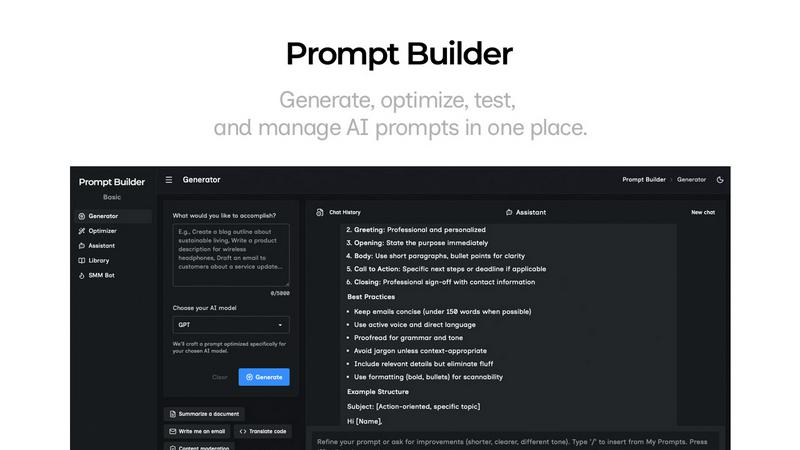
Generate, optimize, test, and manage AI prompts in one place. Turn an idea into a ready-to-use prompt in seconds.
Visual Comparison
NanoBanana 2

Prompt Builder
Overview
About NanoBanana 2
NanoBanana 2 is a cutting-edge AI image editing model designed for photographers, designers, and content creators seeking to elevate their visual content. Building on the success of its predecessor, the original Nano Banana, this next-generation tool offers advanced photo enhancement and intelligent retouching capabilities that are both powerful and user-friendly. With an intuitive interface and robust processing algorithms, NanoBanana 2 delivers professional-grade results in a matter of seconds. Its primary value proposition lies in its ability to combine advanced machine learning with real-time processing, allowing users to enhance images effortlessly while maintaining the integrity of natural details. Whether you are a seasoned professional or a hobbyist, NanoBanana 2 is equipped to meet your diverse image editing needs, making it an essential tool for anyone serious about their visual content.
About Prompt Builder
Prompt Builder is a prompt engineering workspace for writing, testing, and saving prompts. Describe the task in plain English, and it helps you create a prompt that matches the model you choose. Start with a draft, refine it in chat, save or pin versions, then run them when you are ready. It works with GPT, Claude, Gemini, Llama, Mistral, DeepSeek, Grok, Perplexity, and more. You also get an Optimizer, an assistant for quick tests, and a library of reusable prompts and templates from the community. Turn an idea into a ready-to-use prompt in seconds. Refine it in chat, save it to your Library, and run it anytime.