poseup vs SparkPix
Side-by-side comparison to help you choose the right tool.

poseup
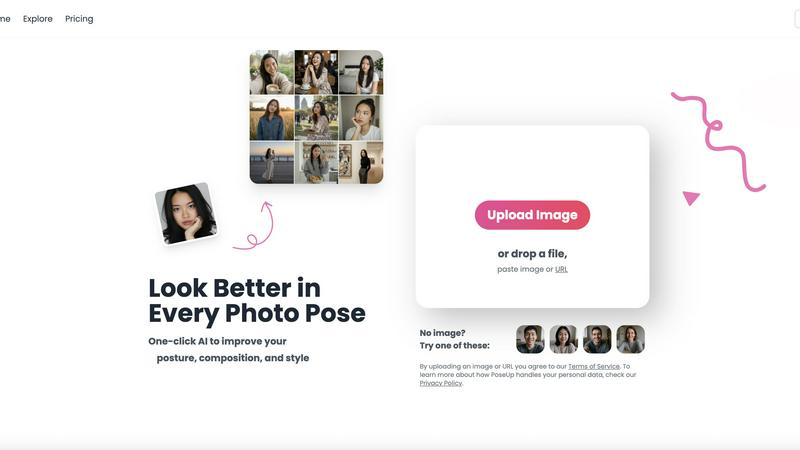
Enhance your photos in seconds with PoseUp's AI for perfect posture, composition, and style at the click of a button.
Last updated: March 1, 2026

SparkPix
SparkPix is the essential AI photo editor that transforms any image instantly by simply typing your request.
Last updated: March 11, 2026
Visual Comparison
poseup
SparkPix

Feature Comparison
poseup
One-Click AI Enhancement
PoseUp simplifies the photo enhancement process with its one-click AI technology. Just upload your image, and the tool automatically analyzes and improves your photo's pose, posture, and composition instantly, making professional results accessible to everyone.
Intelligent Posture Correction
The AI posture correction feature of PoseUp intelligently assesses your images and suggests adjustments for better positioning. This ensures that your photos convey confidence and poise, enhancing the overall visual appeal without requiring any special skills.
Versatile Use Case Support
PoseUp caters to a diverse range of photography needs, whether it’s for casual lifestyle shots, outdoor adventures, professional headshots, or fitness and wellness imagery. This versatility makes it a must-have tool for anyone looking to enhance their photography across different scenarios.
User-Friendly Interface
The intuitive user interface of PoseUp makes it easy for anyone to navigate and use the tool effectively. With support for various file formats (JPG, PNG, WEBP, HEIC) and a file size limit of 5MB, users can quickly upload and enhance their photos without any hassle.
SparkPix
AI Photo Editor (Text-to-Edit)
This is the foundational, must-have feature that defines SparkPix. Instead of navigating confusing menus and tools, you simply type a command like "remove the tourist in the red shirt" or "make this look like a vintage oil painting." The AI interprets your natural language instruction and executes the edit precisely, delivering professional results in under 30 seconds. This removes the steep learning curve of traditional software, making advanced editing a necessity for daily tasks.
AI Background Remover
A critical tool for creating clean, professional images for portraits, product listings, and marketing materials. With a single click, SparkPix's AI accurately removes backgrounds from even complex scenes, leaving you with a transparent PNG or a new backdrop. This feature is a non-negotiable alternative to manual clipping, saving hours of tedious work and ensuring your subjects always stand out perfectly for social media, catalogs, or presentations.
AI Photo Restoration & Enhancer
This is an essential service for preserving irreplaceable memories. The restoration AI intelligently repairs old, damaged photos by removing scratches, tears, and stains while correcting fading and discoloration. Simultaneously, the enhancer function is crucial for modern photos, as it sharpens details, reduces noise, enhances colors, and upscales images to HD quality in one step. It's a mandatory tool for anyone dealing with archival photos or improving smartphone snapshots.
AI Object & People Remover
Removing unwanted elements from a photo is a fundamental editing need. SparkPix's object remover allows you to clean up images effortlessly by using text commands to erase photobombers, distracting objects, logos, or watermarks. The AI fills in the removed areas convincingly, making it a necessary alternative to time-consuming clone-stamp work. This ensures you get the perfect shot every time, without needing a reshoot.
Use Cases
poseup
Social Media Influencer Posts
Social media influencers can leverage PoseUp to improve their selfies and lifestyle photos effortlessly. With one-click enhancements, influencers can maintain a polished and professional online presence, attracting more followers and engagement.
Family Portraits
Families can use PoseUp to enhance their group photos, ensuring everyone looks their best. The tool helps correct poses and optimize compositions, making family memories even more cherished and visually appealing.
Professional Headshots
Individuals seeking professional headshots can benefit from PoseUp's intelligent enhancements. The tool provides corrections for posture and composition, resulting in headshots that convey professionalism and confidence, perfect for LinkedIn or other professional settings.
Fitness and Wellness Imagery
Fitness enthusiasts can utilize PoseUp to enhance their workout photos. By correcting posture and improving composition, the tool helps showcase the effort and dedication in a visually stunning manner, motivating others in their fitness journeys.
SparkPix
E-commerce & Product Photography
For online sellers, high-quality product images are an absolute necessity for conversion. SparkPix is vital for creating professional-looking photos without a studio. Users can remove backgrounds for clean white backdrops, generate product mockups, enhance image clarity, and remove dust or flaws. This transforms basic phone photos into premium Amazon or Shopify listings instantly, which is critical for competitive sales.
Social Media Content Creation
Creating engaging, polished visual content daily is a mandatory task for influencers, marketers, and small businesses. SparkPix provides the essential toolkit to quickly edit photos, apply artistic filters for a unique feed aesthetic, remove unwanted objects, and design eye-catching thumbnails. The speed and simplicity make consistent, high-quality posting a feasible necessity rather than a chore.
Personal Photo Restoration & Enhancement
Preserving family history and personal memories is of paramount importance. SparkPix serves as a crucial resource for restoring cherished old, faded, or damaged photographs from family archives. Additionally, it is necessary for enhancing modern personal photos—fixing blurry shots, colorizing black and white images, and improving picture quality before printing or sharing, ensuring every memory is kept at its best.
Professional Headshots & Formal Portraits
Having a professional online presence for LinkedIn, resumes, or corporate websites is a fundamental requirement. SparkPix's AI can generate or edit photos to create perfect passport photos, visa photos, and business headshots. Users can ensure proper attire, adjust backgrounds to formal colors, and enhance lighting, providing a necessary, cost-effective alternative to expensive professional photoshoots.
Overview
About poseup
PoseUp is an essential AI-powered photo enhancement tool that revolutionizes the way you capture and present images. It is designed to improve poses, correct posture, and optimize composition with a simple one-click solution. This tool is ideal for everyone—from social media influencers and casual photographers to families wanting to preserve precious memories in the best light. PoseUp's main value proposition is its ability to transform ordinary photographs into visually stunning works of art without the need for professional photography skills. By harnessing advanced algorithms, PoseUp analyzes your images and provides intelligent enhancement suggestions, ensuring you look your best in every shot. Whether you are taking selfies, family portraits, or professional headshots, PoseUp empowers you to capture and share memorable moments with confidence and ease, elevating your photography game to new heights.
About SparkPix
SparkPix is an essential, web-based AI photo editor that eliminates the need for complex software like Photoshop. Its core value proposition is simple yet revolutionary: you edit photos by typing what you want. This text-to-edit functionality makes professional-grade photo manipulation accessible to absolutely everyone, from complete beginners to seasoned creators who need speed and efficiency. Whether you're a social media manager crafting perfect posts, an e-commerce seller needing pristine product images, a genealogist restoring family archives, or an individual wanting to enhance personal memories, SparkPix delivers immediate results. The platform is completely free to start with 5 credits, requires no downloads, and works seamlessly on any device with a web browser. In a digital world where visual content is non-negotiable, SparkPix is the indispensable tool that empowers you to create, restore, and transform images in under 30 seconds with just a few words.
Frequently Asked Questions
poseup FAQ
How does PoseUp work?
PoseUp uses advanced AI algorithms to analyze your uploaded photos. It suggests enhancements for posture, pose, and composition, allowing you to achieve professional-quality results with minimal effort.
What file formats does PoseUp support?
PoseUp supports various image formats, including JPG, PNG, WEBP, and HEIC. This flexibility ensures that users can upload their photos easily without compatibility issues.
Is there a limit on image size for uploads?
Yes, PoseUp allows uploads of images up to 5MB in size. This ensures that the images can be processed quickly while maintaining quality for enhancements.
Can anyone use PoseUp, or do I need photography skills?
PoseUp is designed for everyone, regardless of their photography skills. It simplifies the enhancement process, making it accessible for casual photographers, families, and professionals alike, ensuring everyone can look their best in photos.
SparkPix FAQ
Is SparkPix really free to use?
Yes, SparkPix offers a completely free starting tier that is essential for trying the service. You receive 5 free credits upon sign-up without needing a credit card. This allows you to test several AI edits and understand the platform's power. For ongoing needs, affordable paid plans begin at $9.99, making advanced photo editing a necessary and accessible tool for regular use.
What kind of edits can I do by typing?
You can perform a vast range of essential edits through simple text commands. This necessary functionality includes background changes, object and people removal, style transfers (e.g., "make it anime"), photo restoration instructions, colorization, enhancement requests, and even specific commands like "create a passport photo." The more descriptive your prompt, the more accurate the AI result will be.
Do I need to download any software to use SparkPix?
No, and this is a key advantage. SparkPix is a 100% web-based application, which is absolutely essential for accessibility and convenience. It works directly in your web browser on any desktop computer, iPhone, or Android device. There is no mandatory software download or installation, allowing you to start editing immediately from anywhere.
How accurate is the AI background remover?
The AI background remover is highly accurate and designed for necessary precision in professional contexts. It excels at separating subjects from backgrounds in portraits, product photos, and even complex scenes with detailed edges like hair or fur. For the best results, use images with good contrast between the subject and background. It is a reliable, must-have tool for quick cutouts.
Alternatives
poseup Alternatives
PoseUp is an innovative AI-powered photo enhancement tool that elevates your photography by improving poses, correcting posture, and optimizing composition with just one click. It belongs to the Image & Photo category, catering to a diverse range of users from casual photographers to social media influencers. As users explore the market, they often seek alternatives for various reasons such as pricing, specific features, or compatibility with their preferred platforms. When searching for an alternative to PoseUp, it's essential to consider factors such as ease of use, the quality of enhancements, and the variety of supported image formats. Users should also evaluate whether the alternative offers the same level of AI-driven enhancements and whether it aligns with their specific photography needs. Ultimately, finding the right tool can significantly impact the quality of your images and your overall photography experience.
SparkPix Alternatives
SparkPix is a web-based AI photo editor that allows users to edit images by simply typing text commands. It falls into the category of online, AI-powered image editing tools designed for accessibility and speed. Users can perform complex edits like background removal, photo restoration, and style transfer without needing professional software skills. People often search for alternatives to a tool like SparkPix for various reasons. Common factors include pricing structure and credit limits, the need for specific advanced features not offered, or a preference for downloadable software over a web platform. Some users may also seek tools with different user interfaces or workflow integrations. When evaluating an alternative, consider your primary editing needs. Key aspects to compare are the core AI capabilities, output quality, ease of use, and cost-effectiveness for your volume of work. Also, check platform compatibility, privacy policies, and whether the tool offers a free trial to test its suitability before committing.