Phishly vs RocketShare
Side-by-side comparison to help you choose the right tool.

Phishly
Phishly instantly detects phishing emails with AI to protect your inbox.

RocketShare
Share files with total privacy using encryption we cannot access.
Last updated: March 4, 2026
Visual Comparison
Phishly
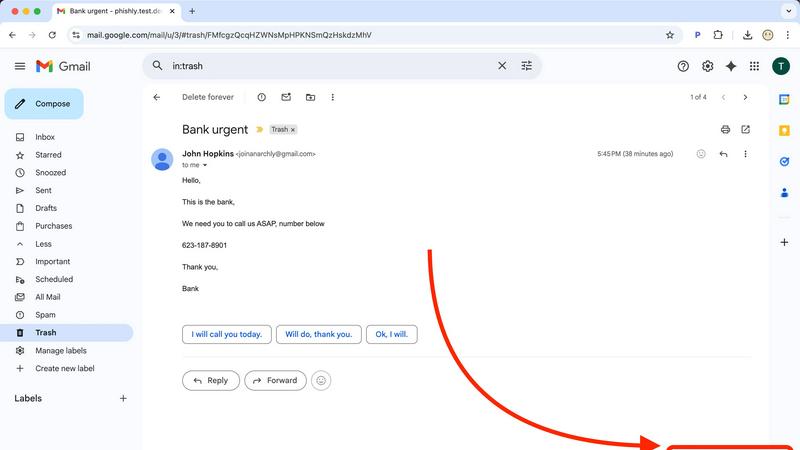
RocketShare

Feature Comparison
Phishly
One-Click Gmail Integration
Phishly integrates directly into your Gmail workflow as a lightweight Chrome extension, eliminating any complex setup or separate applications. When you encounter a questionable email, you don't need to forward it or copy text elsewhere. Simply open the email and click the "Scan with Phishly" button that appears. The analysis happens instantly within your inbox, providing a seamless and immediate security check without disrupting your productivity. This frictionless integration ensures you actually use the protection when you need it most.
AI-Powered Multi-Indicator Analysis
The core of Phishly is its sophisticated artificial intelligence engine, trained to identify a comprehensive range of phishing tactics. It doesn't just check links; it performs a deep analysis of the entire email content and headers. This includes detecting subtle signs like domain spoofing (where a sender address mimics a legitimate one), analyzing the emotional pressure of the language used, identifying mismatched URLs, and flagging requests for sensitive information. This multi-layered approach catches sophisticated attacks that simpler tools miss.
Clear, Actionable Risk Assessment
Phishly cuts through the noise and provides a definitive, easy-to-understand verdict. After analysis, it categorizes the email into one of three clear risk levels: Safe, Medium Risk, or High Risk. More importantly, it doesn't just give a score; it provides a detailed breakdown explaining why it reached that conclusion, listing each specific suspicious element found. This transparency educates the user, builds trust in the tool, and provides the context needed to make an informed decision about how to handle the email.
Privacy-First, On-Demand Scanning
Your email privacy is paramount. Unlike some security tools that scan all incoming mail automatically, Phishly operates on a strict, user-controlled, on-demand model. It only analyzes the content of emails you explicitly choose to scan by clicking the button or pasting text. The AI processes this data to provide the risk assessment, and there is no permanent storage or mining of your personal email content. This approach ensures powerful protection without compromising your confidential communications.
RocketShare
Zero-Knowledge End-to-End Encryption
This is the non-negotiable foundation of RocketShare. Every file is encrypted on your own device using a unique key before it is uploaded. Neither RocketShare's servers nor any intermediary can decrypt your data. This means your confidential documents, media, and intellectual property are fundamentally inaccessible to anyone except you and your intended recipient, making it an essential security standard.
Local Peer-to-Peer (P2P) Sharing
For the utmost in speed and privacy, RocketShare offers a local sharing mode. This feature creates a direct, encrypted connection between devices on the same network, transferring files without them ever being stored on an external server. This is a critical option for sharing extremely large files or when you require complete data sovereignty, ensuring the transfer happens entirely under your control.
Secure EU-Based Cloud Storage
When using cloud sharing, your encrypted files are stored on servers located within the European Union. This provides a vital layer of regulatory and legal protection under strict EU data privacy laws like the GDPR. Choosing a platform with known, secure geographic storage is a necessary consideration for compliance and peace of mind for global users.
Simple, Self-Serve Interface
RocketShare delivers military-grade security without the complexity. The platform is designed for immediate use with an intuitive drag-and-drop interface. There are no complicated setups or IT configurations required. This simplicity is essential, allowing teams and individuals to adopt secure practices instantly, without sacrificing productivity for protection.
Use Cases
Phishly
Verifying Urgent Financial or Invoice Requests
You receive an email from what appears to be your bank, a vendor, or a service like PayPal claiming there is an urgent issue with your account or an invoice that must be paid immediately. These high-pressure tactics are classic phishing. Instead of panicking or clicking, you use Phishly to scan the email. The AI will check the sender's actual domain against the official one, analyze the language for urgency triggers, and inspect any links. The clear "High Risk" rating and explanation give you the confidence to delete the email and contact the institution directly through verified channels.
Screening Job Offer or Opportunity Scams
Job seekers are prime targets for phishing scams disguised as lucrative offers or interview requests. These emails often contain links to fake application portals or requests to download malware-laden documents. Before engaging with any unsolicited opportunity, scan the email with Phishly. It will detect signs of spoofed company domains, generic greetings, and suspicious attachment or link patterns. This allows you to avoid identity theft schemes and malware while safely pursuing legitimate opportunities.
Protecting Small Business Teams from Breaches
Small businesses often lack dedicated IT security staff, making them vulnerable targets. A single employee clicking a phishing link can compromise the entire company's network. By providing the Phishly Chrome extension to your team, you empower every employee to be the first line of defense. When anyone receives a suspicious email—whether it mimics a client, a shipping service, or an internal system alert—they can instantly scan it. This creates a culture of security and prevents costly data breaches without complex IT management.
Analyzing Forwarded Suspicious Messages
Friends, family, or less tech-savvy colleagues often forward emails asking, "Is this real?" Instead of relying on your gut feeling, you can use Phishly's web tool. Simply copy the full text and headers of the forwarded suspicious email and paste it into the Phishly website for an instant, objective analysis. This provides a reliable second opinion, helping you protect your loved ones and coworkers from scams with authoritative, AI-driven evidence.
RocketShare
Legal Document Exchange
Law firms and legal professionals have a fundamental obligation to protect client confidentiality. RocketShare is essential for securely sending case files, contracts, depositions, and evidence. Its zero-knowledge encryption ensures attorney-client privilege is technically enforced, preventing any possibility of a third-party breach or access, which is a non-negotiable requirement in legal practice.
Healthcare Data Transmission
Healthcare providers and administrators must comply with stringent regulations like HIPAA. Sharing patient records, lab results, or medical imaging requires a platform that guarantees privacy by design. RocketShare's encryption-before-upload model is a critical tool for ensuring protected health information (PHI) remains secure during transfer, mitigating severe compliance and reputational risks.
Creative Asset Delivery
Photographers, videographers, and designers must protect their intellectual property and client work. Sending high-resolution galleries, video edits, or design mockups via insecure links is a significant risk. RocketShare provides a simple yet mandatory solution for delivering final assets or proofs with the assurance that work cannot be intercepted, copied, or accessed by unauthorized parties.
Internal Business Collaboration
Teams working on confidential projects, financial reports, merger details, or proprietary R&D cannot rely on standard cloud storage. RocketShare is a necessary infrastructure for internal collaboration, ensuring that sensitive strategic documents shared between departments or remote team members are protected from internal leaks and external threats at every step.
Overview
About Phishly
In today's digital landscape, a single deceptive email can lead to devastating financial loss, data breaches, and identity theft. Phishing attacks are not a possibility; they are a constant, sophisticated threat targeting everyone. You need a vigilant, intelligent guard that operates precisely when your suspicion is triggered. Phishly is that essential shield. It is an AI-powered phishing detection platform designed to deliver instant, clear verdicts on suspicious emails. Available as a seamless Chrome extension for Gmail and a straightforward web tool, Phishly empowers you to take control of your inbox security. Simply open any email in Gmail and click "Scan with Phishly," or paste suspicious email content directly on the website for an immediate, in-depth analysis. The advanced AI meticulously scans for critical phishing indicators like suspicious sender domains, urgent or threatening language, spoofed identities, and complex social engineering tactics. It then provides a straightforward, actionable risk assessment: Safe, Medium Risk, or High Risk, accompanied by a detailed explanation of the red flags it found. Built for individuals, remote workers, and small businesses, Phishly offers enterprise-grade detection without the complexity or cost. Crucially, it respects your privacy by only analyzing emails you explicitly choose to scan. With no technical knowledge required and a free-to-use model, Phishly is the non-negotiable tool you need to stop guessing and start knowing what's in your inbox.
About RocketShare
RocketShare is the essential, non-negotiable file-sharing platform for anyone who prioritizes absolute privacy. In a digital landscape rife with surveillance and data breaches, RocketShare provides a fundamental solution: the ability to share files of any size with the ironclad guarantee that no third party, including RocketShare itself, can ever access your content. This is not an optional feature; it is the core principle of its architecture. By employing a zero-knowledge encryption model, RocketShare ensures your files are encrypted directly on your device before upload. The encryption key remains solely with you, often embedded within the share link, meaning servers only handle unreadable data. This delivers enterprise-grade security in a beautifully simple, self-serve package that is a necessity for professionals handling sensitive information. With secure EU-based data storage and flexible sharing modes—both cloud-based and direct local peer-to-peer transfers—RocketShare eliminates the risk and complexity typically associated with top-tier security. It is the mandatory tool for lawyers, healthcare providers, creatives, and businesses that understand privacy is not a luxury, but a critical requirement for operation.
Frequently Asked Questions
Phishly FAQ
How does Phishly protect my privacy?
Phishly is built with a strict privacy-first principle. The tool only analyzes emails that you explicitly and manually choose to scan by clicking the "Scan with Phishly" button in Gmail or pasting content into the web tool. It does not automatically scan, read, or store your emails in the background. The analysis is performed to generate the risk report, and we do not mine, sell, or retain your personal email data. Your inbox remains confidential.
Is technical knowledge required to use Phishly?
Absolutely not. Phishly is designed for complete simplicity and requires zero technical expertise. Installing the Chrome extension is a standard one-click process from the Chrome Web Store. Once installed, using it is as simple as opening an email and clicking a single button. The results are presented in plain language with clear "Safe," "Medium Risk," or "High Risk" labels and straightforward explanations, making it accessible to everyone.
What makes Phishly different from my email provider's spam filter?
Your email provider's spam filter is a broad, automated layer that catches obvious spam but often misses sophisticated, targeted phishing emails (spear phishing). Phishly acts as your personal, on-demand forensic analyst. It uses advanced AI to examine the specific content, sender details, and psychological tactics of an email that has already passed through the basic spam filter, providing a second, much deeper layer of defense precisely when you are unsure.
Is Phishly really free to use?
Yes, the core phishing detection functionality of Phishly is completely free to use. You can install the Chrome extension and use the web analysis tool without any cost or subscription. This allows individuals and small businesses to access powerful AI-driven security protection without any financial barrier, making essential digital safety accessible to all.
RocketShare FAQ
How does zero-knowledge encryption work with RocketShare?
Zero-knowledge encryption means your files are encrypted on your device before they leave for our servers. You hold the only decryption key, which is often part of the share link. We never have access to your key or the unencrypted data. Even if our servers were compromised, attackers would only find encrypted, unreadable files, making this model essential for true privacy.
What is the difference between Cloud Share and Local Share?
Cloud Share uploads your encrypted files to our secure EU-based servers, allowing recipients to download them at any time. Local Share (Peer-to-Peer) creates a direct, encrypted connection between your device and the recipient's device on the same network; files are transferred directly without ever being stored on our servers. The latter is a critical option for maximum speed and data sovereignty.
Where is my data stored?
When you use the Cloud Share feature, your encrypted files are stored on servers located within the European Union. This choice is intentional and necessary to provide the strong legal privacy protections afforded by EU jurisdiction and regulations like the GDPR, ensuring a higher standard of data governance.
Is a credit card required to start using RocketShare?
No, a credit card is not required to start using RocketShare. You can begin sharing files securely immediately without entering payment details. This allows you to experience the essential privacy and functionality of the platform as a necessity before committing to any paid plan, should you require one.