Nabbed vs Phishly
Side-by-side comparison to help you choose the right tool.

Nabbed is your essential career CRM that transforms your job search into a strategic sales pipeline, tracking roles and contacts with AI support.
Last updated: April 13, 2026

Phishly
Phishly instantly detects phishing emails with AI to protect your inbox.
Visual Comparison
Nabbed

Phishly
Feature Comparison
Nabbed
Target Account Dashboard
The Target Account Dashboard allows users to define their dream companies and meticulously track every role, contact, and hiring signal across their preferred organizations. This feature mirrors a territory plan, making it intuitive for sales professionals who are already accustomed to managing accounts strategically.
Dual Sales Pipelines
Nabbed offers dual sales pipelines through HubSpot-style Kanban boards tailored for both job applications and networking efforts. Users can easily drag-and-drop stages, track momentum, and analyze velocity, effectively managing their job search like a high-stakes sales pipeline, ensuring no opportunity slips through the cracks.
AI Career Suite
The AI Career Suite includes four powerful tools designed to streamline the job application process. Users can generate AI-powered cover letters, tailor resumes for specific positions, prepare for interviews, and compose outreach emails in seconds, all while maintaining their unique voice and style.
Chrome Extension
The Chrome Extension is a game-changer for job seekers, allowing users to capture contacts from LinkedIn, save job postings with one click, and autofill applications across 25+ ATS platforms. With stealth apply mode, users can submit applications discreetly while tracking every email communication in real time.
Phishly
One-Click Gmail Integration
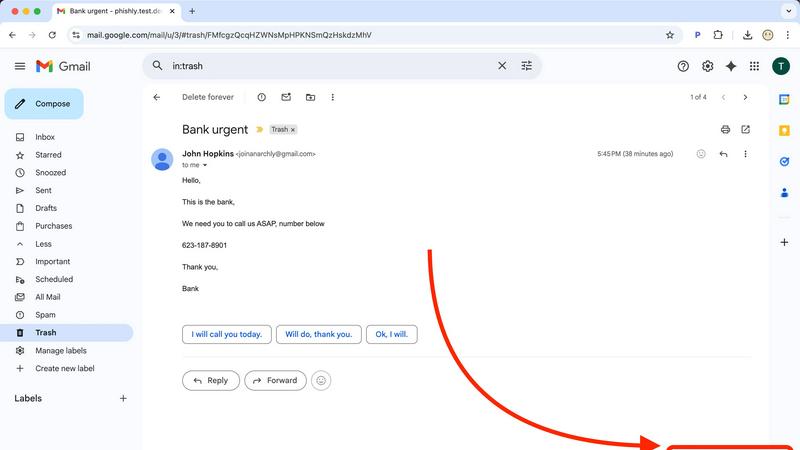
Phishly integrates directly into your Gmail workflow as a lightweight Chrome extension, eliminating any complex setup or separate applications. When you encounter a questionable email, you don't need to forward it or copy text elsewhere. Simply open the email and click the "Scan with Phishly" button that appears. The analysis happens instantly within your inbox, providing a seamless and immediate security check without disrupting your productivity. This frictionless integration ensures you actually use the protection when you need it most.
AI-Powered Multi-Indicator Analysis
The core of Phishly is its sophisticated artificial intelligence engine, trained to identify a comprehensive range of phishing tactics. It doesn't just check links; it performs a deep analysis of the entire email content and headers. This includes detecting subtle signs like domain spoofing (where a sender address mimics a legitimate one), analyzing the emotional pressure of the language used, identifying mismatched URLs, and flagging requests for sensitive information. This multi-layered approach catches sophisticated attacks that simpler tools miss.
Clear, Actionable Risk Assessment
Phishly cuts through the noise and provides a definitive, easy-to-understand verdict. After analysis, it categorizes the email into one of three clear risk levels: Safe, Medium Risk, or High Risk. More importantly, it doesn't just give a score; it provides a detailed breakdown explaining why it reached that conclusion, listing each specific suspicious element found. This transparency educates the user, builds trust in the tool, and provides the context needed to make an informed decision about how to handle the email.
Privacy-First, On-Demand Scanning
Your email privacy is paramount. Unlike some security tools that scan all incoming mail automatically, Phishly operates on a strict, user-controlled, on-demand model. It only analyzes the content of emails you explicitly choose to scan by clicking the button or pasting text. The AI processes this data to provide the risk assessment, and there is no permanent storage or mining of your personal email content. This approach ensures powerful protection without compromising your confidential communications.
Use Cases
Nabbed
Streamlining Job Applications
Sales professionals can use Nabbed to manage their job applications systematically. By tracking each application in a visual pipeline, users can ensure they follow up on leads and maintain a clear overview of their progress, much like managing sales deals.
Networking with Precision
Nabbed's contact and network CRM feature allows users to log activities, follow up with connections, and manage a six-stage networking pipeline. This structured approach to networking helps users leverage their existing relationships effectively to uncover new job opportunities.
AI-Enhanced Interview Preparation
With the AI Career Suite, users can prepare for interviews more efficiently. By using AI-generated coaching and tailored content, candidates can enhance their confidence and readiness, leading to improved performance during actual interviews.
Real-Time Company Insights
Nabbed provides users with real-time company intelligence, enabling them to make informed decisions about potential employers. By accessing critical data such as company funding, employee count, and hiring trends, users can target their applications strategically and increase their chances of landing the desired role.
Phishly
Verifying Urgent Financial or Invoice Requests
You receive an email from what appears to be your bank, a vendor, or a service like PayPal claiming there is an urgent issue with your account or an invoice that must be paid immediately. These high-pressure tactics are classic phishing. Instead of panicking or clicking, you use Phishly to scan the email. The AI will check the sender's actual domain against the official one, analyze the language for urgency triggers, and inspect any links. The clear "High Risk" rating and explanation give you the confidence to delete the email and contact the institution directly through verified channels.
Screening Job Offer or Opportunity Scams
Job seekers are prime targets for phishing scams disguised as lucrative offers or interview requests. These emails often contain links to fake application portals or requests to download malware-laden documents. Before engaging with any unsolicited opportunity, scan the email with Phishly. It will detect signs of spoofed company domains, generic greetings, and suspicious attachment or link patterns. This allows you to avoid identity theft schemes and malware while safely pursuing legitimate opportunities.
Protecting Small Business Teams from Breaches
Small businesses often lack dedicated IT security staff, making them vulnerable targets. A single employee clicking a phishing link can compromise the entire company's network. By providing the Phishly Chrome extension to your team, you empower every employee to be the first line of defense. When anyone receives a suspicious email—whether it mimics a client, a shipping service, or an internal system alert—they can instantly scan it. This creates a culture of security and prevents costly data breaches without complex IT management.
Analyzing Forwarded Suspicious Messages
Friends, family, or less tech-savvy colleagues often forward emails asking, "Is this real?" Instead of relying on your gut feeling, you can use Phishly's web tool. Simply copy the full text and headers of the forwarded suspicious email and paste it into the Phishly website for an instant, objective analysis. This provides a reliable second opinion, helping you protect your loved ones and coworkers from scams with authoritative, AI-driven evidence.
Overview
About Nabbed
Nabbed is the first customer relationship management (CRM) tool specifically designed for sales and revenue professionals to effectively manage their careers. It transforms the job search process into a structured, sales-like pipeline, allowing users to track job applications visually and manage contacts with warm path mapping. With AI-powered company intelligence, Nabbed equips users with essential insights such as funding status, employee headcount, and Glassdoor ratings. The platform also enhances productivity through its Chrome extension, which enables users to autofill applications on over 60 applicant tracking systems (ATS). With features like Gmail auto-sync for interview detection and hiring signal alerts, Nabbed empowers users to stay ahead in their job search, making it an indispensable tool for anyone seeking to advance their career in a competitive job market.
About Phishly
In today's digital landscape, a single deceptive email can lead to devastating financial loss, data breaches, and identity theft. Phishing attacks are not a possibility; they are a constant, sophisticated threat targeting everyone. You need a vigilant, intelligent guard that operates precisely when your suspicion is triggered. Phishly is that essential shield. It is an AI-powered phishing detection platform designed to deliver instant, clear verdicts on suspicious emails. Available as a seamless Chrome extension for Gmail and a straightforward web tool, Phishly empowers you to take control of your inbox security. Simply open any email in Gmail and click "Scan with Phishly," or paste suspicious email content directly on the website for an immediate, in-depth analysis. The advanced AI meticulously scans for critical phishing indicators like suspicious sender domains, urgent or threatening language, spoofed identities, and complex social engineering tactics. It then provides a straightforward, actionable risk assessment: Safe, Medium Risk, or High Risk, accompanied by a detailed explanation of the red flags it found. Built for individuals, remote workers, and small businesses, Phishly offers enterprise-grade detection without the complexity or cost. Crucially, it respects your privacy by only analyzing emails you explicitly choose to scan. With no technical knowledge required and a free-to-use model, Phishly is the non-negotiable tool you need to stop guessing and start knowing what's in your inbox.
Frequently Asked Questions
Nabbed FAQ
What is Nabbed?
Nabbed is a CRM tool specifically designed for sales and revenue professionals to manage their job searches effectively. It offers features that turn the job application process into a structured sales pipeline, including tracking, networking, and AI-powered insights.
How does the Chrome Extension work?
The Chrome Extension allows users to save job postings, autofill applications, and track email communication directly from their browser. It integrates seamlessly with various ATS platforms, making the job application process more efficient.
Can I use Nabbed for networking?
Yes, Nabbed includes a full contact and network CRM that helps users track their connections, log activities, and manage outreach efforts. This feature is essential for building and maintaining professional relationships in a competitive job market.
Is there a free version of Nabbed available?
Yes, Nabbed offers a free tier that allows users to capture job postings and use basic autofill features. For more advanced capabilities, including Gmail tracking and AI email templates, users can subscribe to the Core plan at $19 per month.
Phishly FAQ
How does Phishly protect my privacy?
Phishly is built with a strict privacy-first principle. The tool only analyzes emails that you explicitly and manually choose to scan by clicking the "Scan with Phishly" button in Gmail or pasting content into the web tool. It does not automatically scan, read, or store your emails in the background. The analysis is performed to generate the risk report, and we do not mine, sell, or retain your personal email data. Your inbox remains confidential.
Is technical knowledge required to use Phishly?
Absolutely not. Phishly is designed for complete simplicity and requires zero technical expertise. Installing the Chrome extension is a standard one-click process from the Chrome Web Store. Once installed, using it is as simple as opening an email and clicking a single button. The results are presented in plain language with clear "Safe," "Medium Risk," or "High Risk" labels and straightforward explanations, making it accessible to everyone.
What makes Phishly different from my email provider's spam filter?
Your email provider's spam filter is a broad, automated layer that catches obvious spam but often misses sophisticated, targeted phishing emails (spear phishing). Phishly acts as your personal, on-demand forensic analyst. It uses advanced AI to examine the specific content, sender details, and psychological tactics of an email that has already passed through the basic spam filter, providing a second, much deeper layer of defense precisely when you are unsure.
Is Phishly really free to use?
Yes, the core phishing detection functionality of Phishly is completely free to use. You can install the Chrome extension and use the web analysis tool without any cost or subscription. This allows individuals and small businesses to access powerful AI-driven security protection without any financial barrier, making essential digital safety accessible to all.