
NB2 Hub vs Shrinkpad
Side-by-side comparison to help you choose the right tool.

NB2 Hub
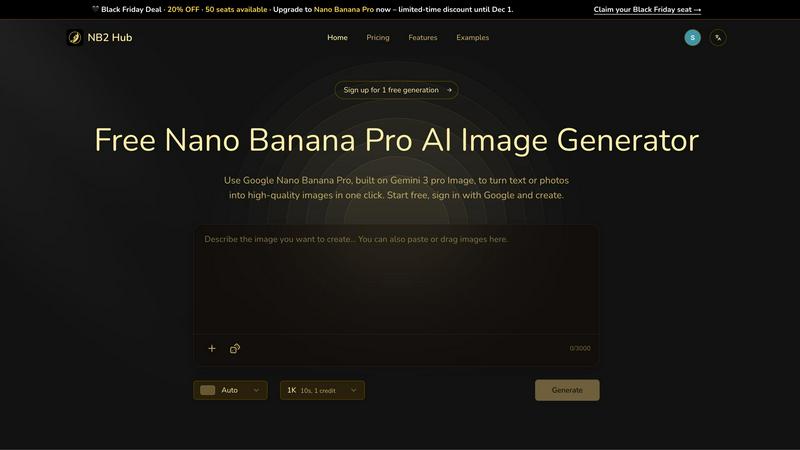
Instantly transform text and photos into stunning 4K images with the powerful Nano Banana Pro AI Image Generator.
Last updated: March 1, 2026

Shrinkpad
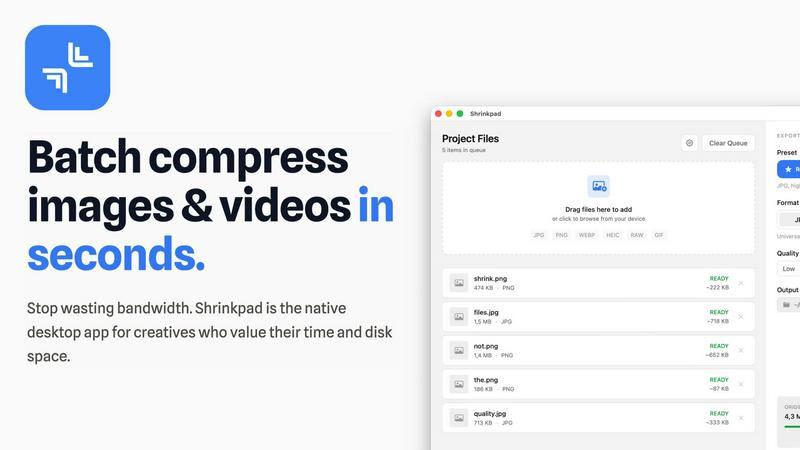
Shrinkpad compresses images and videos in bulk on your Mac, saving space and optimizing performance effortlessly.
Last updated: February 28, 2026
Visual Comparison
NB2 Hub
Shrinkpad
Feature Comparison
NB2 Hub
Faithful text + image remix
This feature allows users to upload a reference image along with a short prompt, ensuring that layout and lighting are preserved while enhancing details and textures. It is perfect for UI iterations, product shots, and comic panels, offering a seamless experience in visual enhancement.
Crisp text inside images
Generate clean and legible text within images, from headlines to paragraphs, with multilingual support and no blurriness. This feature is ideal for creating posters, advertisements, and social media covers where clarity and aesthetics are paramount.
Grounded to real-world facts
NB2 Hub integrates world knowledge and retrieval grounding to visualize accurate data and styles in images. This feature ensures that the generated images are not only beautiful but also truthful, making it suitable for educational content and infographics.
Multi-reference fusion & identity consistency
Users can fuse multiple references while maintaining consistency across characters, products, and brand elements. This functionality is particularly beneficial for storyboards and multi-angle product sets, ensuring a cohesive visual narrative throughout.
Shrinkpad
Batch Compression
Shrinkpad allows users to batch compress images and videos simultaneously, processing thousands of files in seconds. This feature is particularly beneficial for creatives who need to optimize large libraries efficiently without the hassle of manual exports.
Intelligent Quality Preservation
The application automatically analyzes the visual complexity of each file to apply the optimal compression ratio, ensuring high-quality results without artifacts. This means you can trust Shrinkpad to maintain the integrity of your visuals while achieving significant size reductions.
Folder Mode
With Shrinkpad's Folder Mode, users can simply drag and drop entire folders containing media files for compression. The app automatically detects and processes all supported files within that folder, saving time and effort by eliminating the need to select files individually.
Privacy-First Approach
Shrinkpad prioritizes user privacy by performing all processing locally on the user's device. Unlike web-based tools, there are no cloud uploads, ensuring your sensitive files remain on your Mac, thus protecting your creative assets from potential exposure.
Use Cases
NB2 Hub
Graphic Design Projects
Graphic designers can leverage NB2 Hub to create stunning visuals for their projects, from website graphics to branding materials, all while ensuring high quality and consistency in their outputs.
Marketing Campaigns
Marketers can quickly generate eye-catching images for ads and promotional materials. The ability to create crisp, readable text within images enhances the effectiveness of marketing campaigns across various platforms.
Educational Content Creation
Educators and content creators can use NB2 Hub to produce informative infographics and visual aids that accurately represent data and concepts, making learning more engaging and accessible.
Social Media Content
Content creators can utilize NB2 Hub to generate visually appealing posts and stories for social media, ensuring that their content stands out and captures audience attention with high-quality imagery.
Shrinkpad
Photographers Optimizing Portfolios
Photographers can utilize Shrinkpad to compress and optimize their portfolios, reducing file sizes significantly without sacrificing quality. This ensures faster loading times for online galleries, making their work more accessible to potential clients.
Designers Preparing Assets
Graphic designers can streamline their workflow by using Shrinkpad to batch process images and graphics before final export. By compressing assets for web use, designers can ensure that their projects load quickly and efficiently without compromising on visual fidelity.
Content Creators Managing Media Libraries
Content creators who manage extensive video libraries can benefit from Shrinkpad’s ability to compress large video files. This not only saves storage space but also enhances upload speeds to platforms, allowing for quicker content dissemination.
Developers Reducing App Bundle Sizes
Software developers can leverage Shrinkpad to minimize app bundle sizes by compressing images and videos used in applications. This not only improves application performance but also enhances user experience by reducing download times.
Overview
About NB2 Hub
NB2 Hub is a revolutionary online platform that harnesses the power of Google Nano Banana Pro, utilizing the advanced Gemini 3 pro Image architecture to provide users with unparalleled image generation capabilities. Designed for both individuals and businesses, NB2 Hub enables users to transform text and images into breathtaking visuals with remarkable ease. Whether you are a graphic designer, marketer, or content creator, this tool is essential for producing high-quality images in mere seconds. The core value proposition of NB2 Hub lies in its ability to maintain character consistency, deliver stunning 4K resolution images quickly, and streamline workflows for real production work. Users can sign up for two free 4K quality generations, allowing them to experience the remarkable benefits of AI-driven image generation without any initial financial commitment. With its array of features tailored to enhance creativity and productivity, NB2 Hub is a must-have tool for anyone aiming to elevate their visual content.
About Shrinkpad
Shrinkpad is the essential tool for Mac users grappling with oversized media files. This powerful native macOS application is engineered to batch compress images and videos quickly and efficiently, allowing users to reclaim precious storage space without compromising on quality. Whether you're a photographer, designer, content creator, or developer, Shrinkpad streamlines your workflow by enabling the processing of hundreds or even thousands of files in mere seconds. Its core value proposition centers on privacy; all operations are performed locally on your device, meaning your files never leave your Mac. This eliminates reliance on internet connections or cloud services, ensuring your sensitive assets remain secure. Supporting over 50 formats and featuring intelligent quality preservation, Shrinkpad helps you reduce file sizes by up to 90% while maintaining the visual integrity crucial for your projects.
Frequently Asked Questions
NB2 Hub FAQ
What types of images can I create with NB2 Hub?
With NB2 Hub, users can create a wide range of images including promotional graphics, infographics, UI designs, and artistic visuals, all tailored to their specific needs.
Is there a limit to the number of images I can generate?
Users can sign up for two free 4K quality generations, after which various subscription plans may apply. The platform is designed to accommodate both casual users and professionals requiring extensive image generation capabilities.
Can I use NB2 Hub for commercial purposes?
Yes, NB2 Hub is suitable for commercial use. Users can create high-quality images for marketing, branding, and other business purposes without any restrictions as long as they adhere to the platform's terms of service.
How does NB2 Hub ensure image quality?
NB2 Hub leverages advanced AI technology to maintain high fidelity in layouts, text legibility, and overall image quality, ensuring that all generated visuals meet professional standards.
Shrinkpad FAQ
Can I use Shrinkpad for free?
Yes, Shrinkpad offers a Free Starter plan that includes essential tools for casual use, allowing you to process up to 10 files per batch with standard compression.
What file formats does Shrinkpad support?
Shrinkpad supports a wide range of formats, including JPG, PNG, WEBP, AVIF, MP4, MOV, and various other native formats, making it a versatile tool for all your media compression needs.
Does Shrinkpad support video compression?
Absolutely. Shrinkpad not only compresses images but also efficiently handles video files, allowing users to optimize their entire media library in a single batch process.
How many files can I process at once?
With Shrinkpad, users can process thousands of files in one go, making it an ideal solution for those with large volumes of media to optimize quickly and efficiently.
Alternatives
NB2 Hub Alternatives
NB2 Hub is a state-of-the-art online tool designed to transform text and images into breathtaking 4K visuals. Utilizing the advanced Google Nano Banana Pro technology built on the Gemini 3 pro Image architecture, it serves as an essential resource for graphic designers, marketers, and content creators seeking high-quality image generation. Users frequently search for alternatives due to various reasons such as pricing structures, the need for specific features, or compatibility with their workflow platforms. When choosing an alternative, it's crucial to consider factors like user-friendliness, output quality, and the range of creative tools available. Evaluating features that enhance productivity and creativity will ensure you find a solution that meets your unique needs, helping you achieve stunning visual outcomes with ease.
Shrinkpad Alternatives
Shrinkpad is an essential tool for Mac users, designed specifically for batch compressing images and videos. By utilizing local processing on macOS, it enables users to efficiently save space without compromising privacy or quality. As users become more aware of their storage needs, they often seek alternatives due to factors such as pricing, desired features, or compatibility with different platforms. When searching for an alternative to Shrinkpad, it is crucial to consider aspects like local processing capabilities, batch compression efficiency, file format support, and user privacy. A solution that prioritizes these elements will ensure that users maintain control over their media files while optimizing their workflows.