
NanoImg vs Shrinkpad
Side-by-side comparison to help you choose the right tool.
NanoImg
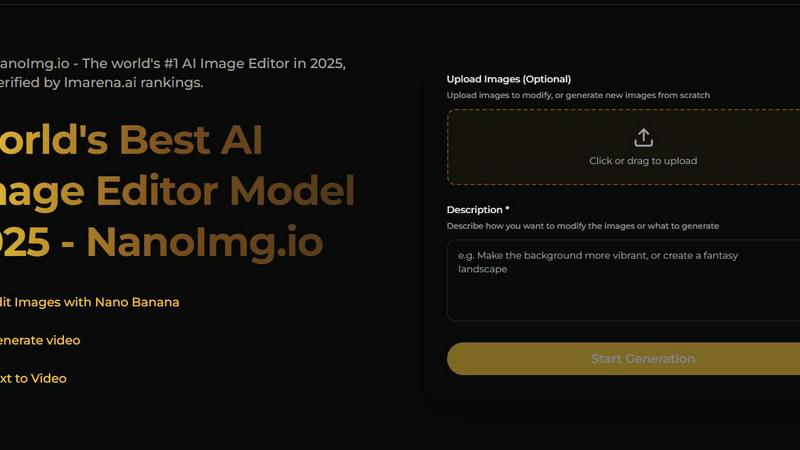
NanoImg instantly creates and edits stunning images using all the best AI models in one essential platform.
Last updated: March 1, 2026

Shrinkpad
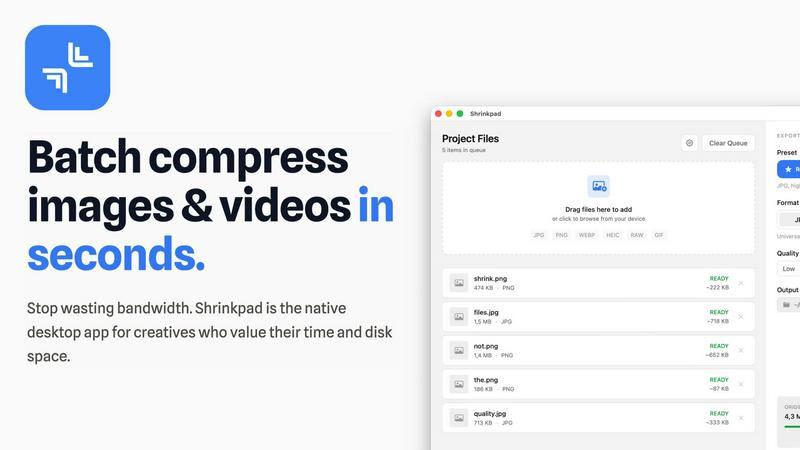
Shrinkpad compresses images and videos in bulk on your Mac, saving space and optimizing performance effortlessly.
Last updated: February 28, 2026
Visual Comparison
NanoImg
Shrinkpad
Feature Comparison
NanoImg
All-In-One AI Model Hub
NanoImg provides centralized access to over 80 top-tier AI tools and models, including Nano Banana Pro, Seedream 4.0, GPT Image 1, and Flux Kontext. This eliminates the need to juggle multiple subscriptions and platforms. You can select the perfect model for each task—whether you need the fastest speed, best text rendering, superior editing, or cinematic video generation—all from one dashboard. This consolidation is a necessity for efficient workflow management and cost-effective creativity.
Natural Language Image Editing
This critical feature allows you to edit images using simple, plain English commands, removing the technical barrier of traditional photo editing. Instead of learning complex software, you can instruct the AI to "remove reflections," "add a handwritten label," "change the background to a beach," or "make the subject smile." The AI understands and executes these edits with precision, preserving style and character consistency. This makes advanced photo manipulation accessible and immediate for every user.
Rapid 10-Second Generation
Speed is a non-negotiable advantage in content creation. NanoImg's optimized models, like Nano Banana and Seedream, generate high-quality images in approximately 4-10 seconds. This rapid turnaround is essential for meeting tight deadlines, iterating on ideas quickly, and maintaining a consistent output for social media or e-commerce. The platform's efficiency ensures you spend less time waiting and more time creating and refining your visual projects.
Professional Template Library
To jumpstart any project, NanoImg offers a vast library of plug-and-play templates for social media, ads, e-commerce, and more. This feature is a must-have for users who need professional results without starting from scratch. Simply select a layout, input your text, and generate a polished visual in seconds. It democratizes design, ensuring that anyone, regardless of skill level, can produce eye-catching, on-brand graphics with minimal effort.
Shrinkpad
Batch Compression
Shrinkpad allows users to batch compress images and videos simultaneously, processing thousands of files in seconds. This feature is particularly beneficial for creatives who need to optimize large libraries efficiently without the hassle of manual exports.
Intelligent Quality Preservation
The application automatically analyzes the visual complexity of each file to apply the optimal compression ratio, ensuring high-quality results without artifacts. This means you can trust Shrinkpad to maintain the integrity of your visuals while achieving significant size reductions.
Folder Mode
With Shrinkpad's Folder Mode, users can simply drag and drop entire folders containing media files for compression. The app automatically detects and processes all supported files within that folder, saving time and effort by eliminating the need to select files individually.
Privacy-First Approach
Shrinkpad prioritizes user privacy by performing all processing locally on the user's device. Unlike web-based tools, there are no cloud uploads, ensuring your sensitive files remain on your Mac, thus protecting your creative assets from potential exposure.
Use Cases
NanoImg
Social Media Content Creation
For influencers, marketers, and brands, generating a constant stream of fresh, engaging visuals is a daily necessity. NanoImg allows you to create viral memes, stunning posts, and consistent brand imagery in seconds. Using templates and AI generation, you can maintain a cohesive aesthetic and high posting frequency without a graphic designer, directly boosting engagement and audience growth.
E-commerce Product Visualization
E-commerce managers and shop owners must showcase products in various settings to drive sales. NanoImg is essential for creating unlimited product photos, lifestyle mockups, and scene variations without expensive photoshoots. You can generate models wearing apparel or place products in different environments, significantly reducing costs while improving conversion rates with professional visuals.
Marketing and Advertising Campaigns
Creating compelling visuals for ads, banners, and campaign materials is a core marketing need. NanoImg streamlines this by enabling the rapid production of high-quality advertisement assets. Teams can quickly prototype ideas, generate multiple visual variants for A/B testing, and produce final campaign art that captures attention and communicates brand messaging effectively.
Creative Illustration and Storyboarding
Artists, filmmakers, and designers require tools that understand creative vision. NanoImg's character consistency and natural language editing are vital for creating uniform characters across storyboard frames, concept art, and illustrations. It transforms written descriptions into consistent visual narratives, accelerating the pre-production and conceptual design phases.
Shrinkpad
Photographers Optimizing Portfolios
Photographers can utilize Shrinkpad to compress and optimize their portfolios, reducing file sizes significantly without sacrificing quality. This ensures faster loading times for online galleries, making their work more accessible to potential clients.
Designers Preparing Assets
Graphic designers can streamline their workflow by using Shrinkpad to batch process images and graphics before final export. By compressing assets for web use, designers can ensure that their projects load quickly and efficiently without compromising on visual fidelity.
Content Creators Managing Media Libraries
Content creators who manage extensive video libraries can benefit from Shrinkpad’s ability to compress large video files. This not only saves storage space but also enhances upload speeds to platforms, allowing for quicker content dissemination.
Developers Reducing App Bundle Sizes
Software developers can leverage Shrinkpad to minimize app bundle sizes by compressing images and videos used in applications. This not only improves application performance but also enhances user experience by reducing download times.
Overview
About NanoImg
NanoImg is the essential, all-in-one AI image generation and editing platform you need to create professional visuals instantly. It eliminates the complexity and high costs traditionally associated with high-quality digital art, making it an indispensable tool for marketers, content creators, e-commerce managers, designers, and casual users alike. By consolidating the world's best AI models—including Nano Banana, Seedream, Flux AI, and Sora 2—into a single, browser-based interface, NanoImg provides unmatched versatility and power. Its core value proposition is delivering Midjourney-level results without the steep learning curve. You don't need to master complex prompts, layers, or masks; simply describe your vision in plain English or use plug-and-play templates to generate stunning images, edits, or even videos in as little as 4-10 seconds. From generating viral social media posts and product mockups to editing photos with natural language commands, NanoImg streamlines the entire creative workflow, ensuring you have the visual assets you need, when you need them, without friction.
About Shrinkpad
Shrinkpad is the essential tool for Mac users grappling with oversized media files. This powerful native macOS application is engineered to batch compress images and videos quickly and efficiently, allowing users to reclaim precious storage space without compromising on quality. Whether you're a photographer, designer, content creator, or developer, Shrinkpad streamlines your workflow by enabling the processing of hundreds or even thousands of files in mere seconds. Its core value proposition centers on privacy; all operations are performed locally on your device, meaning your files never leave your Mac. This eliminates reliance on internet connections or cloud services, ensuring your sensitive assets remain secure. Supporting over 50 formats and featuring intelligent quality preservation, Shrinkpad helps you reduce file sizes by up to 90% while maintaining the visual integrity crucial for your projects.
Frequently Asked Questions
NanoImg FAQ
Is NanoImg free to use?
Yes, NanoImg offers a free tier that allows users to generate and edit images online at no cost. This provides access to core AI models and tools, making it an essential starting point for anyone exploring AI-powered creativity. For advanced features, higher resolution outputs, and increased usage limits, paid subscription plans are available.
What AI models are available on NanoImg?
NanoImg integrates a suite of best-in-class AI models to cover every creative task. Key models include Nano Banana for best overall generation and character consistency, Seedream 4.0 for ultra-fast 4K processing, GPT Image 1 for superior text rendering within images, Flux Kontext for precise and fast editing, and Sora 2 for generating high-quality, cinematic videos.
How does the natural language editing work?
The feature uses advanced LLM-vision technology to interpret your plain English commands. You simply describe the edit you want—like "make the sky more dramatic" or "remove the person in the background"—and the AI analyzes the image and executes the change. It intelligently preserves the original style and details, making complex edits simple and accessible.
Can I use NanoImg for commercial projects?
Absolutely. Images generated and edited with NanoImg can be used for commercial purposes, including in marketing materials, social media, e-commerce, and advertising. It is an essential tool for businesses and professionals who need a reliable, fast source of original visual content for their commercial ventures.
Shrinkpad FAQ
Can I use Shrinkpad for free?
Yes, Shrinkpad offers a Free Starter plan that includes essential tools for casual use, allowing you to process up to 10 files per batch with standard compression.
What file formats does Shrinkpad support?
Shrinkpad supports a wide range of formats, including JPG, PNG, WEBP, AVIF, MP4, MOV, and various other native formats, making it a versatile tool for all your media compression needs.
Does Shrinkpad support video compression?
Absolutely. Shrinkpad not only compresses images but also efficiently handles video files, allowing users to optimize their entire media library in a single batch process.
How many files can I process at once?
With Shrinkpad, users can process thousands of files in one go, making it an ideal solution for those with large volumes of media to optimize quickly and efficiently.
Alternatives
NanoImg Alternatives
NanoImg is a leading AI image generator and editor that transforms text into professional visuals in seconds. It belongs to the rapidly growing category of browser-based, AI-powered design tools that simplify complex creative tasks for users of all skill levels. Users often explore alternatives for various practical reasons. These can include budget constraints, the need for specific advanced features NanoImg may not offer, or a requirement for a different platform like a desktop application or mobile app. Some may seek tools with a different focus, such as more granular control over image elements or integration with other software. When evaluating an alternative, prioritize your core needs. Consider the balance between ease of use and creative control, the quality and consistency of the output, and the overall value relative to the cost. The ideal tool should fit your specific workflow, whether you need rapid template-based creation or deep, customizable editing.
Shrinkpad Alternatives
Shrinkpad is an essential tool for Mac users, designed specifically for batch compressing images and videos. By utilizing local processing on macOS, it enables users to efficiently save space without compromising privacy or quality. As users become more aware of their storage needs, they often seek alternatives due to factors such as pricing, desired features, or compatibility with different platforms. When searching for an alternative to Shrinkpad, it is crucial to consider aspects like local processing capabilities, batch compression efficiency, file format support, and user privacy. A solution that prioritizes these elements will ensure that users maintain control over their media files while optimizing their workflows.