
Nano AI vs Sketch To
Side-by-side comparison to help you choose the right tool.

Nano AI
Nano AI is your essential all-in-one creative platform for ultra-fast AI image generation and editing.
Last updated: February 28, 2026
Sketch To
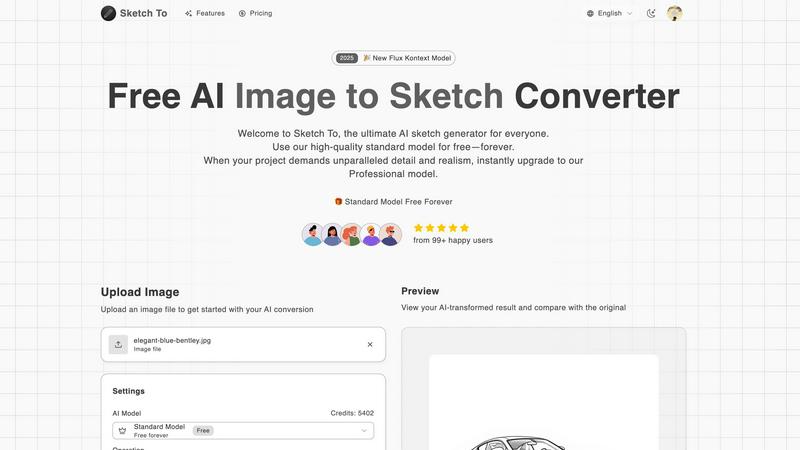
Transform your images into stunning sketches instantly with Sketch To's powerful AI conversion tool for every creator.
Last updated: February 28, 2026
Visual Comparison
Nano AI

Sketch To
Feature Comparison
Nano AI
Nano Banana AI Model
The cornerstone of the platform, Nano Banana is a flash-speed inference model built for velocity and fidelity. It delivers sub-10-second image generation from text or existing images, a speed critical for maintaining creative flow. The model intelligently interprets layered instructions and stylistic cues from casual descriptions, reducing the need for complex prompt engineering. This allows you to generate, imagine, and create with unprecedented responsiveness, turning ideas into visual drafts almost instantly.
All-in-One Creative Workspace
Nano AI consolidates the entire creative pipeline into one intuitive interface. You can fire off a text-to-image generation, seamlessly switch to image-to-image transformation, and then apply tools like background removal or the Magic Edit without ever leaving the platform. This unified flow is essential for eliminating context-switching delays and keeping every experiment, edit, and export in one organized place, ensuring you never lose creative momentum.
Magic Edit (Inpainting/Outpainting)
This feature allows for precise, language-driven editing directly within your images. Need to change a shirt color, add an object, or expand the canvas? Simply highlight the area and describe what you want using natural language. The AI handles the rest, intelligently inpainting or outpainting to match the scene. This "fix it in post" capability is indispensable for refining concepts and executing client revisions without starting from scratch.
Deep Style Tuning & AI Effects
Move beyond generic filters. Nano AI, powered by Nano Banana, provides granular control over the artistic style of your generations. By simply describing the desired vibe—such as "Renaissance lighting" or "vaporwave aesthetic"—the model faithfully applies it. Coupled with dedicated AI Effects like Photo to Sketch, Photo to Painting, and Chibi Art, this gives you the necessary tools to achieve a precise, professional look tailored to any brand or campaign.
Sketch To
Image to Sketch Conversion
Sketch To employs advanced AI technology to convert photos into breathtaking pencil sketches. This feature is perfect for artists and designers who wish to create unique artistic representations of their images, enhancing their creative portfolios effortlessly.
Sketch to Image AI
With the Professional model, users can transform their sketches into hyper-realistic images filled with intricate details and textures. This feature is particularly beneficial for professionals who require high-quality visuals for commercial projects.
Instant Processing
Sketch To's powerful cloud-based AI infrastructure ensures that users receive their transformed images almost instantly. This feature allows for seamless creativity without long wait times, making it an essential tool for efficient workflows.
High Resolution Output
All creations can be downloaded in high resolution, making them suitable for both print and digital use. This feature ensures that the final products maintain their quality, whether for personal projects or professional presentations.
Use Cases
Nano AI
Marketing & Advertising Campaigns
Marketing teams can rapidly ideate and produce a high volume of visual assets for social media, ads, and email campaigns. The sub-10-second generation speed allows for quick A/B testing of concepts, while the unified workspace lets designers polish backgrounds, adjust styles, and prepare final files for shipment without delays, ensuring campaigns launch on schedule.
Content Creation & Social Media
Content creators, bloggers, and influencers can generate unique, on-brand imagery daily to accompany posts and articles. The platform's speed and ease of use make it possible to create custom illustrations, thumbnails, and graphics in minutes. Tools like the Manga Generator or Watercolor effect provide quick stylistic twists to keep content fresh and engaging for their audience.
Product Design & Mockups
Designers can use Nano AI to quickly visualize product concepts, iterate on styles, and create realistic mockups. Starting with a text prompt or a basic sketch, they can generate multiple variations, use image-to-image to refine details, and employ Magic Edit to make specific adjustments like changing materials or colors, dramatically speeding up the prototyping phase.
Collaborative Team Projects
With features like shared galleries and upcoming API access, Nano AI is built for team environments. Art directors can share prompt ideas, designers can iterate in a common workspace, and stakeholders can review assets in a centralized gallery. This streamlines feedback loops and ensures everyone works from the latest version, accelerating project timelines from concept to final delivery.
Sketch To
Social Media Enhancements
Creators can utilize Sketch To to generate eye-catching content for their social media platforms. By converting images into artistic sketches, users can stand out from the crowd, boosting engagement and attracting followers.
Creative Hobbies
For hobbyists looking to explore their artistic side, Sketch To provides an easy way to transform everyday photos into sketches. This feature encourages creativity and experimentation, allowing users to produce personalized artwork.
Educational Projects
Students can leverage Sketch To to enhance their school projects, turning images into sketches for presentations or reports. This functionality adds a unique visual element, making projects more engaging and memorable.
Commercial Art and Design
Professionals in the art and design industry can take advantage of Sketch To to create high-quality visuals for their clients. Whether for branding, marketing, or portfolio development, the ability to convert images to sketches and vice versa offers endless possibilities.
Overview
About Nano AI
Nano AI is the essential, all-in-one creative platform engineered to eliminate workflow friction and accelerate production. It consolidates the entire creative process—from initial concept generation to final asset polishing—into a single, streamlined workspace. This eliminates the critical bottleneck of juggling multiple disparate applications, allowing creators to maintain momentum and meet aggressive deadlines. At its heart is the proprietary Nano Banana model, which delivers sub-10-second text-to-image and image-to-image generation. This speed is non-negotiable for professionals. The platform is built for marketers, designers, content creators, and teams who need to ship production-ready visuals faster. Beyond generation, it provides a suite of indispensable utility tools like background removal, inpainting/outpainting, and granular style control for refining any concept. With collaborative features like shared galleries, upcoming 4K neural upscaling, and API access, Nano AI transitions from a personal tool to a critical hub for commercial projects. The core value proposition is unequivocal: stop waiting on renders and app-switching. Start creating, iterating, and shipping from one unified, high-speed environment.
About Sketch To
Sketch To is an innovative AI tool that revolutionizes the way users interact with images and sketches. This powerful platform allows individuals to effortlessly convert their photographs into artistic sketches and vice versa, making it ideal for both casual users and professional artists. By harnessing cutting-edge AI technology, Sketch To breathes life into ordinary photos, transforming them into stunning, photorealistic images. This versatility caters to a wide array of creators, including artists, designers, and hobbyists, enabling them to enhance their creative projects with ease. With a commitment to accessibility, Sketch To provides a free standard model for new users, along with a professional model for those seeking unparalleled detail and realism. The user-friendly interface facilitates immediate image processing without the hassle of software installations or subscriptions, positioning Sketch To as an essential resource for anyone looking to elevate their creative output.
Frequently Asked Questions
Nano AI FAQ
What makes Nano AI different from other AI image generators?
Nano AI is not just a generator; it's a complete, consolidated creative platform. While others offer standalone generation, Nano AI integrates the powerful Nano Banana model for sub-10-second speed with a full suite of essential editing and utility tools—like background removal, inpainting, and style control—into one workspace. This end-to-end integration is essential for professionals who need to move from idea to finished asset without switching apps.
Do I need technical expertise to use Nano AI effectively?
No. Nano AI is designed with a single-tap interface that removes complex manual setup. The Nano Banana model is built to understand layered instructions from casual, descriptive language, minimizing the need for advanced prompt engineering. Anyone can start creating high-quality visuals quickly, while the platform manages the technical stack behind the scenes.
What is the "Magic Edit" feature?
Magic Edit is an advanced inpainting and outpainting tool. It allows you to edit specific parts of an image using natural language. You simply highlight the area you want to change or expand and type a instruction (e.g., "change the shirt to blue" or "add a mountain in the background"). The AI then regenerates that selected region to match your description, seamlessly blending it with the original image.
Is Nano AI suitable for commercial use?
Absolutely. Nano AI is built for commercial, production-ready work. Features like shared galleries facilitate team collaboration, the upcoming 4K neural upscaling will allow for high-resolution outputs suitable for print and large displays, and API access (available or coming soon) enables integration into larger business workflows. It is an essential tool for marketers, agencies, and creators who need to ship professional assets.
Sketch To FAQ
How does Sketch To work?
Sketch To utilizes advanced AI algorithms to analyze and transform images into sketches and sketches into images. Users simply upload their files, select a style, and the AI processes the request instantly.
Is there a free version of Sketch To?
Yes, Sketch To offers a free standard model that allows new users to explore its features with trial credits. This makes it accessible for casual users and hobbyists.
What are the benefits of the Professional model?
The Professional model unlocks superior detail, texture, and realism for users who require high-quality outputs for commercial use. It is designed for professionals needing advanced features for their creative projects.
Can I download my creations?
Absolutely! Users can download their transformed images in high resolution, making them suitable for both personal and professional use, ensuring quality is maintained for all applications.
Alternatives
Nano AI Alternatives
Nano AI is an essential all-in-one creative platform in the AI image generation and editing category. It consolidates the entire workflow into a single, high-speed environment powered by its proprietary Nano Banana model, delivering results in under ten seconds to maintain creative momentum. Users often explore alternatives for several critical reasons. These can include budget constraints, the need for different feature sets, or specific platform requirements like offline access or integration capabilities that may better suit a particular project or team structure. When evaluating any alternative, you must prioritize a tool that aligns with your non-negotiable needs. Key considerations should be generation speed, the depth of editing utilities, collaborative features for teams, and the overall efficiency it brings to your production pipeline. The right platform eliminates friction, allowing you to create and ship assets without delay.
Sketch To Alternatives
Sketch To is a cutting-edge AI tool designed for creators who wish to transform images into stunning sketches and vice versa. It falls within the image and photo category, offering both casual users and professionals an innovative way to enhance their artistic projects. Users often seek alternatives to Sketch To for various reasons, including pricing structures, feature sets, and compatibility with different platforms. The quest for the perfect replacement can stem from a need for specific functionalities or a desire for a more tailored experience. When searching for alternatives, it is crucial to consider factors such as ease of use, the quality of image processing, and whether the tool provides free or premium options. Assessing the range of features and the target audience that each alternative caters to can help users find a solution that best fits their creative needs. Ultimately, the right choice will enhance the artistic journey and empower creators to express their vision more effectively.