Looktara vs MyImageUpscaler
Side-by-side comparison to help you choose the right tool.

Looktara
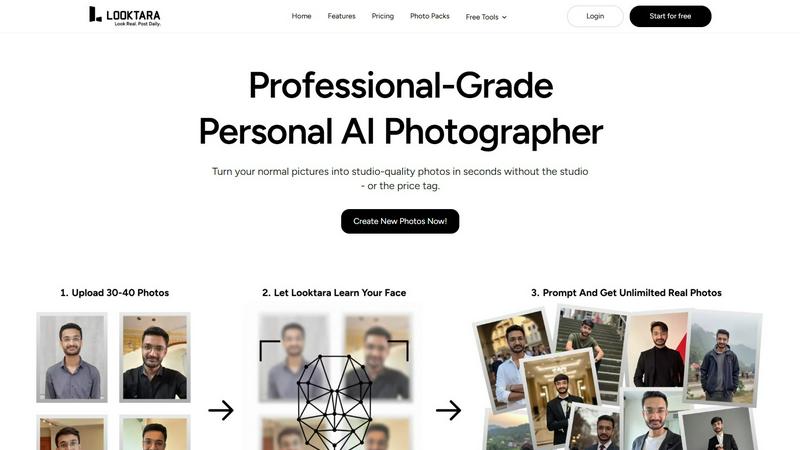
Looktara creates professional, personalized AI-generated photos that authentically reflect your unique style and.
Last updated: February 28, 2026

MyImageUpscaler
Enhance and upscale your images in seconds with MyImageUpscaler, featuring sharp text preservation and a free tier.
Last updated: February 28, 2026
Visual Comparison
Looktara
MyImageUpscaler

Feature Comparison
Looktara
Personalized AI Model
Looktara creates a unique, encrypted AI model for each user, ensuring that generated images reflect your personal style and characteristics. This bespoke approach guarantees that the photos you receive are unmistakably you, enhancing your professional image without compromising authenticity.
Rapid Image Generation
In just 5 seconds, users can generate high-quality images by providing a simple text prompt. This speed not only saves valuable time but also allows for greater flexibility in creating images that align perfectly with current projects or social media needs.
Customizable Output
Unlike most AI photo generators, Looktara allows you to specify the tone and style of your images. Whether you need a professional headshot or a warm, approachable photo for social media, you can tailor the output to fit your brand's message seamlessly.
Consistent Quality and Style
Looktara maintains a high standard of quality across all generated images. With the ability to create professional-grade photos that reflect your personal brand, you can be confident that every image will contribute positively to your online presence.
MyImageUpscaler
Advanced Detail Preservation
This feature ensures that when images are upscaled, the integrity of fine details remains intact. Users can expect crisp and clear results, allowing for high-quality visuals that look professional and vibrant.
Fast Processing Speed
MyImageUpscaler processes images in under 10 seconds, making it an efficient tool for users who need quick results without compromising on quality. This speed is essential for content creators and businesses that operate on tight deadlines.
Flexible Upscaling Options
Users can choose from 2x or 4x upscaling options based on their specific needs. This flexibility allows for precise control over image quality and size, catering to different platforms and use cases.
Batch Processing Capability
The platform supports batch processing for up to 500 images at a time, streamlining workflows for busy professionals. This feature is particularly beneficial for photographers and e-commerce sellers who need to enhance multiple images simultaneously.
Use Cases
Looktara
Personal Branding for Entrepreneurs
Entrepreneurs can leverage Looktara to create a diverse array of professional images that showcase their brand. With custom photos tailored to their unique style, they can enhance their online presence across various platforms.
Social Media Content Creation
Content creators can utilize Looktara to generate eye-catching images for their social media profiles. The rapid generation process allows for frequent updates and fresh content that resonates with their audience.
Online Networking and Professional Profiles
Professionals can use Looktara to create polished images for platforms like LinkedIn. By customizing their images to convey authority and professionalism, they can enhance their networking efforts and make lasting impressions.
Marketing Campaigns
Businesses can employ Looktara to produce high-quality images for marketing materials. With the ability to generate tailored images in moments, marketing teams can respond quickly to promotional needs and maintain brand consistency.
MyImageUpscaler
E-commerce Sellers
Online retailers can utilize MyImageUpscaler to enhance product images, making them more appealing to potential customers. High-quality visuals can lead to increased sales and improved customer engagement.
Content Creators
Social media influencers and content creators can benefit from the platform by resizing and enhancing images for various platforms like Instagram, YouTube, and TikTok. This ensures that their content stands out and maintains a professional appearance.
Real Estate Agents
Real estate agents can prepare stunning MLS listings by upscaling property images, helping to attract prospective buyers. High-resolution images create a more inviting and impressive presentation of properties.
Photographers
For photographers handling large volumes of images, MyImageUpscaler simplifies the editing process. They can batch process images to enhance quality and detail, saving time and effort while ensuring their portfolios shine.
Overview
About Looktara
Looktara is your essential, on-demand personal AI photographer, designed to address the critical challenge of professional image scarcity. In today's digital age, the need for consistent, high-quality personal photos for professional branding, social media, and marketing is paramount. However, traditional photoshoots often involve high costs, lengthy scheduling, and rigid frameworks that can hinder creativity. Looktara revolutionizes this process by allowing users to upload approximately 30 photos of themselves. Within about 10 minutes, it creates a secure, personalized AI model tailored specifically for you. This unique digital twin is the heart of Looktara's value, enabling you to generate studio-quality solo images in approximately 5 seconds by simply entering a text prompt. The resulting images are strikingly authentic, free from the artificial traits often found in generic AI-generated visuals. With Looktara, professionals, entrepreneurs, and creators can maintain a polished, versatile, and authentic visual presence anytime, anywhere, making it an indispensable tool for personal branding.
About MyImageUpscaler
MyImageUpscaler is an essential AI-powered image enhancement and upscaling platform specifically designed for businesses and content creators looking to elevate their visual content. By leveraging cutting-edge technology, MyImageUpscaler enables users to upscale images by 2x to 4x, ensuring that sharpness is preserved while fine details are enhanced. This powerful tool is perfect for a variety of users, including e-commerce sellers seeking to showcase their products with high-quality visuals, content creators who need to resize images for social media, real estate agents preparing detailed MLS listings, and photographers managing large batches of images. With a user-friendly interface and no watermarks on the free tier, MyImageUpscaler offers a seamless experience that helps users upscale smarter, not harder. The platform’s commitment to maintaining image quality where it matters most makes it an invaluable resource for anyone looking to improve their visual content for marketing materials, branded content, and more.
Frequently Asked Questions
Looktara FAQ
How does Looktara ensure the authenticity of generated images?
Looktara uses a personalized AI model created from your uploaded photos, ensuring that the images generated are uniquely tailored to reflect your individual characteristics and style.
Can I customize the style of my photos?
Yes, Looktara allows you to specify the tone and style of your images, enabling you to create photos that align perfectly with your branding needs, whether they require a professional or casual touch.
How long does it take to generate a new image?
Once your personalized AI model is ready, generating a new image takes only about 5 seconds through a simple text prompt, making it a quick solution for your imaging needs.
Is Looktara suitable for all types of professionals?
Absolutely! Looktara is designed for anyone seeking to enhance their personal brand, including entrepreneurs, content creators, and professionals across various industries, making it an essential tool for all.
MyImageUpscaler FAQ
What is the free tier of MyImageUpscaler?
The free tier allows users to access 10 credits without requiring a credit card. This gives potential customers a chance to explore the platform's capabilities before committing to a paid plan.
How does MyImageUpscaler ensure image quality?
The platform employs advanced AI technology to maintain sharpness and enhance fine details during the upscaling process, ensuring that the final images are of the highest quality suitable for professional use.
Can I upscale multiple images at once?
Yes, MyImageUpscaler offers batch processing capabilities, allowing users to upscale up to 500 images simultaneously, making it a convenient choice for those needing to handle large quantities of visuals.
What formats does MyImageUpscaler support?
While the specific formats are not mentioned, MyImageUpscaler is designed to work with popular image formats commonly used in e-commerce, social media, and professional photography, ensuring versatility for all users.
Alternatives
Looktara Alternatives
Looktara is an innovative solution in the realm of generative art, specifically designed to serve as a personal AI photographer. By allowing users to train a private AI model on their own photos, Looktara addresses the growing demand for high-quality, professional images that reflect an individual's unique identity. Users often seek alternatives to Looktara for various reasons, including pricing, specific feature sets, or compatibility with diverse platform needs. When searching for alternatives, it's essential to consider factors such as privacy and security, the quality of image generation, and the ease of use of the platform. A good alternative should also offer a personalized experience while ensuring that the generated images maintain authenticity and meet professional standards.
MyImageUpscaler Alternatives
MyImageUpscaler is an innovative AI-powered image enhancement and upscaling platform designed for businesses and content creators. It falls under the category of productivity and management tools, specifically aimed at improving visual content quality. Users often seek alternatives to MyImageUpscaler due to various factors such as pricing, specific feature sets, and compatibility with different platforms. When considering alternatives, it is essential to assess the key features offered, including upscaling capabilities, processing speed, and batch processing options. Additionally, factors like ease of use, pricing structures, and the availability of a free tier can significantly influence the decision-making process. Ultimately, finding the right fit will depend on individual needs and the specific requirements of the projects at hand.