
ImaginePro vs Img Editor
Side-by-side comparison to help you choose the right tool.

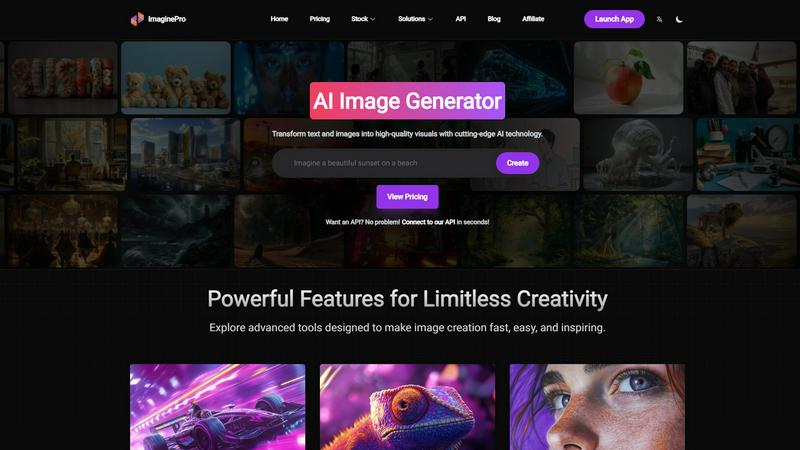
ImaginePro
ImaginePro instantly transforms your ideas into stunning, high-quality images with advanced AI.
Last updated: March 1, 2026

Img Editor
Create stunning AI-generated images in seconds with Img Editor's powerful and intuitive digital art technology.
Last updated: February 28, 2026
Visual Comparison
ImaginePro
Img Editor

Feature Comparison
ImaginePro
Advanced Text-to-Image Generation
This core feature is powered by top-tier AI models that create lifelike, high-resolution images from simple text prompts. It is essential for producing professional-quality visuals for any project, from social media posts to marketing campaigns, in mere seconds. The technology ensures realism and detail, providing results that often require no additional editing, which is a critical time-saver for professionals under tight deadlines.
Intelligent Background Removal
A non-negotiable tool for e-commerce and content creation, this feature effortlessly isolates subjects by removing image backgrounds with precision. It is vital for creating clean product shots, professional portraits, and versatile assets for graphic design. This automation replaces hours of manual editing, making it a necessary function for maintaining a consistent and polished visual brand across all platforms.
Text Behind Image Effect
This unique feature is indispensable for creating dynamic, magazine-style compositions. The AI intelligently detects subjects within an image, allowing users to seamlessly place customizable text behind objects for an eye-catching, layered effect. It is a must-have for designers and photographers looking to add sophisticated typography and visual depth to covers, posters, and social media graphics without complex software.
Developer-Focused API & AI Agent Integration
For automated and scalable workflows, this feature is critical. It provides a zero-dependency Python skill and API that allows AI coding agents like Claude Code to generate images programmatically. Supporting multiple models, upscaling, and prompt enhancement, it is an essential integration for developers building automated content pipelines, chatbots, and applications that require on-demand, high-quality image generation.
Img Editor
Advanced AI Image Generation
Img Editor harnesses the power of sophisticated artificial intelligence to produce high-quality images quickly and effortlessly. Users can input their ideas and receive professional-grade visuals tailored to their preferences, ensuring that creativity is no longer limited by technical skills.
Ten Free Daily Image Generations
One of the standout features of Img Editor is its commitment to accessibility. Users can generate up to ten images for free every day, allowing for continuous exploration and creativity without any financial commitment, making it ideal for casual users and professionals alike.
Community Engagement Rewards
Img Editor encourages collaboration and creativity within its user base by offering opportunities to earn unlimited bonus generations. By engaging with the community, users can submit their creations for review, fostering a sense of belonging and shared inspiration.
Flexible Image Customization Options
The platform offers numerous customization choices, including aspect ratio, image quality, and specific prompts. Users can select from various formats, such as square or widescreen, and choose high-resolution options, ensuring their images meet any project’s requirements.
Use Cases
ImaginePro
Marketing & Advertising Campaigns
Marketing teams must produce a high volume of engaging visuals for ads, banners, and social media. ImaginePro is essential for rapidly generating original, brand-consistent imagery based on campaign concepts, eliminating the need for expensive stock photos or lengthy photoshoots. This accelerates campaign rollout and allows for real-time visual A/B testing.
E-commerce Product Listings
Online sellers require countless high-quality, white-background product images. ImaginePro's background removal and generation features are necessary to create professional, consistent product photos at scale. This directly impacts conversion rates by presenting products in the best possible light without the high cost of professional photography for every item.
Social Media Content Creation
Content creators and influencers need a constant stream of unique, attention-grabbing visuals. ImaginePro is a vital tool for quickly generating custom images, illustrations, and graphics tailored to specific posts or themes. This maintains a fresh and engaging feed, which is necessary for growing and retaining an audience on competitive platforms.
Prototyping & Conceptual Design
Designers and product teams must visualize concepts quickly. ImaginePro is indispensable for creating mockups, mood boards, and visual prototypes from textual descriptions. This streamlines the creative process, facilitates better client communication, and accelerates decision-making in the early, critical stages of any project.
Img Editor
Social Media Content Creation
Img Editor is a vital tool for social media managers and influencers looking to create eye-catching visuals. With the ability to generate stunning images quickly, users can enhance their posts and attract more engagement from their audience.
Marketing and Advertising
Marketers can utilize Img Editor to produce compelling graphics for campaigns, advertisements, and promotional materials. The platform allows for the rapid generation of visuals tailored to specific branding needs, driving effective marketing strategies.
Artistic Exploration and Inspiration
Artists seeking inspiration can leverage Img Editor to experiment with new styles and concepts. By generating various artistic interpretations, users can push their creative boundaries and explore artistic possibilities that they might not have considered.
Personal Projects and Gifts
Whether it's for a personal blog, custom gifts, or unique home decor, Img Editor serves as an excellent resource for individuals looking to create personalized visuals. Users can generate images that reflect their personal style or commemorate special occasions, making their projects truly one-of-a-kind.
Overview
About ImaginePro
ImaginePro is an essential AI image generation platform that transforms text descriptions and existing images into high-quality, commercial-ready visuals in seconds. It is a must-have tool for professionals who require polished, impactful imagery without the time investment or specialized skills traditionally needed for design. The platform serves a critical need for designers, marketers, social media managers, content creators, and developers, providing an all-in-one solution for visual content creation. Its core value proposition lies in delivering unmatched speed, creative control, and professional-grade results through an intuitive interface. By leveraging cutting-edge AI models, ImaginePro eliminates the barrier between a creative concept and a finished visual asset, making it a necessary resource for anyone looking to enhance their digital presence, marketing materials, or product pipelines with stunning, original imagery efficiently and cost-effectively.
About Img Editor
Img Editor is a groundbreaking AI image generation platform that empowers users to unleash their creativity without financial barriers. Designed for artists, designers, marketers, and creative enthusiasts alike, Img Editor makes high-quality image generation accessible to everyone. With its advanced AI technology, users can create a diverse range of visuals, from intricate artistic representations to lifelike photographs. The platform's unique proposition includes offering ten free image generations daily, alongside the opportunity to earn unlimited bonus generations through community interactions. This model not only enhances accessibility but fosters a collaborative environment where users can share and inspire each other. Img Editor effectively transforms imaginative concepts into tangible artwork, making it an essential tool for anyone looking to produce stunning visuals for social media, websites, or personal projects.
Frequently Asked Questions
ImaginePro FAQ
What kind of images can I create with ImaginePro?
You can create a vast range of high-quality, realistic images including landscapes, portraits, product shots, abstract art, and conceptual scenes. The AI interprets your text prompts to generate visuals suitable for commercial use, social media, marketing materials, and personal projects. The key is providing descriptive and detailed prompts to guide the AI toward your desired outcome.
Do I need design experience to use ImaginePro?
No, design experience is not necessary. ImaginePro is built with an intuitive web interface that makes image generation accessible to everyone. You simply describe your idea, select from streamlined style presets, and let the AI handle the complex rendering. This makes it a powerful tool for both beginners and seasoned professionals.
How does the Background Removal feature work?
The feature uses advanced AI to automatically detect the primary subject in your uploaded image and cleanly separate it from the background. You simply upload an image, and the tool delivers a subject with a transparent background, ready to be used in new compositions. It is fast, accurate, and essential for e-commerce and graphic design.
Can I use ImaginePro for commercial projects?
Yes, images generated with ImaginePro are intended for commercial use. You can use the created visuals in marketing materials, on websites, in product listings, in advertisements, and more. It is a necessary solution for businesses needing original, royalty-free imagery without licensing concerns or attribution requirements.
Img Editor FAQ
How many images can I generate for free each day?
Users can generate up to ten images for free every day, providing ample opportunity to explore creativity without any cost.
Can I earn more image generations through community engagement?
Yes, Img Editor encourages community participation by allowing users to submit their creations for review. Approved submissions can earn users additional free generations, promoting collaboration and shared creativity.
What types of images can I create with Img Editor?
Img Editor supports a wide variety of image types, including artistic renderings, realistic photographs, and abstract visuals. Users can customize their prompts to generate images that fit their specific needs and preferences.
Is Img Editor suitable for professional use?
Absolutely. Img Editor's advanced AI technology enables the creation of high-quality images suitable for professional use in marketing, advertising, and content creation, making it a valuable tool for both amateur and professional users.
Alternatives
ImaginePro Alternatives
ImaginePro is a leading AI image generation tool in the image and photo category. It transforms text prompts into high-quality, professional visuals instantly, catering to designers, marketers, and creators who need compelling imagery without extensive design work. Users often explore alternatives for various essential reasons. These include finding a tool that better fits their budget, offers specific features like different art styles or editing capabilities, or integrates more seamlessly with their existing workflow platform. The need for different pricing tiers or usage limits is also a common driver for comparison. When evaluating alternatives, prioritize tools that deliver on core necessities: reliable output quality, intuitive controls for creative direction, and a feature set that directly addresses your project requirements. Consider the value proposition of pricing plans against the volume and commercial needs of your work to ensure a sustainable and effective choice.
Img Editor Alternatives
Img Editor is a cutting-edge AI image generation platform designed to empower creativity in the digital art space. With its ability to produce stunning visuals in seconds, it falls under the category of image and photo editing tools. Users often seek alternatives for various reasons, including pricing concerns, specific feature requirements, or compatibility with different platforms. When exploring alternatives, it is essential to consider factors such as usability, quality of generated images, and the availability of free trials or tiers that can accommodate both casual users and professionals. As the demand for innovative and efficient image editing solutions grows, users are increasingly looking for tools that can meet their unique needs while offering advanced features. When choosing an alternative, prioritize platforms that provide a user-friendly interface, robust image generation capabilities, and flexibility in terms of customization options. Additionally, consider community engagement opportunities and the potential for collaborative creativity that can enhance the overall experience.