Image to 3D AI vs Prompt Builder
Side-by-side comparison to help you choose the right tool.

Image to 3D AI
Effortlessly transform any 2D image into a stunning 3D model for free with our powerful AI tool.
Last updated: February 28, 2026

Prompt Builder
Generate, optimize, test, and manage AI prompts in one place. Turn an idea into a ready-to-use prompt in seconds.
Visual Comparison
Image to 3D AI

Prompt Builder
Overview
About Image to 3D AI
Image to 3D AI is an innovative, AI-powered platform that revolutionizes the way creators, developers, and businesses convert 2D images into fully realized 3D models. It serves as an essential solution for anyone involved in digital asset creation, significantly speeding up the traditionally tedious process of manual 3D sculpting. By harnessing advanced deep learning algorithms, this platform allows users to upload a single photo, sketch, or drawing and automatically generates detailed 3D geometry and meshes in mere seconds. This tool is indispensable for various fields, including game development, 3D printing, e-commerce, and XR/VR content creation, providing a seamless path from initial concept to a usable digital asset. ImgTo3D.ai is committed to democratizing access to professional 3D modeling, offering a permanently free tier with no sign-up or credit card required, while its Pro tier ensures professional-grade outputs and unlimited access for high-demand production environments.
About Prompt Builder
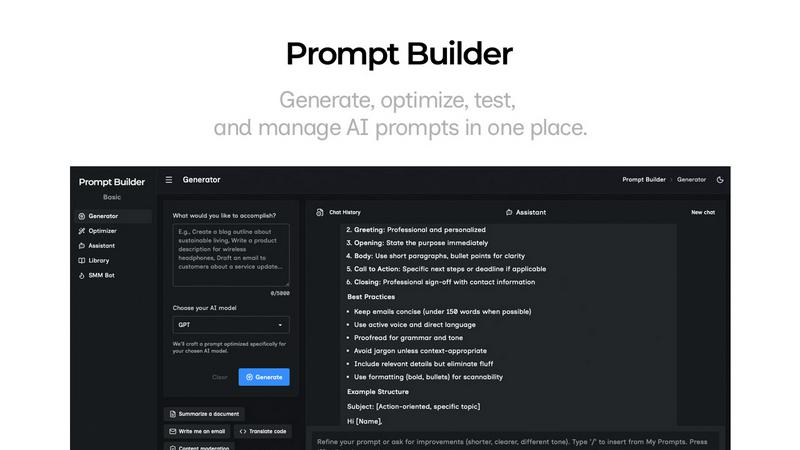
Prompt Builder is a prompt engineering workspace for writing, testing, and saving prompts. Describe the task in plain English, and it helps you create a prompt that matches the model you choose. Start with a draft, refine it in chat, save or pin versions, then run them when you are ready. It works with GPT, Claude, Gemini, Llama, Mistral, DeepSeek, Grok, Perplexity, and more. You also get an Optimizer, an assistant for quick tests, and a library of reusable prompts and templates from the community. Turn an idea into a ready-to-use prompt in seconds. Refine it in chat, save it to your Library, and run it anytime.