Dokta vs Tailride
Side-by-side comparison to help you choose the right tool.

Dokta automates your invoices, quotes, and cash flow so you can stop chasing payments and focus on your work.
Last updated: April 4, 2026

Tailride
Tailride automates invoice and receipt collection from your inbox and portals, saving you hundreds of hours.
Last updated: February 28, 2026
Visual Comparison
Dokta

Tailride
Feature Comparison
Dokta
Instant AI Document Analysis
This is the foundational, must-have feature. Simply drag and drop a photo, scan, or PDF of any document. Dokta's AI, powered by Claude from Anthropic combined with OCR, analyzes it in less than 60 seconds. It automatically identifies the document type (invoice, quote, contract), and extracts critical data like amounts, due dates, client or supplier details, and tax information. This eliminates all manual data entry, ensuring accuracy and saving hours of tedious work.
Automated Invoicing & Quote Management
Creating and managing billing documents is a non-negotiable task, and Dokta streamlines it completely. You can generate professional invoices and quotes in just a few clicks. For freelancers with day-rate contracts, it enables automatic monthly invoicing. Furthermore, you can send quotes with online acceptance links, allowing clients to approve digitally, and then convert an accepted quote into a final invoice with a single click, closing the loop seamlessly.
Real-Time Cash Flow & Anomaly Detection
You must have immediate visibility into your financial health. Dokta provides a real-time dashboard showing billed revenue, collected revenue, unpaid invoices, and VAT overviews with 12-month graphs. Crucially, it also includes proactive anomaly detection to protect your business, alerting you to changed IBANs, duplicate invoices, inconsistent VAT, or missing numbering, acting as an essential safeguard.
Intelligent Client Database & Payment Tracking
Dokta automatically builds and enriches your contact database from processed documents. It uses SIRET numbers to auto-complete company information and applies a payment scoring system based on historical data, giving you insight into client reliability. It maintains a complete history per entity and automates payment reminders with professional, polite templates, ensuring you get paid faster without awkward follow-ups.
Tailride
Inbox Scanning & Monitoring
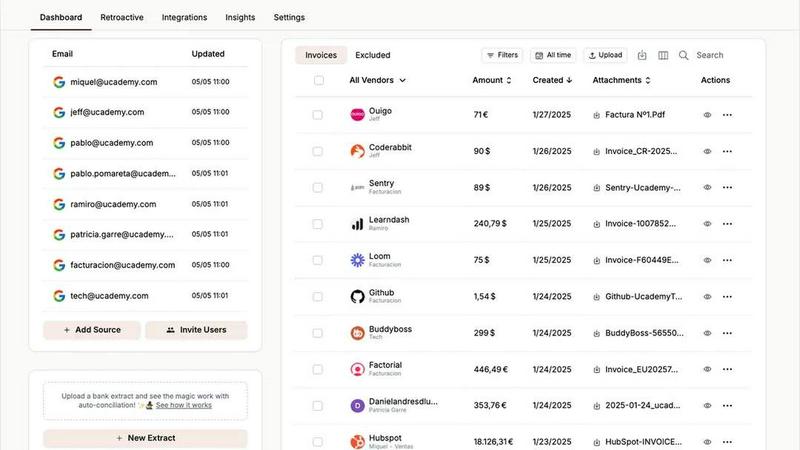
Tailride's inbox scanning is a fundamental feature that connects directly to your email client to automatically detect and extract every invoice and receipt. It monitors your inbox and your colleagues' inboxes in real-time, ensuring no document is ever missed. The system handles all formats—PDFs, images, and even text within the email body—and allows you to retroactively search for past invoices from any time period. This eliminates the frantic, end-of-quarter scramble to find missing documents and provides complete visibility over all incoming financial data without ever having to forward emails manually.
Chrome Extension for Online Portals
The Tailride Chrome extension is a non-negotiable time-saver for modern businesses. With a single click, you can extract invoices directly from over 20 essential online services and SaaS platforms, including Amazon, Meta Ads, Adobe, Notion, Microsoft, and ChatGPT. This feature is critical because many of these companies do not send invoices via email, creating a major gap in your records. The extension ensures that every subscription, ad spend, and online purchase is automatically captured and fed into your centralized document dashboard.
AI Processing & Custom Rules
Beyond simple extraction, Tailride employs intelligent document recognition AI to accurately read and process the data on each invoice. This is paired with fully customizable AI rules that allow you to automate categorization, tagging, and routing based on your company's specific needs. You can set rules to automatically forward invoices to your accountant, file them in specific Google Drive folders, or apply custom labels, transforming raw documents into organized, actionable financial data without any manual intervention.
Bank Reconciliation & Integrations
Tailride completes the automation cycle with robust bank reconciliation features. It matches bank transactions with the corresponding extracted invoices and receipts, instantly identifying any missing documents or discrepancies. This feature is indispensable for maintaining accurate books. Furthermore, Tailride's seamless integrations with accounting software like QuickBooks and Xero, and cloud storage like Google Drive, ensure your financial ecosystem is connected and that data flows automatically to where it is needed most.
Use Cases
Dokta
Freelance IT Consultants & Developers
For freelancers working on Time & Materials contracts, manual monthly invoicing is a repetitive burden. Dokta is essential for automating this entire process. Set up your recurring contract once, and Dokta automatically generates and sends invoices, tracks their payment status, and manages client follow-up. This allows you to focus entirely on development work while ensuring your cash flow is systematic and reliable.
Creative Freelancers & Project-Based Workers
Managing the proposal-to-payment cycle for creative projects is fragmented and time-consuming. Dokta provides the necessary integrated workflow. Create a professional quote, send it via a client acceptance link, and with one click convert it to an invoice upon approval. It tracks the project from the first quote to the final payment, ensuring you never miss a step and get paid for your delivered work.
Auto-Entrepreneurs & Micro-Entrepreneurs
Simplicity and compliance are paramount for auto-entrepreneurs. Dokta is a vital tool for generating compliant invoices, easily tracking all receipts and payments, and providing clear warnings for upcoming URSSAF contribution deadlines. It offers a straightforward, stress-free way to manage all administrative documentation without complexity, which is absolutely necessary for staying organized and avoiding penalties.
Growing Small Businesses & SMEs
As a small business grows, document chaos becomes a major operational risk. Dokta serves as the central, AI-driven command center for all financial documents. It provides a unified view of cash flow across all clients and projects, automates accounts receivable, manages supplier contracts and deadlines, and ensures clean, exportable data for accountants, which is critical for sustainable scaling and financial control.
Tailride
Automating Accounts Payable for SMBs
For small and medium-sized businesses, manually processing supplier invoices from emails is a massive time sink. Tailride automates the entire accounts payable workflow by capturing every incoming invoice automatically, extracting key data, and categorizing it. This use case eliminates manual data entry, reduces human error, and ensures bills are paid on time, freeing up the team to focus on core business activities instead of administrative tasks.
Streamlining Expense Management for Teams
Companies with remote employees or those with business expenses struggle with collecting receipts. Tailride solves this by allowing employees to simply take pictures of physical receipts and send them via a Telegram or WhatsApp bot. All receipts are processed and centralized in the Tailride dashboard. This use case provides finance teams with complete, real-time visibility into company spending and simplifies the reimbursement process, making it an essential tool for operational efficiency.
Empowering Accounting Firms
Accounting firms managing multiple clients face the chaos of inconsistent document submission. Tailride allows accountants to invite each client to connect their own inbox, creating a standardized, automated pipeline for all financial documents. This use case transforms the client-accountant relationship, eliminating the need for clients to manually forward emails and ensuring the accountant always has an organized, up-to-date set of documents for filing taxes and closing the books.
Centralizing SaaS & Online Subscriptions
Modern businesses use dozens of SaaS tools, but invoices often live only in online portals. Tailride's Chrome extension is critical for this use case, as it enables one-click extraction of invoices from platforms like Notion, ChatGPT, and Meta Ads. This ensures all subscription costs are captured, preventing missed deductions and providing a complete picture of software expenditures for accurate budgeting and financial reporting.
Overview
About Dokta
Dokta is the essential AI-powered document management platform built specifically for the modern independent professional. It eliminates the administrative chaos that steals time and money from freelancers, solo entrepreneurs, auto-entrepreneurs, and small businesses. The core necessity is simple: you drop any document - an invoice, quote, or contract - and Dokta's advanced AI engine reads, classifies, and extracts all key data in under 60 seconds. This is not just storage; it's intelligent automation for the entire document lifecycle. The platform handles creating professional invoices and quotes, tracking payments, sending automated reminders for unpaid invoices, managing contract deadlines, and even generating actionable tasks directly from your documents. It solves critical pain points: no more lost files, missed payment deadlines, or wasted weekends on manual admin. Dokta automatically builds and maintains your client database from your documents, provides real-time cash flow tracking, and offers one-click exports for your accountant. For anyone who bills for their time or services, Dokta is the indispensable central hub that puts your documents to work, managed by AI, so you can focus on your actual business.
About Tailride
Tailride is an essential AI-powered accounting automation platform designed to eliminate the manual chaos of invoice and receipt management. It is a must-have solution for business owners, finance teams, and accountants who are tired of wasting hundreds of hours each month on tedious data entry and document chasing. The platform's core value proposition is its ability to completely automate the capture, extraction, and organization of financial documents from the very sources where they already exist: your email inbox and online accounts. By connecting natively to email clients like Gmail and Outlook, Tailride continuously scans for invoices and receipts, whether they are in PDFs, images, email bodies, or behind URLs. Its powerful Chrome extension is a critical tool for instantly extracting invoices from over 20 online platforms such as Amazon, Meta Ads, and Notion. With intelligent AI processing, automatic categorization rules, and seamless integrations with QuickBooks, Xero, and Google Drive, Tailride ensures every document is accounted for and reconciled. For any fast-growing company, this platform is not just a convenience; it is a necessary foundation for accurate, efficient, and stress-free financial operations.
Frequently Asked Questions
Dokta FAQ
How does Dokta's AI analysis work?
Dokta uses a combination of Optical Character Recognition (OCR) to read text from your documents and advanced AI, specifically Claude by Anthropic, to understand the context. The AI classifies the document type and intelligently extracts key fields like dates, amounts, tax numbers, and client information. This entire process is completed in under 60 seconds, requiring zero manual input from you for data extraction.
Is my data secure and compliant with European regulations?
Absolutely. Data security and compliance are fundamental necessities. Dokta is 100% GDPR compliant. All your data is hosted on secure servers within Europe (AWS Paris region). Furthermore, all data is protected with AES-256 encryption, ensuring that your sensitive business and client information remains private and secure at all times.
What happens if I exceed my monthly document limit?
Your plan determines the number of documents you can process each month. If you reach your limit, you will need to upgrade to a higher plan to process additional documents in that billing cycle. You can monitor your usage within the application. The Free Discovery plan allows 15 documents per month, making it easy to test the platform's core features before committing.
Can I connect Dokta to my accounting software?
Currently, Dokta focuses on providing flawless, automated document management and cash flow tracking. It offers a crucial feature: the ability to export all your financial data, including invoices, expenses, and client records, to a universal CSV file format. This CSV file can then be easily imported into any major accounting software, ensuring your accountant receives perfectly organized data.
Tailride FAQ
How does Tailride connect to my email, and is it secure?
Tailride establishes a native, secure connection with your email provider (like Gmail or Outlook) using OAuth, the same secure protocol used by other trusted apps. Your emails never leave your inbox; Tailride only scans for and extracts data from emails identified as invoices or receipts. We do not store your email login credentials, and all data transmission is encrypted, ensuring your information remains private and secure.
Can Tailride find and process old invoices from my inbox?
Yes, absolutely. When you first connect your inbox, Tailride gives you the option to perform a retroactive scan. You can choose to search for past invoices from specific time ranges, such as "This Month," "This Quarter," "This Year," or a custom date range. This feature is essential for catching up on backlogged documents and ensuring your financial records are complete from day one.
What if an invoice is not in an email but on a website?
This is a common gap that Tailride directly addresses with its Chrome extension. For invoices that only exist within online portals (e.g., your Amazon Seller Central, Meta Ads Manager, or Notion account), you simply navigate to the page and click the Tailride extension. It will instantly detect, extract, and process the invoice, ensuring no financial document is missed, regardless of its source.
Does Tailride integrate with my existing accounting software?
Yes, Tailride offers seamless integrations with major accounting platforms including QuickBooks and Xero. Once processed, invoices and their extracted data can be automatically synced to your accounting software. It also integrates with Google Drive for organized document storage. These integrations are vital for creating a fully automated workflow from document capture to reconciled bookkeeping.
Alternatives
Dokta Alternatives
Dokta is an AI-powered document management platform designed for freelancers, solo entrepreneurs, and SMBs. It automates the entire document lifecycle, from creation and data extraction to payment tracking and deadline management, putting your documents at the heart of your business operations. Users often explore alternatives for various reasons. These can include budget constraints, the need for specific integrations, different platform preferences, or requiring a feature set tailored to a larger or more niche business model. It's a common step in finding the perfect operational fit. When evaluating other solutions, key considerations should be AI automation strength, security and data residency, scalability of pricing, and the depth of features for your specific document types. The goal is to find a system that eliminates administrative chaos as effectively as Dokta does, ensuring no lost files or missed payments.
Tailride Alternatives
Tailride is an AI-powered accounting automation platform in the business and finance category. It specializes in automatically extracting and processing invoices and receipts from emails, web portals, and attachments, streamlining bookkeeping and reconciliation. Users often seek alternatives for various reasons. These can include budget constraints, the need for different feature sets, or specific integration requirements with other business software. The ideal solution must align with your company's workflow and financial scale. When evaluating an alternative, prioritize core functionality like accurate data extraction, seamless integration with your accounting stack, and robust automation rules. Security, ease of use, and reliable customer support are also non-negotiable factors for protecting and managing your financial data.