Dokta vs invoice Sonic
Side-by-side comparison to help you choose the right tool.

Dokta automates your invoices, quotes, and cash flow so you can stop chasing payments and focus on your work.
Last updated: April 4, 2026

Create professional invoices instantly for free with no signup required.
Last updated: February 28, 2026
Visual Comparison
Dokta

invoice Sonic
Feature Comparison
Dokta
Instant AI Document Analysis
This is the foundational, must-have feature. Simply drag and drop a photo, scan, or PDF of any document. Dokta's AI, powered by Claude from Anthropic combined with OCR, analyzes it in less than 60 seconds. It automatically identifies the document type (invoice, quote, contract), and extracts critical data like amounts, due dates, client or supplier details, and tax information. This eliminates all manual data entry, ensuring accuracy and saving hours of tedious work.
Automated Invoicing & Quote Management
Creating and managing billing documents is a non-negotiable task, and Dokta streamlines it completely. You can generate professional invoices and quotes in just a few clicks. For freelancers with day-rate contracts, it enables automatic monthly invoicing. Furthermore, you can send quotes with online acceptance links, allowing clients to approve digitally, and then convert an accepted quote into a final invoice with a single click, closing the loop seamlessly.
Real-Time Cash Flow & Anomaly Detection
You must have immediate visibility into your financial health. Dokta provides a real-time dashboard showing billed revenue, collected revenue, unpaid invoices, and VAT overviews with 12-month graphs. Crucially, it also includes proactive anomaly detection to protect your business, alerting you to changed IBANs, duplicate invoices, inconsistent VAT, or missing numbering, acting as an essential safeguard.
Intelligent Client Database & Payment Tracking
Dokta automatically builds and enriches your contact database from processed documents. It uses SIRET numbers to auto-complete company information and applies a payment scoring system based on historical data, giving you insight into client reliability. It maintains a complete history per entity and automates payment reminders with professional, polite templates, ensuring you get paid faster without awkward follow-ups.
invoice Sonic
Completely Free Tier
Invoice Sonic offers a critically important free tier that allows users to create up to five professional invoices per month without any hidden fees, trials, or credit card requirements. This feature is essential for new freelancers and bootstrapped startups to begin invoicing clients immediately with zero financial risk. It provides full access to professional templates and core functionality, making professional billing accessible from day one.
Professional, Customizable Templates
The platform includes a library of professionally designed, modern invoice templates tailored for various industries and business types. This feature is a necessity for establishing brand credibility, as users can select and customize templates with their business details, logo, and preferred layout. It ensures every invoice sent reflects a high standard of professionalism and brand identity, which is vital for client trust and perception.
Instant PDF Generation and Download
A fundamental feature for efficiency, Invoice Sonic allows users to download their completed invoices as PDF files instantly. This eliminates the need for manual conversion or clunky formatting, ensuring invoices are always client-ready in a universal, polished format. The ability to immediately secure and send a professional document is non-negotiable for maintaining a swift payment cycle and organized records.
Automatic Calculation Engine
This essential feature automatically calculates subtotals, taxes, discounts, and final totals as line items are added or edited. It removes the risk of manual calculation errors that can delay payments and damage professional relationships. By ensuring absolute accuracy in every financial detail, this automated engine is indispensable for reliable and trustworthy billing.
Use Cases
Dokta
Freelance IT Consultants & Developers
For freelancers working on Time & Materials contracts, manual monthly invoicing is a repetitive burden. Dokta is essential for automating this entire process. Set up your recurring contract once, and Dokta automatically generates and sends invoices, tracks their payment status, and manages client follow-up. This allows you to focus entirely on development work while ensuring your cash flow is systematic and reliable.
Creative Freelancers & Project-Based Workers
Managing the proposal-to-payment cycle for creative projects is fragmented and time-consuming. Dokta provides the necessary integrated workflow. Create a professional quote, send it via a client acceptance link, and with one click convert it to an invoice upon approval. It tracks the project from the first quote to the final payment, ensuring you never miss a step and get paid for your delivered work.
Auto-Entrepreneurs & Micro-Entrepreneurs
Simplicity and compliance are paramount for auto-entrepreneurs. Dokta is a vital tool for generating compliant invoices, easily tracking all receipts and payments, and providing clear warnings for upcoming URSSAF contribution deadlines. It offers a straightforward, stress-free way to manage all administrative documentation without complexity, which is absolutely necessary for staying organized and avoiding penalties.
Growing Small Businesses & SMEs
As a small business grows, document chaos becomes a major operational risk. Dokta serves as the central, AI-driven command center for all financial documents. It provides a unified view of cash flow across all clients and projects, automates accounts receivable, manages supplier contracts and deadlines, and ensures clean, exportable data for accountants, which is critical for sustainable scaling and financial control.
invoice Sonic
Freelancers and Independent Contractors
For freelancers juggling multiple clients and projects, Invoice Sonic is indispensable. It enables them to quickly generate and send branded invoices for completed work without administrative overhead. The speed and professionalism ensure they get paid faster, which is critical for managing cash flow and maintaining a streamlined solo operation.
Small Business Owners and Startups
Small business owners must project professionalism while managing limited resources. Invoice Sonic is essential for creating consistent, accurate invoices for products or services without investing in accounting software. It streamlines their billing process, allowing them to focus on growth while ensuring their financial operations are handled efficiently.
Service-Based Professionals
Consultants, designers, coaches, and other service providers need to invoice for hourly work or project-based fees. Invoice Sonic's templates and itemization features are necessary for clearly breaking down services rendered, rates, and totals. This clarity prevents client disputes and facilitates prompt payment for services delivered.
Sending Proforma Invoices and Quotes
Before starting work, many businesses need to send proforma invoices or quotes. Invoice Sonic is vital for creating these preliminary documents quickly, using professional templates that outline proposed costs and terms. This helps in securing client approval and setting clear financial expectations from the outset.
Overview
About Dokta
Dokta is the essential AI-powered document management platform built specifically for the modern independent professional. It eliminates the administrative chaos that steals time and money from freelancers, solo entrepreneurs, auto-entrepreneurs, and small businesses. The core necessity is simple: you drop any document - an invoice, quote, or contract - and Dokta's advanced AI engine reads, classifies, and extracts all key data in under 60 seconds. This is not just storage; it's intelligent automation for the entire document lifecycle. The platform handles creating professional invoices and quotes, tracking payments, sending automated reminders for unpaid invoices, managing contract deadlines, and even generating actionable tasks directly from your documents. It solves critical pain points: no more lost files, missed payment deadlines, or wasted weekends on manual admin. Dokta automatically builds and maintains your client database from your documents, provides real-time cash flow tracking, and offers one-click exports for your accountant. For anyone who bills for their time or services, Dokta is the indispensable central hub that puts your documents to work, managed by AI, so you can focus on your actual business.
About invoice Sonic
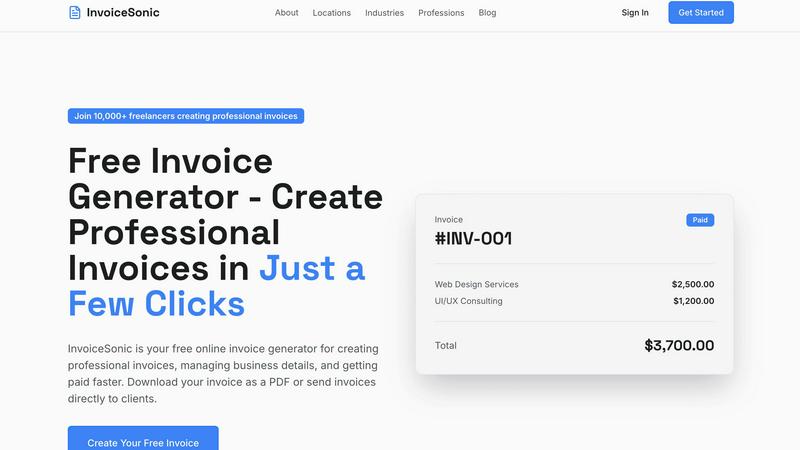
Invoice Sonic is an essential, non-negotiable tool for any freelancer, startup, or small business owner who needs to get paid promptly and professionally. It is a powerful, user-friendly online invoice generator designed to eliminate the complexity and cost traditionally associated with creating invoices. The platform provides a fast, efficient, and completely free way to generate polished, modern invoices without requiring expensive software subscriptions or even user sign-ups. Its core value proposition is absolute simplicity and accessibility, allowing users to create, preview, and download professional invoices instantly. By streamlining the entire invoicing process with customizable templates, automatic calculations, and instant PDF generation, Invoice Sonic enables business owners to focus on their core work while ensuring their billing is accurate, branded, and delivered without delay. It is the must-have solution for transforming a tedious administrative task into a seamless, seconds-long operation.
Frequently Asked Questions
Dokta FAQ
How does Dokta's AI analysis work?
Dokta uses a combination of Optical Character Recognition (OCR) to read text from your documents and advanced AI, specifically Claude by Anthropic, to understand the context. The AI classifies the document type and intelligently extracts key fields like dates, amounts, tax numbers, and client information. This entire process is completed in under 60 seconds, requiring zero manual input from you for data extraction.
Is my data secure and compliant with European regulations?
Absolutely. Data security and compliance are fundamental necessities. Dokta is 100% GDPR compliant. All your data is hosted on secure servers within Europe (AWS Paris region). Furthermore, all data is protected with AES-256 encryption, ensuring that your sensitive business and client information remains private and secure at all times.
What happens if I exceed my monthly document limit?
Your plan determines the number of documents you can process each month. If you reach your limit, you will need to upgrade to a higher plan to process additional documents in that billing cycle. You can monitor your usage within the application. The Free Discovery plan allows 15 documents per month, making it easy to test the platform's core features before committing.
Can I connect Dokta to my accounting software?
Currently, Dokta focuses on providing flawless, automated document management and cash flow tracking. It offers a crucial feature: the ability to export all your financial data, including invoices, expenses, and client records, to a universal CSV file format. This CSV file can then be easily imported into any major accounting software, ensuring your accountant receives perfectly organized data.
invoice Sonic FAQ
Is Invoice Sonic really free to use?
Yes, Invoice Sonic offers a genuinely free tier that is essential for getting started. You can create, preview, and download up to five invoices per month without any cost, sign-up, or credit card required. This makes it a necessary tool for testing the platform and handling initial billing needs with zero commitment.
Do I need to create an account to use Invoice Sonic?
No, an account is not required to use the free invoice generator, which is a key feature for immediate accessibility. You can create and download invoices instantly. However, creating a free account is necessary to unlock additional features like saving your business details and managing recurring invoices for ongoing efficiency.
Can I add my company logo and branding to the invoices?
Absolutely. The ability to add your company logo and customize invoice details is a fundamental feature for brand consistency. You can input your business name, address, contact information, and upload your logo to ensure every invoice you send reinforces your professional brand identity.
What file format are the invoices downloaded in?
Invoices are downloaded instantly as PDF files. This format is a universal standard and a necessity for professional communication, as it preserves formatting, is easy for clients to open on any device, and is suitable for printing and official record-keeping.
Alternatives
Dokta Alternatives
Dokta is an AI-powered document management platform designed for freelancers, solo entrepreneurs, and SMBs. It automates the entire document lifecycle, from creation and data extraction to payment tracking and deadline management, putting your documents at the heart of your business operations. Users often explore alternatives for various reasons. These can include budget constraints, the need for specific integrations, different platform preferences, or requiring a feature set tailored to a larger or more niche business model. It's a common step in finding the perfect operational fit. When evaluating other solutions, key considerations should be AI automation strength, security and data residency, scalability of pricing, and the depth of features for your specific document types. The goal is to find a system that eliminates administrative chaos as effectively as Dokta does, ensuring no lost files or missed payments.
invoice Sonic Alternatives
Invoice Sonic is a fast, free invoice generator in the Productivity & Management category, designed to help freelancers and small businesses create professional invoices instantly without signup. It’s a go-to tool for its simplicity and immediate access. Users often seek alternatives for various reasons. Some may need more than the free tier allows, require deeper integration with other business platforms like accounting software, or seek advanced features such as recurring invoices, client portals, or multi-user access. The specific needs of a growing business can quickly outgrow even the best free tools. When evaluating an alternative, prioritize what is essential for your workflow. Necessities often include a clear pricing structure that scales with your volume, robust feature sets like automatic payment reminders, and reliable customer support. Security and data portability are also critical non-negotiable factors for protecting your business information.