
DocuExtractor vs LuxSign
Side-by-side comparison to help you choose the right tool.

DocuExtractor
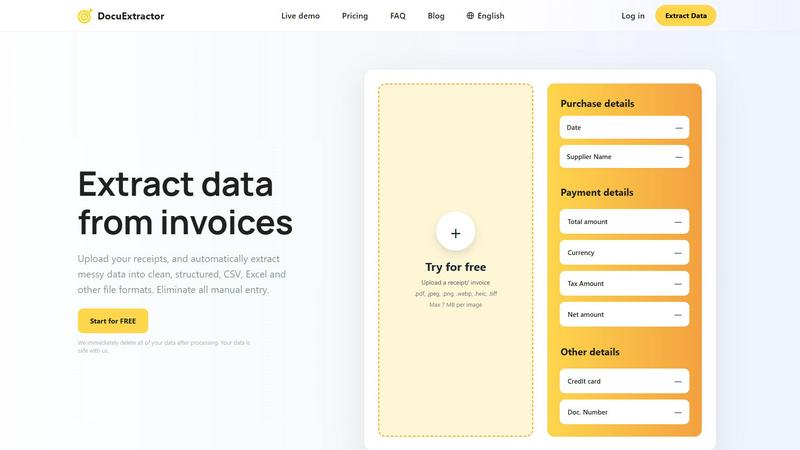
DocuExtractor instantly extracts clean data from receipts and invoices to eliminate manual entry.
Last updated: February 28, 2026

LuxSign enables fast, secure, and legally valid electronic signatures for all your documents across the EU.
Last updated: February 28, 2026
Visual Comparison
DocuExtractor
LuxSign

Feature Comparison
DocuExtractor
Industry-Leading 99.6% Accuracy
Our platform delivers unmatched precision by combining advanced OCR with Deep Learning and proprietary Large Language Model (AI) technology. This multi-layered approach ensures that even the messiest handwritten notes, low-quality scans, or complex invoice layouts are interpreted correctly, extracting key fields like totals, dates, and vendor names with near-perfect reliability, eliminating costly manual verification.
Fully Automated, Drag-and-Drop Simplicity
DocuExtractor is built for speed and ease. The entire extraction process is fully automated. Users simply log in, drag and drop their documents—whether single files or large batches—into the workspace, and the AI takes over. There is no need for complex setup or manual template configuration, making it instantly accessible for teams of all technical skill levels.
Secure, Scalable & Multi-Language Processing
Engineered with enterprise-grade security and performance in mind, DocuExtractor processes over half a million documents monthly with consistent reliability. It features automatic language detection for documents in over 45 languages. Crucially, we enforce a strict data privacy protocol where all uploaded documents and extracted data are permanently deleted immediately after processing, ensuring your financial information is never stored or compromised.
Structured Output for Direct Software Integration
The core value is in the output. DocuExtractor doesn't just read text; it structures it intelligently. The AI organizes extracted data into clean, formatted CSV or Excel files that are perfectly aligned for direct import into accounting software like QuickBooks, Xero, or Sage. This eliminates the final, frustrating step of manual data reformatting and cleanup, delivering true end-to-end automation.
LuxSign
Multiple Signature Methods
LuxSign offers versatile signing methods, allowing users to draw their signature, type their name, or upload an image. This flexibility caters to different preferences, ensuring a quick and efficient signing experience.
End-to-End Encryption
Every document uploaded and processed through LuxSign is secured with industry-standard encryption. This means that your sensitive data remains protected throughout the entire lifecycle, from upload to storage and transmission.
Collaboration Workspaces
With LuxSign's collaboration workspaces, teams can create shared environments for managing documents. This feature enables organized document storage, member access management, and seamless collaboration on signing workflows, making teamwork more effective.
Complete Audit Trail
LuxSign provides a comprehensive audit trail that logs every action taken on a document. This includes timestamps, IP addresses, and signer information, which are crucial for compliance and verification, ensuring transparency throughout the signing process.
Use Cases
DocuExtractor
Automating Accounts Payable Processing
Finance teams can instantly process hundreds of supplier invoices and receipts weekly. By uploading batches of documents, they automatically extract invoice numbers, dates, amounts due, and tax details into a structured spreadsheet. This data is ready for immediate review and posting into their ERP or accounting system, slashing processing time from hours to minutes and drastically improving cash flow management.
Streamlining Expense Reporting and Reconciliation
Employees can upload their business receipts—from coffee to client dinners—directly to DocuExtractor. The AI extracts the merchant, date, total, and tax, populating a standardized expense report template. This allows accountants to quickly verify and reconcile corporate card statements against claims, eliminating manual entry errors and accelerating the reimbursement cycle for everyone.
Accelerating Month-End and Year-End Book Closing
During critical closing periods, bookkeepers are inundated with bank statements, transaction records, and financial PDFs. DocuExtractor processes these documents en masse, extracting transaction dates, descriptions, and amounts into a clean ledger format. This provides a clear, auditable trail and reduces the frantic, error-prone manual work that delays financial reporting.
Digitizing and Organizing Historical Financial Archives
Firms transitioning from paper-based systems or dealing with years of scanned document archives can use DocuExtractor to unlock that data. By processing old invoices, receipts, and statements, they can convert entire filing cabinets into searchable, structured digital databases. This creates a single source of truth for audits, analysis, and historical reporting without monumental manual effort.
LuxSign
Contract Signatures for Businesses
Businesses can utilize LuxSign to streamline contract signing processes, allowing for quick turnaround times and ensuring that all documents are legally binding under EU regulations.
Real Estate Transactions
Real estate agents can use LuxSign for property transactions, facilitating secure and quick signatures on agreements and contracts, leading to faster closings and improved client satisfaction.
HR Onboarding Processes
Human resources departments can simplify their onboarding processes by using LuxSign to send and collect signed employment contracts and policy documents, ensuring that all new hires are legally compliant from day one.
Financial Document Management
Banks and financial institutions can leverage LuxSign for managing loan agreements, account openings, and other financial documents, ensuring compliance with regulatory standards while enhancing operational efficiency.
Overview
About DocuExtractor
DocuExtractor is the non-negotiable, essential AI-powered document converter engineered specifically for modern accounting and finance teams. It directly confronts the critical bottleneck of manual data entry by transforming messy, unstructured financial documents—including invoices, receipts, bank statements, and PDFs—into perfectly clean, structured, and immediately actionable data. This is not a simple scanner; it is a sophisticated data extraction platform that leverages a powerful combination of Optical Character Recognition (OCR), Deep Learning, and Large Language Model (AI) technology to achieve an industry-leading 99.6% accuracy rate. It automatically identifies and extracts every critical data point: dates, supplier names, totals, tax amounts, document numbers, and more. The extracted data is then seamlessly converted into versatile, ready-to-use formats like CSV and Excel for direct import into any accounting software, eliminating hours of tedious work and the risk of human error. Built for security and scale, it processes over 500,000 documents monthly, supports 45+ languages, and adheres to a strict privacy-first policy by deleting all user data immediately after processing. For accountants, bookkeepers, and finance professionals, DocuExtractor is a critical necessity to reclaim time, guarantee accuracy, and achieve a streamlined, efficient financial workflow from day one.
About LuxSign
LuxSign is a secure, cloud-based electronic signature platform designed specifically for businesses that demand high compliance standards. Founded in Luxembourg, the platform prioritizes user security by ensuring that all documents are encrypted end-to-end and stored exclusively within the country, thereby guaranteeing full adherence to GDPR regulations. LuxSign supports the eIDAS SES standards, which provide legal validity for contracts throughout the European Union. This makes it an essential tool for businesses aiming to streamline their signing processes while maintaining legal compliance. With user-friendly features such as drag-and-drop signature field placement and automated email notifications, LuxSign simplifies document management. Its advanced tiers offer powerful functionalities like document templates, audit trails, bulk signing, collaboration workspaces, and a full REST API with an embeddable SDK for seamless system integrations.
Frequently Asked Questions
DocuExtractor FAQ
What types of documents can DocuExtractor process?
DocuExtractor is specialized for financial documents and can accurately process invoices, receipts, bank statements, and general PDFs. It supports a wide range of file formats including PDF, JPEG, PNG, WebP, HEIC, and TIFF. The AI is trained to handle various layouts and qualities, from digital PDFs to photographed receipts.
How does DocuExtractor ensure the accuracy of extracted data?
We achieve our 99.6% accuracy rate by using a powerful, multi-stage technology stack. Advanced OCR first captures text, then Deep Learning models understand the document's structure and layout. Finally, our specialized Large Language Model (AI) interprets the context to correctly identify and classify each data field, such as distinguishing a total amount from a subtotal, ensuring exceptional precision.
Is my financial data secure with DocuExtractor?
Security and privacy are our top priorities. We employ enterprise-grade security measures throughout our platform. Most importantly, we operate on a strict zero-retention data policy. All uploaded documents and the resulting extracted data are permanently and automatically deleted from our servers immediately after processing is complete. Your data is never stored, sold, or used for training.
Can I process multiple documents at once?
Yes, batch processing is a core functionality designed for efficiency. You can upload dozens or even hundreds of documents simultaneously via drag-and-drop. DocuExtractor will automatically process them in sequence, extracting data from each one and compiling the results into a single, consolidated CSV or Excel output file, saving you immense time over processing files individually.
LuxSign FAQ
How does LuxSign ensure document security?
LuxSign ensures document security through end-to-end encryption during the upload, storage, and transmission processes, alongside secure data hosting in Luxembourg, compliant with GDPR.
What types of documents can I sign with LuxSign?
You can sign various document formats, including PDF, DOC, and DOCX. LuxSign also supports automatic conversion and allows for uploading files up to 10MB.
Can multiple signers be included in a single document?
Yes, LuxSign allows up to four signers per document. You can choose between parallel or sequential signing workflows to suit your needs.
Is LuxSign compliant with EU regulations?
Absolutely. LuxSign is compliant with the eIDAS SES standards, which means that signatures made through the platform are legally valid across all EU member states.
Alternatives
DocuExtractor Alternatives
DocuExtractor is a powerful document converter software in the productivity and management category, designed to eliminate manual data entry by instantly extracting clean, structured data from invoices, receipts, and other financial documents. It is an essential tool for modern accounting and bookkeeping workflows. Users may explore alternatives for various reasons, including budget constraints, specific feature requirements, or the need for integration with a particular platform or existing software stack. The search for a different solution is a common step in finding the perfect fit for a business's unique operational needs. When evaluating any alternative, key considerations must include the accuracy of data extraction, supported document types and export formats, processing speed for batch operations, and the overall security posture of the platform. The right tool should function as a non-negotiable asset that seamlessly integrates into and enhances your financial workflow.
LuxSign Alternatives
LuxSign is an electronic signature platform based in Luxembourg, designed for businesses needing a secure, compliant solution for document signing. As an eIDAS SES compliant service, it guarantees that signatures are legally valid across all EU member states. Users often seek alternatives to LuxSign due to concerns about pricing, specific feature sets, or compatibility with their unique platform requirements. When searching for a suitable alternative, it's essential to consider factors such as compliance with relevant regulations, security measures, ease of use, and the availability of features that align with your business processes. When evaluating alternatives, prioritize platforms that offer robust security and compliance features, particularly if your business operates within regulated industries. Look for user-friendly interfaces that facilitate efficient workflows and ensure that the solution can be tailored to meet your specific operational needs. Additionally, consider the level of customer support and integration capabilities with existing systems, as these factors can significantly impact your overall experience and satisfaction with the electronic signature solution.