Customer Connect CRM vs Prompt Builder
Side-by-side comparison to help you choose the right tool.

Customer Connect CRM
Customer Connect CRM consolidates leads and streamlines follow-ups with AI for effortless sales growth and efficiency.
Last updated: February 28, 2026

Prompt Builder
Generate, optimize, test, and manage AI prompts in one place. Turn an idea into a ready-to-use prompt in seconds.
Visual Comparison
Customer Connect CRM

Prompt Builder
Overview
About Customer Connect CRM
Customer Connect CRM is an essential AI-powered sales platform tailored specifically for freelancers, consultants, and small to medium-sized teams. Its core mission is to streamline the sales process by eliminating administrative burdens that often hinder business growth. Unlike traditional CRMs, Customer Connect offers a unified workspace where all inquiries—whether from website forms, email inboxes, or direct messages—are centralized. This allows users to gain complete control over their sales pipeline, ensuring that no lead is lost and that follow-ups can be executed swiftly and intelligently. With features designed to simplify lead management, Customer Connect transforms the often chaotic process of handling inquiries into an efficient, organized workflow. By prioritizing ease of use and affordability, this CRM is a must-have for businesses serious about converting inquiries into revenue without the complexities and high costs associated with conventional systems.
About Prompt Builder
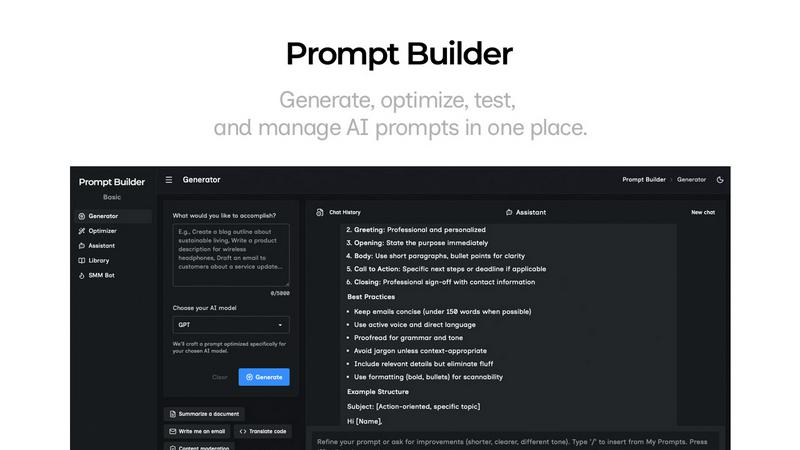
Prompt Builder is a prompt engineering workspace for writing, testing, and saving prompts. Describe the task in plain English, and it helps you create a prompt that matches the model you choose. Start with a draft, refine it in chat, save or pin versions, then run them when you are ready. It works with GPT, Claude, Gemini, Llama, Mistral, DeepSeek, Grok, Perplexity, and more. You also get an Optimizer, an assistant for quick tests, and a library of reusable prompts and templates from the community. Turn an idea into a ready-to-use prompt in seconds. Refine it in chat, save it to your Library, and run it anytime.