
Cosy vs FilexHost
Side-by-side comparison to help you choose the right tool.

Cosy automates Slack community onboarding and engagement to save you hours.
Last updated: February 28, 2026

FilexHost
Easily host and share files in seconds with drag-and-drop uploads and instant shareable links.
Last updated: February 28, 2026
Visual Comparison
Cosy
FilexHost

Feature Comparison
Cosy
Automated Onboarding Sequences
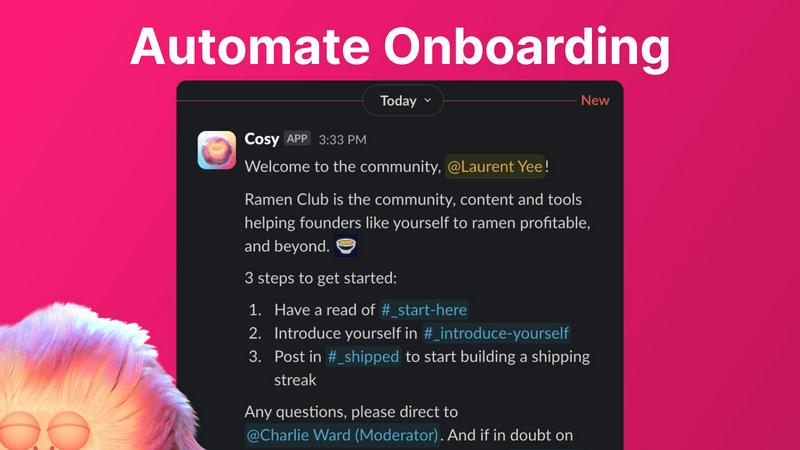
Eliminate the manual grind of welcoming every new member. Cosy allows you to create and automate up to 10 distinct welcome DM sequences, sent either from you, a team member, or the Cosy bot itself. Fully customize messages with member names, links, and emojis, and set precise time delays—from immediately to months in the future. This ensures every new joiner receives a warm, timely welcome, even at 4:30 AM, saving you hours and guaranteeing no one is ever overlooked. If sent from a human profile, members can reply naturally, kickstarting genuine conversation from day one.
Automated Member Introductions
Foster deep connections and combat isolation by automatically introducing opted-in community members to each other via DM. Cosy handles the entire process, creating a 3-person DM with the two members and the Cosy bot on a regular cadence you control (every 1-4 weeks). It randomly selects members to enhance serendipity while avoiding recent matches. You can fully customize the intro message template, weekday, and time (UTC). This feature builds a highly engaged network on autopilot, driving the meaningful interactions that define a true community.
Slack-Native Member Directory
Build a searchable knowledge base of your members without anyone ever leaving Slack. Create a custom directory with up to 10 fields (text, single-select, or multi-choice) and prompt members to fill out their profiles via a one-click notification. Members can then search for keywords and filter profiles directly within the Cosy app or via a /member-directory slash command. New joiners are automatically prompted after 24 hours. This turns your Slack into a powerful, internal network where members can easily find and connect with the right people.
Content Highlights & Moderation Alerts
Surface the most valuable conversations and maintain community health instantly. Use simple slash commands to pull the top 10 most engaged posts in a specific channel (/most-engaged-messages) or across all public channels (/most-engaged-messages-all). Identify unanswered questions with /unreplied-messages to ensure nothing slips through the cracks. Furthermore, Cosy proactively flags abusive and spam messages in real-time, allowing moderators to act swiftly to maintain a positive and safe environment for all members.
FilexHost
Instant Subdomains
Every file you upload is assigned an instant subdomain (your-file.filex.host) with zero setup required. This feature allows for quick and easy sharing, enabling users to distribute files without any delay or complicated configurations.
Free SSL Encryption
FileXHost automatically provides free SSL encryption for every link generated. This ensures that all shared files are secure, protecting your data during transit and giving both you and your recipients peace of mind regarding privacy and security.
Smart View Modes
Users can choose between direct rendering or a download page for their shared files. This means that files can be viewed interactively in the browser or downloaded directly, depending on the recipient's preference, making it a flexible solution for various needs.
Optional Password Protection & Expiry Settings
To enhance security further, FileXHost allows users to set optional password protection and expiry settings for their links, ranging from 24 hours to forever. This feature is particularly useful for sensitive information that requires an additional layer of security and control over access.
Use Cases
Cosy
For Scaling Startup Communities
Startup founders and early community managers are stretched thin. Cosy is essential for automating the foundational engagement tasks that make a community feel alive as it grows from 50 to 500+ members. It ensures every new member gets a personalized welcome, helps them find relevant peers automatically, and allows them to explore a member directory—all without constant manual intervention, freeing up leadership to focus on strategy and high-touch interactions.
For Professional Network & Membership Groups
Professional networks require meaningful connections to deliver value. Cosy automates the serendipitous networking that members join for, via its automated 1:1 introductions. The searchable member directory becomes a vital resource for finding expertise, potential collaborators, or mentors within the community, directly within the Slack platform they already use daily, dramatically increasing the network's utility and stickiness.
For Internal Company Engagement & Culture
Team leaders and HR professionals can use Cosy to transform internal Slack workspaces into more connected company cultures. Automate onboarding for new hires with tailored sequences from their manager or team. Foster cross-departmental relationships with automated introductions to break down silos. The member directory helps employees discover colleagues' skills and interests, building a more cohesive and collaborative internal community.
For Moderating Large, Public Communities
Managing large, active public Slack communities is a constant challenge for moderation. Cosy is a necessity for maintaining safety and quality. Its instant alerting for abusive or spam messages allows moderators to act before issues escalate. Meanwhile, features like highlighting unreplied messages help community managers ensure questions get answers, and surfacing top content rewards valuable contributions, guiding community culture positively.
FilexHost
Professionals Sharing Client Reports
Professionals can use FileXHost to share client reports seamlessly. With instant URLs and secure links, they can deliver documents without the need for cumbersome email attachments, ensuring that clients receive exactly what they need, when they need it.
Developers Hosting Landing Pages
Developers can quickly host landing pages or mock APIs using FileXHost. The platform supports HTML and other web files, allowing developers to showcase projects efficiently without needing extensive server knowledge or setup.
Creators Distributing Digital Products
Creators can distribute digital products like eBooks, videos, or software with ease. By utilizing the smart rendering features, their products can be presented perfectly, enhancing user experience and boosting sales potential.
Anyone Needing Friction-Free File Delivery
FileXHost is ideal for anyone who requires simple and fast file delivery without the hassle of "request access" emails or attachment limitations. It caters to a broad audience, from students sharing assignments to businesses exchanging critical documents.
Overview
About Cosy
Cosy is the essential, non-negotiable automation platform built directly for Slack. It transforms your standard Slack workspace into a thriving, engaged, and safe community without the crushing burden of manual effort. Designed specifically for community managers, founders, and team leaders, Cosy automates the foundational, time-consuming tasks that are critical for community health but are often neglected due to limited bandwidth. Its core mission is clear: save you hours every single week while systematically boosting member engagement, connection, and safety. By operating natively within Slack, Cosy eliminates friction entirely—there is no new platform for your members to learn or context for them to switch to, ensuring seamless and immediate adoption. It tackles the vital necessities of community management: automating personalized member onboarding, fostering meaningful 1:1 connections, creating a searchable in-Slack member directory, intelligently surfacing valuable content, and maintaining a positive environment. For any Slack community aiming to evolve beyond a simple chat group into a meaningful, scalable network, Cosy provides the indispensable automation and structure required to grow sustainably and effectively.
About FilexHost
FileXHost is a cutting-edge file hosting and sharing solution designed to streamline the process of sharing any type of file effortlessly. Whether you are dealing with documents, media, spreadsheets, or even entire websites, FileXHost provides high-speed, universal hosting that caters to all file types. Its intuitive "Drop & Share" workflow allows users to simply drag files into the platform, instantly generating a secure URL for sharing. This eliminates the need for complex server setups, DNS configurations, or user logins for recipients. FileXHost is perfect for professionals, developers, and creators who require a seamless and efficient way to deliver files without the hassle of traditional file-sharing methods. By prioritizing viewer experience, it ensures that recipients can access files in the best possible format, enhancing communication and collaboration.
Frequently Asked Questions
Cosy FAQ
How does the automated onboarding work?
You can create up to 10 distinct welcome message sequences in Cosy. When a new member joins your Slack, Cosy automatically sends these DMs based on your configuration. You choose the sender (you, a teammate, or the Cosy bot), fully customize the message content, and set precise time delays (e.g., send immediately, after 24 hours, or a week later). This happens automatically, 24/7, ensuring consistent onboarding for every single member without any manual effort from your team.
How are members matched for introductions?
Opted-in community members are randomly selected and introduced to each other in a 3-person DM that includes the Cosy bot. The matching is designed for serendipity, similar to tools like Donut. Cosy's algorithm avoids matching people who have been recently introduced to each other to ensure fresh connections. You control the frequency (every 1, 2, 3, or 4 weeks) and the specific day and time (in UTC) when these introductions are sent out.
Can members access the directory without leaving Slack?
Absolutely. This is a core benefit of Cosy's Slack-native design. Members can access the full, searchable member directory in two ways: by opening the Cosy app within Slack, or by using the /member-directory slash command in any public channel, which provides a quick link. All searching and filtering of profiles happens directly within the Slack interface—no external websites or logins are required.
What does Cosy do with flagged spam or abusive messages?
Cosy proactively monitors conversations and uses systems to instantly flag messages it identifies as potentially abusive or spam. These alerts are sent to community moderators or admins within Cosy, allowing for swift review and action, such as deleting the message or addressing the member. This helps maintain a safe and positive community environment by catching issues early, often before they are widely seen or cause harm.
FilexHost FAQ
What is FileXHost?
FileXHost is a file hosting and sharing platform that allows users to upload, manage, and share files of any type instantly. It simplifies the file-sharing process with a drag-and-drop interface and provides secure URLs for easy access.
Is it really free?
Yes, FileXHost offers a free plan that allows users to host up to 1,000 files with a maximum size of 25MB each. However, this plan is ad-supported and has a 7-day expiry for shared files.
What file types are supported?
FileXHost supports a wide variety of file types, including PDFs, Excel sheets, images, audio, video, ZIP archives, and HTML projects. Its smart rendering engine ensures that each file type is displayed optimally for the viewer.
How do I update my site?
To update your hosted content, simply re-upload the desired file or project to FileXHost. The platform will generate a new link or update the existing one, maintaining your sharing workflow seamlessly.
Alternatives
Cosy Alternatives
Cosy is a must-have Slack-native automation platform in the productivity and management category. It automates the essential tasks of community onboarding, member introductions, and content sharing to save managers hours each week while driving meaningful engagement. Users may seek alternatives for various critical reasons. Common necessities include budget constraints, the need for features beyond Slack automation, or a requirement to manage communities on platforms like Discord. Evaluating your core operational needs is the first priority. When choosing an alternative, the essential factors to consider are seamless platform integration, robust automation capabilities for welcome sequences and moderation, and tools that genuinely foster member connections. The right solution must address these foundational needs without creating administrative overhead.
FilexHost Alternatives
FilexHost is a straightforward and efficient file hosting and sharing solution designed for users who need to quickly upload and distribute files. This platform excels in delivering high-speed, universal file support, allowing users to share various file types with minimal hassle. Users often seek alternatives to FilexHost due to factors such as pricing, specific feature requirements, or compatibility with different platforms and workflows. When searching for an alternative, it’s essential to consider the range of features offered, the ease of use, and the level of security provided. Look for options that maintain a user-friendly interface, support the necessary file types, and offer adequate storage and sharing capabilities tailored to your needs.