
Published on:
November 13, 2025
Pricing:
About Cosy
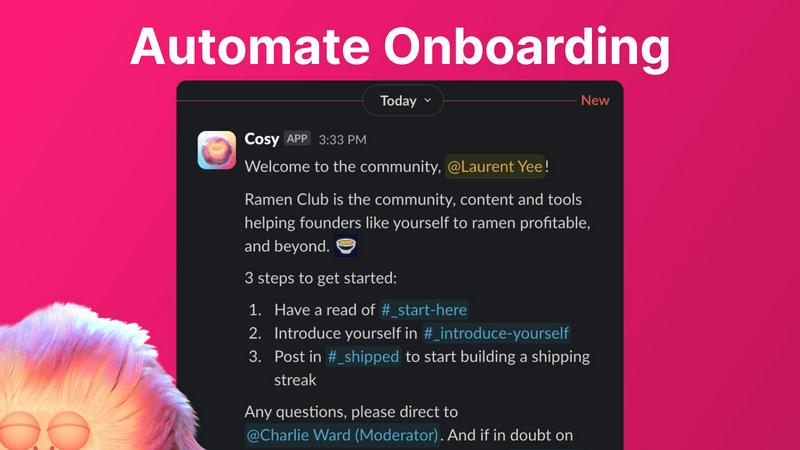
Cosy is the essential, non-negotiable automation platform built directly for Slack. It transforms your standard Slack workspace into a thriving, engaged, and safe community without the crushing burden of manual effort. Designed specifically for community managers, founders, and team leaders, Cosy automates the foundational, time-consuming tasks that are critical for community health but are often neglected due to limited bandwidth. Its core mission is clear: save you hours every single week while systematically boosting member engagement, connection, and safety. By operating natively within Slack, Cosy eliminates friction entirely—there is no new platform for your members to learn or context for them to switch to, ensuring seamless and immediate adoption. It tackles the vital necessities of community management: automating personalized member onboarding, fostering meaningful 1:1 connections, creating a searchable in-Slack member directory, intelligently surfacing valuable content, and maintaining a positive environment. For any Slack community aiming to evolve beyond a simple chat group into a meaningful, scalable network, Cosy provides the indispensable automation and structure required to grow sustainably and effectively.
Features of Cosy
Automated Onboarding Sequences
Eliminate the manual grind of welcoming every new member. Cosy allows you to create and automate up to 10 distinct welcome DM sequences, sent either from you, a team member, or the Cosy bot itself. Fully customize messages with member names, links, and emojis, and set precise time delays—from immediately to months in the future. This ensures every new joiner receives a warm, timely welcome, even at 4:30 AM, saving you hours and guaranteeing no one is ever overlooked. If sent from a human profile, members can reply naturally, kickstarting genuine conversation from day one.
Automated Member Introductions
Foster deep connections and combat isolation by automatically introducing opted-in community members to each other via DM. Cosy handles the entire process, creating a 3-person DM with the two members and the Cosy bot on a regular cadence you control (every 1-4 weeks). It randomly selects members to enhance serendipity while avoiding recent matches. You can fully customize the intro message template, weekday, and time (UTC). This feature builds a highly engaged network on autopilot, driving the meaningful interactions that define a true community.
Slack-Native Member Directory
Build a searchable knowledge base of your members without anyone ever leaving Slack. Create a custom directory with up to 10 fields (text, single-select, or multi-choice) and prompt members to fill out their profiles via a one-click notification. Members can then search for keywords and filter profiles directly within the Cosy app or via a /member-directory slash command. New joiners are automatically prompted after 24 hours. This turns your Slack into a powerful, internal network where members can easily find and connect with the right people.
Content Highlights & Moderation Alerts
Surface the most valuable conversations and maintain community health instantly. Use simple slash commands to pull the top 10 most engaged posts in a specific channel (/most-engaged-messages) or across all public channels (/most-engaged-messages-all). Identify unanswered questions with /unreplied-messages to ensure nothing slips through the cracks. Furthermore, Cosy proactively flags abusive and spam messages in real-time, allowing moderators to act swiftly to maintain a positive and safe environment for all members.
Use Cases of Cosy
For Scaling Startup Communities
Startup founders and early community managers are stretched thin. Cosy is essential for automating the foundational engagement tasks that make a community feel alive as it grows from 50 to 500+ members. It ensures every new member gets a personalized welcome, helps them find relevant peers automatically, and allows them to explore a member directory—all without constant manual intervention, freeing up leadership to focus on strategy and high-touch interactions.
For Professional Network & Membership Groups
Professional networks require meaningful connections to deliver value. Cosy automates the serendipitous networking that members join for, via its automated 1:1 introductions. The searchable member directory becomes a vital resource for finding expertise, potential collaborators, or mentors within the community, directly within the Slack platform they already use daily, dramatically increasing the network's utility and stickiness.
For Internal Company Engagement & Culture
Team leaders and HR professionals can use Cosy to transform internal Slack workspaces into more connected company cultures. Automate onboarding for new hires with tailored sequences from their manager or team. Foster cross-departmental relationships with automated introductions to break down silos. The member directory helps employees discover colleagues' skills and interests, building a more cohesive and collaborative internal community.
For Moderating Large, Public Communities
Managing large, active public Slack communities is a constant challenge for moderation. Cosy is a necessity for maintaining safety and quality. Its instant alerting for abusive or spam messages allows moderators to act before issues escalate. Meanwhile, features like highlighting unreplied messages help community managers ensure questions get answers, and surfacing top content rewards valuable contributions, guiding community culture positively.
Frequently Asked Questions
How does the automated onboarding work?
You can create up to 10 distinct welcome message sequences in Cosy. When a new member joins your Slack, Cosy automatically sends these DMs based on your configuration. You choose the sender (you, a teammate, or the Cosy bot), fully customize the message content, and set precise time delays (e.g., send immediately, after 24 hours, or a week later). This happens automatically, 24/7, ensuring consistent onboarding for every single member without any manual effort from your team.
How are members matched for introductions?
Opted-in community members are randomly selected and introduced to each other in a 3-person DM that includes the Cosy bot. The matching is designed for serendipity, similar to tools like Donut. Cosy's algorithm avoids matching people who have been recently introduced to each other to ensure fresh connections. You control the frequency (every 1, 2, 3, or 4 weeks) and the specific day and time (in UTC) when these introductions are sent out.
Can members access the directory without leaving Slack?
Absolutely. This is a core benefit of Cosy's Slack-native design. Members can access the full, searchable member directory in two ways: by opening the Cosy app within Slack, or by using the /member-directory slash command in any public channel, which provides a quick link. All searching and filtering of profiles happens directly within the Slack interface—no external websites or logins are required.
What does Cosy do with flagged spam or abusive messages?
Cosy proactively monitors conversations and uses systems to instantly flag messages it identifies as potentially abusive or spam. These alerts are sent to community moderators or admins within Cosy, allowing for swift review and action, such as deleting the message or addressing the member. This helps maintain a safe and positive community environment by catching issues early, often before they are widely seen or cause harm.
Explore more in this category:
Similar to Cosy
DebutPin
Indie product playground — ship, and collect pins

Product Launch Checklist
A free launch checklist for SaaS, apps, AI tools and more. Every step says why it matters and when you can skip it.
Kody Tools
Free collection of online developer utilities, code formatters, and digital converters designed to streamline your daily workflow.
Forms Plugin
The #1 Native Form Builder Plugin for Framer - No Code, No Embeds, No External Platforms.


amaze.directory
Every AI tool here was opened and used on a real task before it went in. Free to submit.

benchmark.directory
We buy the tool, use it on real work for a week, then write down what the pricing page will not tell you. 146 listings so far.