Changeflow vs TinyFast
Side-by-side comparison to help you choose the right tool.

Changeflow
Changeflow uses AI to track critical website changes and competitor updates for you.
Last updated: March 4, 2026

TinyFast instantly and privately compresses your files on Mac without risky uploads.
Last updated: February 28, 2026
Visual Comparison
Changeflow

TinyFast
Feature Comparison
Changeflow
AI-Powered Change Intelligence
This core feature is what makes Changeflow indispensable. Its AI doesn't just detect text differences; it comprehends the content, understands your specific monitoring goals from a plain English description, and filters out meaningless updates. This ensures you receive only the high-signal changes that impact your business, saving you from wasting hours sifting through false positives and irrelevant noise.
Natural Language & Smart Link Following
Forget complex RSS feeds or manual configuration. You simply tell Changeflow what to look for in everyday language. Furthermore, its smart link-following capability can turn any page with links into a dynamic monitoring feed. It automatically follows new links, reads the target pages, determines their relevance to your goals, and summarizes the crucial information, creating a powerful automated research assistant.
Enterprise-Grade Page Unblocking
Reliable access is non-negotiable for business monitoring. Changeflow's sophisticated anti-blocking technology is built on a decade of experience, allowing it to successfully navigate and monitor even the most challenging websites that defeat other tools. With a 99.9% success rate, you gain the confidence that your critical sources—from competitor sites to secure portals—are being tracked without fail.
Interactive Change Viewer & Site Version Control
When a change is detected, you need to investigate it thoroughly. Changeflow provides timestamped archives of every page version, allowing you to navigate through time. The interactive change viewer offers a forensic look, clearly highlighting the exact modifications that occurred. This is essential for legal, compliance, and competitive analysis where understanding the precise delta is critical.
TinyFast
100% Local & Private Compression
Your files never leave your Mac. TinyFast is engineered for total privacy by design, processing all compression tasks locally without any uploads to cloud servers. This is critical for handling confidential documents, client assets under NDA, or any sensitive material, providing peace of mind that your data remains completely under your control and is never stored or accessed by third parties.
Blazing-Fast Drag & Drop Workflow
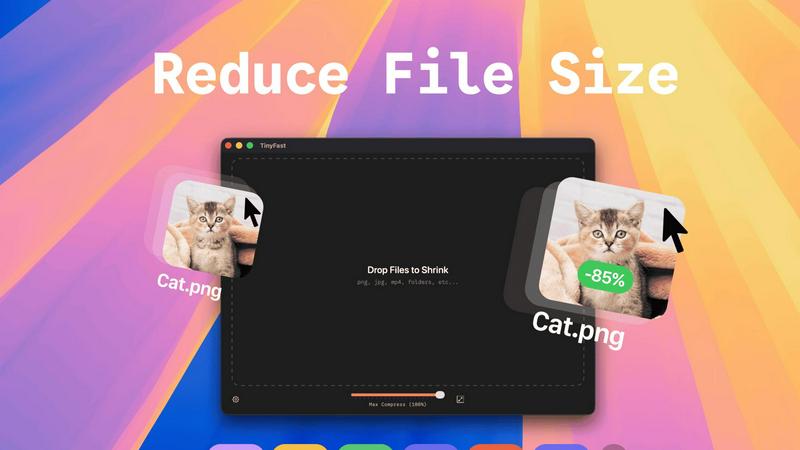
Experience instant file size reduction with an intentionally simple interface. The entire process is as straightforward as dragging your file or folder into the TinyFast window and dragging the optimized output out. This eliminates complex settings, lengthy upload queues, and slow downloads, delivering shrunk files in seconds and saving you invaluable time with every use.
Universal File Format Support
TinyFast is your single, go-to solution for compressing a vast range of file types. It comprehensively supports images (PNG, JPG, TIFF, HEIC, WEBP, GIF, BMP, SVG), videos (MP4, MOV, M4V), documents (PDF, DOCX), code files (JS, CSS, JSON), and audio (MP3). This universal support means you don't need multiple tools for different file types.
Batch Processing & Resolution Control
Boost your productivity by compressing entire folders of files at once. Drop a folder and get optimized output in seconds. Furthermore, TinyFast provides control over your output quality by allowing you to automatically resize image and video resolution during compression, giving you the flexibility to reduce file size precisely according to your needs.
Use Cases
Changeflow
Competitive & Pricing Intelligence
Businesses must continuously track competitor pricing, product updates, feature changes, and promotional offers. Changeflow automates this surveillance, providing immediate alerts on strategic moves. This real-time intelligence is essential for maintaining market competitiveness, enabling swift pricing adjustments, and informing product development strategies without manual, error-prone checks.
Legal & Regulatory Compliance Monitoring
For legal teams and compliance officers, missing a regulatory update can have severe consequences. Changeflow is vital for tracking changes on sites like court dockets, SEC EDGAR, FDA guidance pages, and regulatory body announcements. It ensures that legal librarians and compliance professionals are instantly aware of new filings, rulings, or guidance changes that affect their operations.
News & Brand Mention Tracking
Staying on top of media coverage and brand mentions is crucial for PR and marketing teams. Changeflow monitors news sites, review platforms, and industry blogs, delivering concise summaries of any new articles or posts that reference your company, executives, or products. This allows for rapid response to both positive press and potential crises.
Market & Supply Chain Movement Tracking
Procurement, sales, and strategy teams need to monitor industry news, supplier terms, and market shifts. Changeflow can track changes on supplier websites, industry reports, and commodity pricing pages, providing timely updates on factors that could impact supply chain stability, costs, or sales strategies, enabling proactive business planning.
TinyFast
For Developers & Coders
Developers constantly need to optimize assets for web and app deployment. TinyFast allows them to quickly compress project images, SVGs, and code files (like JS and CSS bundles) locally, ensuring no proprietary code or assets are exposed to online services. This integrates seamlessly into a development workflow, speeding up build times and protecting intellectual property.
For Designers & Creative Professionals
Designers working with high-resolution images, mockups, and video clips need to share proofs or final assets without compromising quality or confidentiality. TinyFast enables them to shrink large PSD exports, PNGs, JPEGs, and MOV files on the spot, facilitating quick client reviews and safe transfer of sensitive creative work directly from their Mac.
For Business & Legal Documentation
Professionals handling contracts, reports, and presentations in PDF or DOCX format often need to reduce file sizes for email attachments or secure portals. Using TinyFast ensures these confidential documents are compressed locally, adhering to strict data privacy policies and compliance requirements without ever risking exposure on an online server.
For Content Creators & Marketers
Bloggers, social media managers, and marketers regularly process large volumes of images and videos for publication. TinyFast streamlines this by allowing batch compression of media files, saving hours of upload time. They can maintain visual quality while meeting platform file size limits, all from the safety and speed of their desktop.
Overview
About Changeflow
Changeflow is an essential AI-powered web monitoring platform that eliminates the frustration of manual website checks and unreliable alerts. It doesn't just tell you that a page changed; it intelligently identifies what changed and explains why it matters to your specific needs. By leveraging advanced AI, Changeflow reads and understands the context of web pages, filtering out irrelevant noise to deliver only the critical updates you must know about. Setup is remarkably simple: you describe what you want to track in plain English, point the tool at a starting URL, and it autonomously creates a clean, intelligent feed of meaningful changes. Built for business reliability, it overcomes common technical barriers like login walls and heavy JavaScript with a 99.9% success rate, accessing pages other tools fail to reach. Trusted by Fortune 500 and Am Law 200 firms, Changeflow is the non-negotiable solution for teams that require timely, accurate, and actionable intelligence from the web to protect their competitive edge, ensure compliance, and make informed decisions.
About TinyFast
TinyFast is the essential, non-negotiable tool for any Mac user who handles digital files. It is a native macOS application built to perform one critical task with unmatched efficiency: compressing files directly on your computer. In a digital landscape where data privacy is paramount and efficiency is currency, TinyFast eliminates the insecurity and sluggishness of online tools. It processes a wide array of formats—including PNG, JPEG, MP4, MOV, PDF, SVG, WebP, MP3, and GIF—locally on your Mac. Your files never leave your machine, ensuring total privacy and blazing-fast speed. The workflow is deliberately and powerfully simple: just drag your file in and drag the compressed version out. This tool is built for developers, designers, creators, and professionals who cannot afford to waste time uploading sensitive assets to unknown servers or compromise on confidentiality. TinyFast is not just an app; it's a necessary upgrade to your workflow, guaranteeing security, speed, and simplicity in every single compression, making it an indispensable asset for anyone serious about their digital productivity.
Frequently Asked Questions
Changeflow FAQ
How is Changeflow different from other website change detectors?
Changeflow fundamentally differs by using AI to understand context and relevance, not just detect text changes. While other tools send alerts for any minor update, Changeflow reads the page, filters out irrelevant noise based on your instructions, and provides a clear summary of what changed and why it matters. It also reliably accesses complex, JavaScript-heavy pages that often block simpler tools.
What kind of websites can Changeflow monitor successfully?
Changeflow is engineered to monitor virtually any public website with an exceptional 99.9% success rate. Its advanced technology handles pages with complex JavaScript, login walls, and dynamic content that typically break other monitors. This includes e-commerce sites, legal databases, financial portals, news sites, and government regulatory pages.
Can my whole team use Changeflow?
Yes, team collaboration is a core capability. Changeflow offers shared workspaces that keep your entire team aligned on the same intelligence feed. It includes centralized user administration and billing, allowing you to manage access seamlessly. Notifications and the central dashboard ensure everyone stays informed from a single source of truth.
How do I get the updates from Changeflow?
You can receive updates through multiple channels to fit your workflow. All changes are surfaced in your personalized, noise-free dashboard feed. You can also configure email alerts to specific notification addresses. For integration into other tools like Slack or CRM systems, Changeflow offers API access and connectivity through Zapier.
TinyFast FAQ
Is TinyFast really completely private?
Yes, absolutely. TinyFast is a native macOS application that performs all compression processes locally on your Mac. Your files are never uploaded to the internet, sent to cloud servers, or stored by any third party. This local-first design is the core of the app, guaranteeing total privacy and security for all your data.
What file types does TinyFast support?
TinyFast supports a wide range of common file formats. This includes images (PNG, JPG, TIFF, HEIC, WEBP, GIF, BMP, SVG), videos (MP4, MOV, M4V), documents (PDF, DOCX), code files (JS, CSS, JSON), and audio files (MP3). It is designed to be a universal compression tool for most digital file needs.
How does the pricing work?
TinyFast offers a free tier that allows you to compress up to 5 files per day with access to all features. For unlimited use, you can choose a monthly subscription or a one-time lifetime purchase. The lifetime plan provides unlimited local compressions, all features, lifetime updates, and supports future development with a single payment.
Can I compress multiple files or folders at once?
Yes, you can. One of TinyFast's key features is batch processing. You can drag and drop an entire folder containing multiple files into the app, and it will compress all supported files within it, outputting the optimized versions in seconds. This is ideal for processing large batches of photos, videos, or documents efficiently.
Alternatives
Changeflow Alternatives
Changeflow is an AI-driven market and competitor insights tool in the productivity and management category. It specializes in monitoring web pages for meaningful changes, using artificial intelligence to understand context and deliver summarized updates, even on complex sites. Users often explore alternatives for various reasons. Common drivers include budget constraints, the need for specific integrations, or a requirement for different feature sets like broader social media monitoring or more basic change detection without AI analysis. When evaluating an alternative, prioritize capabilities that match your core needs. Essential factors include the tool's ability to handle JavaScript-heavy sites and login-protected pages, the intelligence of its change analysis, the robustness of its historical archives, and options for team collaboration and API access.
TinyFast Alternatives
TinyFast is a native macOS application for local file compression, a critical tool in the tech utility category. It stands apart by processing files directly on your Mac, ensuring privacy and speed without risky uploads to external servers. Users may explore alternatives for various reasons, such as budget constraints, a need for cross-platform compatibility, or specific feature requirements not covered by a single tool. The search often stems from a desire to balance core functionality with other practical considerations. When evaluating any alternative, the non-negotiable priorities should be privacy (does it process files locally?), speed, and format support. The ideal tool must handle your specific file types efficiently while fitting seamlessly into your existing workflow without compromising security.