AskFormulas vs BRCKS
Side-by-side comparison to help you choose the right tool.

AskFormulas
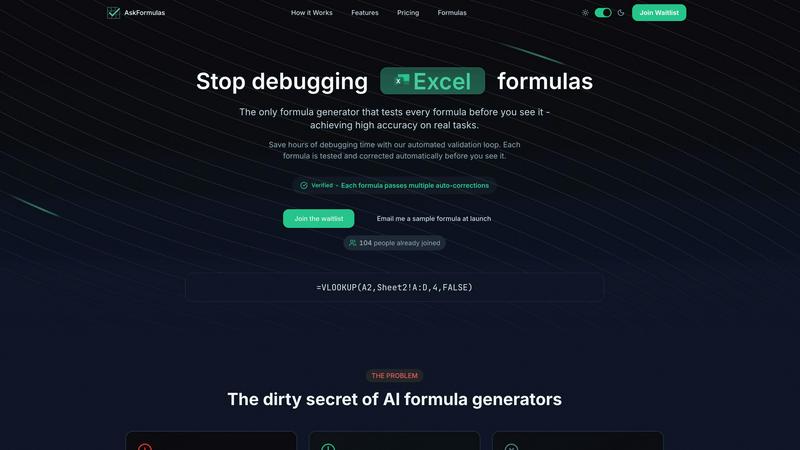
AskFormulas generates and validates Excel and Sheets formulas with guaranteed accuracy.
Last updated: February 28, 2026

Streamline your construction projects by connecting your team on WhatsApp with BRCKS for seamless updates and collaboration in one platform.
Last updated: April 4, 2026
Visual Comparison
AskFormulas
BRCKS

Feature Comparison
AskFormulas
Automated Validation Loop
This is the core, indispensable feature that sets AskFormulas apart. Every formula you request undergoes a rigorous 3-step validation process. It is first parsed for intent, then auto-tested on synthetic data in a sandbox, and finally auto-corrected through iterative loops until it is verified. This process guarantees that the formula you receive has already been debugged, delivering a high accuracy rate of over 95% and saving you hours of manual correction.
Natural Language to Formula
You absolutely do not need to know complex spreadsheet syntax. Simply describe what you need in plain English, such as "Sum all values in column B where column A contains the word Sales." AskFormulas' AI understands the context and intent behind your request, converting your everyday language into precise, technical formula syntax automatically. This removes the biggest barrier to advanced spreadsheet functionality.
Cross-Platform Compatibility
Switching between Microsoft Excel and Google Sheets is seamless and effortless. A simple one-click toggle allows you to specify your platform, and AskFormulas automatically adjusts the formula syntax for you. It handles the differences between functions like VLOOKUP and ARRAYFORMULA, ensuring you always get the correct, platform-specific formula without needing to learn two different systems.
Smart Error Detection & Correction
The tool proactively identifies and fixes formula errors before you ever see them. If a generated formula produces a #REF!, #VALUE!, or any other common error during its internal validation, the system doesn't just flag it—it automatically corrects it through multiple iterations. This ensures you are only presented with formulas that are confirmed to be working correctly in a real spreadsheet environment.
BRCKS
Centralized Communication
BRCKS brings all your project communications into one platform, allowing teams to manage updates, tasks, and files without juggling multiple applications. This ensures that nothing gets lost and that everyone stays on the same page.
Free Subcontractor Access
With BRCKS, subcontractors can be invited to join the project without any additional cost. They gain full access to essential project elements such as checklists, calendars, and files, enhancing collaboration without burdening the budget.
Client Portal
The Client Portal feature allows homeowners to view their project's progress in a user-friendly format. Clients can see updates, photos, and milestones while remaining separate from the internal management tools, promoting transparency without confusion.
BRCKS Bot Integration
The BRCKS Bot enables users to manage tasks and receive real-time updates directly through WhatsApp. This seamless integration allows for instant communication without the need to switch apps, enhancing productivity and reducing response times.
Use Cases
AskFormulas
Financial Reporting & Analysis
Financial analysts and accountants must generate accurate reports quickly. AskFormulas is vital for creating complex formulas for quarterly summaries, profit & loss statements, and variance analyses without the risk of manual error. Describing a need like "calculate year-over-year growth percentage" yields a validated, ready-to-use formula, ensuring data integrity and saving critical time during closing periods.
Sales and Revenue Management
Sales managers and revenue operations teams need to track performance metrics reliably. Creating formulas to sum sales by region, calculate commissions, or analyze pipeline conversion rates is simplified. You can request "average deal size for closed-won opportunities this quarter" and instantly get a flawless formula, enabling faster and more accurate sales insights and forecasting.
Small Business Operations
Small business owners wearing multiple hats often lack deep Excel expertise but rely heavily on spreadsheets for inventory, budgeting, and customer data. AskFormulas empowers them to perform advanced tasks by simply asking. Generating formulas to calculate inventory turnover, project cash flow, or merge customer lists becomes an accessible, error-free process, directly impacting operational efficiency.
Data Cleaning and Preparation
A significant amount of time is spent preparing messy data for analysis. AskFormulas is crucial for automating this tedious process. You can easily generate formulas to remove duplicates, extract text, combine columns, or standardize date formats by describing the task in plain language. This transforms hours of manual work into a few seconds of description and a guaranteed, working formula.
BRCKS
Streamlining Daily Operations
Construction teams can utilize BRCKS to organize their daily operations, keeping track of tasks and updates in one place. This reduces the time spent searching for information and ensures that everyone is aligned on project progress.
Enhancing Client Communication
Using the Client Portal, builders can keep homeowners informed about their projects without overwhelming them with technical details. This fosters trust and satisfaction, leading to better client relationships and fewer misunderstandings.
Coordinating with Subcontractors
BRCKS allows for efficient collaboration with subcontractors by providing them with the essential tools they need to succeed. This ensures that trades can access project specifics such as schedules and checklists without incurring extra costs.
Improving Project Documentation
BRCKS centralizes all project documentation, including meeting notes, task lists, and files, making it easy for teams to refer back to past discussions and decisions. This comprehensive record-keeping is vital for accountability and future project references.
Overview
About AskFormulas
AskFormulas is the essential, non-negotiable solution for anyone who relies on spreadsheets but is tired of the frustration and wasted hours caused by broken formulas. It is a revolutionary AI-powered tool that transforms plain English requests into accurate, ready-to-use Excel and Google Sheets formulas. The critical differentiator is its automated validation loop, a proprietary process that rigorously tests and corrects every single formula in a secure sandbox environment before it is presented to you. While other generators have a staggering 40-60% error rate, AskFormulas guarantees over 95% accuracy by ensuring each formula is verified and working. This tool is a necessity for financial analysts, revenue managers, SMB owners, and professionals at all skill levels who need reliable results fast. It eliminates the tedious cycle of debugging #REF! and #VALUE! errors, empowering you to focus on analysis and decision-making, not formula troubleshooting. With AskFormulas, you get more than a suggestion; you get a validated, trustworthy solution in seconds.
About BRCKS
BRCKS is an essential construction project management and communication software tailored specifically for residential builders, trades, and homeowners. It serves as a centralized hub where project conversations, checklists, tasks, files, photos, and meeting notes converge, eliminating the chaos often associated with disjointed communication channels like WhatsApp and email. Designed with simplicity and practicality in mind, BRCKS enhances day-to-day site communication, allowing teams to track actions, share real-time updates with clients, and maintain a clear record of decisions throughout the project lifecycle. By streamlining communication, BRCKS not only saves valuable time but also improves overall project efficiency, making it an indispensable tool for construction teams looking to optimize their workflows and enhance collaboration.
Frequently Asked Questions
AskFormulas FAQ
How accurate are the generated formulas?
AskFormulas achieves an accuracy rate of over 95% on real-world tasks. This exceptional reliability is due to our mandatory automated validation loop. Unlike other tools that provide untested suggestions, every formula we generate is tested, corrected, and verified in a simulated spreadsheet environment before you see it, virtually eliminating broken formulas.
Does it work with both Excel and Google Sheets?
Yes, absolutely. AskFormulas provides full, seamless support for both Microsoft Excel and Google Sheets. A simple toggle lets you select your platform, and the system automatically generates the correct syntax for the chosen application, handling all the functional differences between the two behind the scenes.
How does the validation process work?
The validation process is a 3-step automated loop. First, your natural language request is parsed for intent. Second, the initial formula is run against synthetic test data in a secure sandbox. Third, if any errors are found, the system auto-corrects the formula and retests it. This loop continues iteratively until the formula passes all tests and is marked as "Verified."
What if I need to generate a lot of formulas?
AskFormulas offers tiered pricing plans designed for different usage volumes. The Starter plan is for individual users, the Pro plan caters to power users with higher formula limits, and the Team plan supports small teams with shared workspaces. All plans include the core benefit of validated, high-accuracy formula generation.
BRCKS FAQ
How does BRCKS improve communication within construction teams?
BRCKS consolidates all project communications into one platform, reducing reliance on fragmented tools like email and WhatsApp. This centralization leads to improved clarity and faster decision-making.
Is there a cost for subcontractors to use BRCKS?
No, subcontractors can be invited to use BRCKS at no extra charge. They receive full access to project details, enhancing collaboration without financial implications for the main contractor.
What benefits does the Client Portal offer?
The Client Portal provides homeowners with a clear view of their project's status, including updates, photos, and milestones. This transparency helps build trust and ensures clients feel engaged without overwhelming them with technical details.
Can I use BRCKS on mobile devices?
Yes, BRCKS is designed for ease of use across various devices, including smartphones and tablets. This allows construction teams to stay connected and manage projects on the go, further enhancing productivity.
Alternatives
AskFormulas Alternatives
AskFormulas is a specialized productivity tool that generates and validates spreadsheet formulas for Excel and Google Sheets. It belongs to the category of AI-powered assistants designed to eliminate the frustrating and time-consuming process of debugging formulas, delivering reliable, ready-to-use solutions directly from plain English instructions. Users often explore alternatives for essential reasons like budget constraints, specific feature requirements, or the need for integration with other platforms. Some may seek tools with different pricing models, while others prioritize advanced functionalities beyond core formula generation or require support for additional software ecosystems. When evaluating an alternative, the critical factors to prioritize are accuracy guarantees, platform compatibility, and the depth of error-handling capabilities. The necessity is a tool that not only creates formulas but also ensures they work correctly the first time, saving you from the hidden costs of manual debugging and potential data errors.
BRCKS Alternatives
BRCKS is an essential construction project management and communication software tailored for residential builders, trades, and homeowners. It centralizes project conversations, checklists, tasks, files, photos, and meeting notes, ensuring that vital information is not lost in various communication tools like WhatsApp or email. This platform falls under the productivity and management category, aimed specifically at enhancing efficiency on construction sites. Users often seek alternatives to BRCKS due to factors such as pricing, specific feature sets, or compatibility with existing platforms. When exploring options, it’s crucial to consider the software's usability, integration capabilities, and whether it meets the unique needs of your construction project. A good alternative should streamline communication, enhance collaboration, and ensure that all project details are easily accessible.