

Alternatives to File Studio
File Studio is the essential offline tool for privately converting and editing files on your computer.
20 alternatives found

Context Board
Context Board brings your numbers, docs, clients, content and day into one workspace that Claude and Codex can read and update.

@fuck.it - email with attitude
Private email. Pure. Secure. Exclusive. No ads, no tracking, no data selling. GDPR compliant, EU-hosted.

JevModel
Bilingual Jev decision workbench with original guides for structured, AI-assisted decisions.

ftak
Look up any word while you read: meaning, Wikipedia summary and map preview in one tooltip. Free Chrome extension.

Filler
Chrome extension that fills web forms from your saved profile: Google Forms, job applications, surveys, signups. Free, no account.

Memorable Contact
Memorable Contact helps you remember people, save conversation details, find contacts using AI-powered search, and share digital business cards

AI Email Filter
AI Email Filter sorts incoming mail into folders using plain-language prompts you write. Works with any IMAP mailbox; bring your own LLM if you want.


Product Launch Checklist
A free launch checklist for SaaS, apps, AI tools and more. Every step says why it matters and when you can skip it.

Kody Tools
Free collection of online developer utilities, code formatters, and digital converters designed to streamline your daily workflow.
Forms Plugin
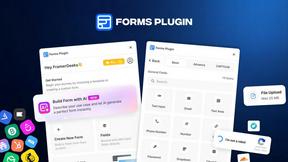
The #1 Native Form Builder Plugin for Framer - No Code, No Embeds, No External Platforms.




PerPageFax
PerPageFax lets you send a fax online from any browser for a flat $0.50 per page — no account, no subscription, no fax machine.




About File Studio Alternatives
File Studio is a powerful desktop application in the productivity and management category, designed for offline file and PDF conversion, editing, and management. It operates entirely on your computer, ensuring your sensitive documents remain private and secure without ever needing an internet connection. Users often explore alternatives for various reasons, such as different budget constraints like preferring free tools over a one-time purchase, needing specific features not covered, or requiring compatibility with other operating systems like Linux. The search for the right tool is common as individual workflows and security requirements vary greatly. When evaluating alternatives, key considerations include whether the tool processes files offline to protect privacy, the breadth of supported file formats and editing capabilities, and the overall cost structure. The essential choice hinges on finding software that matches your specific necessity for security, functionality, and value without compromise.
FAQs about File Studio Alternatives
What is File Studio?
File Studio is a robust desktop application for converting, editing, and managing PDFs and images entirely offline on your Mac or Windows computer.
Who is File Studio for?
It is ideal for photographers, freelancers, and remote workers who handle sensitive documents and prioritize privacy, security, and powerful offline tools.
Is File Studio free?
File Studio is not free; it operates on a one-time purchase model with no subscriptions or required accounts.
Why choose File Studio?
Choose File Studio for its essential 100% offline processing, comprehensive PDF and image tools, and batch capabilities, ensuring complete privacy and control over your files.