
Never Drop vs Refbox
Side-by-side comparison to help you choose the right tool.

Never Drop
NeverDrop instantly captures event leads and drafts personalized follow-ups to close deals faster.
Last updated: February 28, 2026

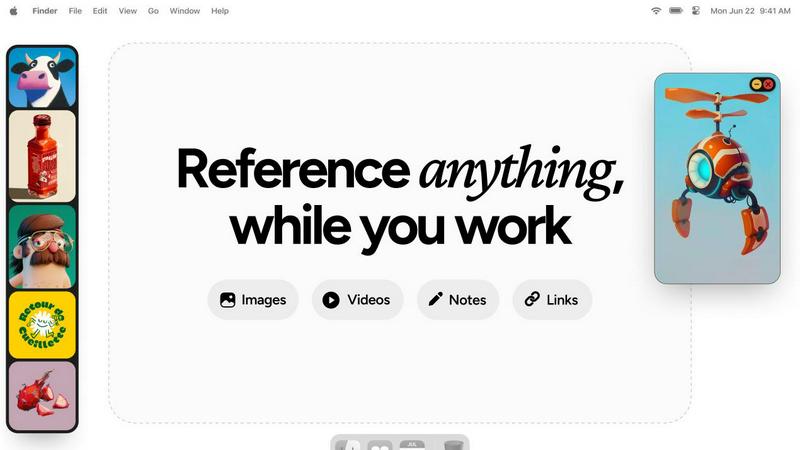
Refbox floats your reference images and notes above your workspace for instant access.
Last updated: February 28, 2026
Visual Comparison
Never Drop

Refbox
Feature Comparison
Never Drop
Instant AI-Powered Card Scanning
Snap a photo of any business card with your smartphone. Never Drop's advanced AI-powered Optical Character Recognition (OCR) technology instantly and accurately extracts every critical detail: name, company, title, phone number, and email. This eliminates the tedious, error-prone manual entry and ensures you capture the data perfectly in seconds, right at the booth.
Smart Contact Enrichment & Email Finding
Business cards often lack direct contact information. Never Drop automatically finds and verifies professional work emails using just the contact's name and company. This eliminates the guesswork and manual LinkedIn searches, delivering a complete, enriched contact profile that is ready for your CRM and immediate follow-up, ensuring you always have the right point of contact.
AI-Drafted Personalized Follow-Up Emails
This is the core advantage. Based on the specific context from your voice notes and conversation, Never Drop's AI generates a unique, personalized follow-up email draft in under two minutes. It is not a generic template; it reflects your actual discussion. You can review, tweak, and send it directly from your phone before you even walk to your next meeting.
Centralized Team Workspace & CRM Sync
Manage your entire event strategy from one dashboard. Organize scans by event, reassign leads between team members, and track collective activity. Never Drop seamlessly integrates with HubSpot to push enriched contact data directly into your sales pipeline, keeping your CRM clean and ensuring every captured lead is accounted for and ready for action.
Refbox
Always-On-Top Floating Frames
This core feature allows you to drag any reference—image, video, GIF, or note—from your library and pin it as a resizable, transparent window that stays above all other applications. You can position these frames directly over Photoshop, Blender, or Figma, ensuring your inspiration is always visible without ever blocking your workflow. This eliminates the need for constant alt-tabbing and window rearranging, keeping you locked in your creative zone.
Centralized Media Sidebar & Infinite Canvas
Refbox provides a central hub, or "Box," for all your reference material. You can import images, videos, GIFs, and notes from your computer, web links, or clipboard into this organized sidebar. For broader overviews, you can view your entire collection on an infinite canvas or flip through items in a focused slideshow mode for quick comparison, ensuring you have the right layout for every stage of your project.
Advanced Media-Specific Tools
Beyond simple viewing, Refbox includes powerful tools tailored for professional use. You can step through GIFs frame-by-frame for detailed animation reference, use the built-in color picker on any media to sample and copy colors, crop images to focus on specific details, and even take website screenshots directly by pasting a URL. These features turn Refbox from a simple viewer into an active part of the creative process.
Smart Workflow Enhancements
The tool is packed with intelligent touches designed to save time and maintain focus. You can auto-hide the main Box to declutter your screen, swap between floating references using arrow keys, lock frames in place to work behind them, and instantly switch between different collections of references. Full keyboard shortcut support gives you complete, efficient control over your entire reference library without touching the mouse.
Use Cases
Never Drop
High-Volume Trade Show Lead Capture
For sales reps at bustling trade shows, speed is everything. Never Drop allows you to capture a lead's information and the context of your conversation in under 30 seconds. By drafting the follow-up email before you leave their booth, you ensure you are the first responder, dramatically increasing your conversion rate while the interaction is still fresh in both your minds.
Conference and Networking Event Follow-Up
After a day of back-to-back meetings at a conference, recalling specific details for dozens of new contacts is impossible. With Never Drop, you record a quick voice memo after each conversation. The AI uses this context to craft personalized emails that reference your specific talk, making your follow-up stand out in a sea of generic "nice to meet you" messages.
Streamlining Team-Based Event Operations
For sales managers, ensuring no lead is missed by the team is critical. Never Drop's shared workspace lets you organize all captured leads by event, see which rep captured which contact, and reassign leads for follow-up. This provides full visibility and accountability, guaranteeing seamless handoffs and that every potential deal is pursued.
Enhancing CRM Data Quality and Hygiene
Manually entering business card data into a CRM is slow and leads to errors, missing fields, and duplicate entries. Never Drop automates this by scanning cards, enriching the data with verified emails, and syncing clean, complete contact profiles directly to HubSpot. This saves administrative time and ensures your CRM is a reliable source of truth.
Refbox
3D Modeling and Texturing
For 3D artists working in Blender, Maya, or ZBrush, Refbox is essential. You can keep floating reference images of concept art, material surfaces, and anatomical studies directly over your viewport. The ability to lock frames and sample colors directly from references accelerates the modeling and texturing process, ensuring accuracy and artistic fidelity without breaking immersion in your complex 3D software.
Digital Illustration and Concept Art
Illustrators and concept artists can use Refbox to assemble comprehensive mood boards and pin multiple style references, color palettes, and compositional sketches around their canvas in Procreate, Photoshop, or Clip Studio Paint. The infinite canvas and gallery modes make it easy to organize inspiration, while floating frames keep key visual guides permanently in sight throughout the entire drawing and painting process.
UI/UX and Web Design
Designers in Figma, Sketch, or Adobe XD can use Refbox to manage competitor screenshots, design system components, and inspiration from sites like Dribbble. The website screenshot feature lets you quickly capture live pages for reference. Keeping these UI patterns and notes in always-on-top frames allows for constant comparison and iteration, streamlining the design workflow and ensuring consistency.
Animation and Motion Graphics
Animators can leverage Refbox to study motion reference. By importing video clips or GIFs and using the frame-by-frame playback control, they can analyze movement in detail while working in After Effects or similar software. Floating these reference videos next to their timeline allows for precise imitation and creative interpretation of motion, greatly enhancing the quality and efficiency of the animation process.
Overview
About Never Drop
Never Drop is the essential lead-capture weapon for sales teams operating in high-velocity environments. It is built for the critical moments at trade shows, conferences, and networking events where deals are won or lost. The core problem is universal: leads are captured but then die in spreadsheets or get lost in a pile of business cards, resulting in missed opportunities and wasted investment. Never Drop solves this by transforming the entire post-meeting workflow into a seamless, two-minute process. You simply scan a business card with your phone, enrich the data with a quick voice note about your conversation, and the app's AI instantly drafts a personalized, context-rich follow-up email. It is not just a scanner; it is a complete system that ensures no lead is ever forgotten. By automatically finding verified work emails and syncing enriched profiles directly to CRMs like HubSpot, Never Drop guarantees your pipeline is always actionable. In a world where speed wins deals, this tool is not an option; it is a necessity for any sales professional who cannot afford to let a single handshake go cold.
About Refbox
Refbox is the indispensable, non-negotiable tool for modern creative professionals who cannot afford to have their momentum shattered by workflow interruptions. It directly solves the fundamental, daily frustration of constant window switching and tab management by providing instant, always-accessible access to inspiration and reference material. This essential floating desktop application is designed to keep your visual research—including images, GIFs, videos, and notes—pinned in resizable, always-on-top frames directly over your primary work applications like Photoshop, Blender, Figma, or any other software. You no longer need to waste time digging through disorganized folders, managing a cluttered desktop, or alt-tabbing through a dozen browser tabs. The workflow is seamless: you add media from the web, your computer, or clipboard into a centralized sidebar and then drag individual references directly onto your digital canvas. With versatile viewing modes like Masonry, Gallery, and floating frames, you can tailor the layout precisely to your task. For anyone involved in sketching, designing, animating, 3D modeling, illustration, or concept art, Refbox is the absolute necessity that ensures your inspiration is literally at your fingertips. It transforms a fragmented, distracting process into a seamless, fluid, and highly focused creative session, making it an essential component for achieving quality output efficiently.
Frequently Asked Questions
Never Drop FAQ
How does Never Drop's business card scanning work?
You use the Never Drop mobile app to take a photo of any business card. Our proprietary AI-powered OCR technology instantly analyzes the image and accurately extracts the contact's name, company, title, phone number, and email address. The process takes seconds and requires no manual typing, ensuring perfect data capture every time.
What types of events is Never Drop designed for?
Never Drop is built for any fast-paced, in-person business development scenario. This includes trade shows, industry conferences, networking mixers, meetups, and even business dinners. Any event where you exchange business cards and need to follow up quickly and personally is the perfect use case for Never Drop.
Do I need both the mobile app and the web dashboard?
Yes, both are essential for the full functionality. The mobile app is your on-the-go tool for scanning business cards, recording voice context, and sending follow-up emails immediately. The web dashboard is your management hub for organizing leads by event, managing your team, reviewing all captured data, and configuring settings like CRM integrations.
Is my data secure with Never Drop?
Absolutely. Never Drop is developed by SCOPEO, a French company. All user data is hosted in the European Union in compliance with strict GDPR regulations. Data is encrypted both in transit and at rest. Images of business cards are used solely for the purpose of contact extraction via our AI and are not shared with or sold to any third parties.
Refbox FAQ
What types of files does Refbox support?
Refbox supports a wide range of media essential for creative work. You can import common image formats (JPG, PNG, SVG, etc.), video files, and GIFs. It also features a dedicated Notes panel for text, checklists, and styled notes. A unique feature is the ability to paste a website URL to automatically generate a screenshot for your reference library.
How does Refbox handle privacy with my reference images?
Your data and reference files are stored locally on your computer. Refbox does not upload your images, videos, or notes to any external cloud server unless you explicitly use a cloud sync service for your own library folder. This ensures your proprietary work and confidential project references remain private and secure on your own machine.
Can I use Refbox with multiple monitors?
Yes, Refbox is fully functional across multiple monitor setups. You can position your main Box sidebar on one screen and drag floating reference frames onto any other screen, placing them over your primary application windows. This flexibility is ideal for professionals who use one monitor for their main work canvas and another for tools and references.
Is there a free trial or a free version available?
Based on the provided context, Refbox is offered as a one-time purchase license. This suggests there is a single, perpetual license fee rather than a subscription model. The website context indicates a "One-time" purchase option, meaning you pay once to own the software for personal use on your machine, with no recurring monthly or annual fees.
Alternatives
Never Drop Alternatives
Never Drop is a productivity and management tool designed to streamline lead capture and follow-up for sales professionals. It belongs to the category of sales enablement and contact management software, specifically targeting the chaotic environment of in-person networking. Users often explore alternatives for various reasons, including budget constraints, the need for different feature sets like broader CRM capabilities or offline functionality, or compatibility with their existing tech stack and preferred platforms. Finding the right fit is crucial for maintaining a smooth sales workflow. When evaluating other options, prioritize solutions that address your core pain points: seamless contact capture, efficient data enrichment, and automated, personalized follow-up generation. Ensure any alternative integrates with your CRM and offers the reliability necessary to never let a valuable connection drop.
Refbox Alternatives
Refbox is an essential productivity tool for creative professionals, designed to eliminate workflow interruptions by keeping reference images and notes in always-on-top windows over your primary applications. It belongs squarely in the category of creative workflow and reference management software, acting as a non-negotiable utility for sustained focus. Users may seek alternatives for various practical reasons, such as budget constraints, specific feature requirements not covered, or compatibility needs with different operating systems. The search often stems from a need to solve the same core problem: accessing visual inspiration without constant, momentum-killing window switching. When evaluating any alternative, prioritize solutions that deliver on the absolute necessity of instant, always-accessible reference viewing. The critical features to look for are reliable always-on-top window functionality, seamless media import from multiple sources, and a clean interface that stays out of the way until you need it. The right tool should feel like an indispensable extension of your workspace.