
Decode This Text vs Refbox
Side-by-side comparison to help you choose the right tool.

Decode This Text
Decode This Text delivers quick, insightful analyses of confusing conversations in just 30 seconds for total clarity.
Last updated: February 28, 2026

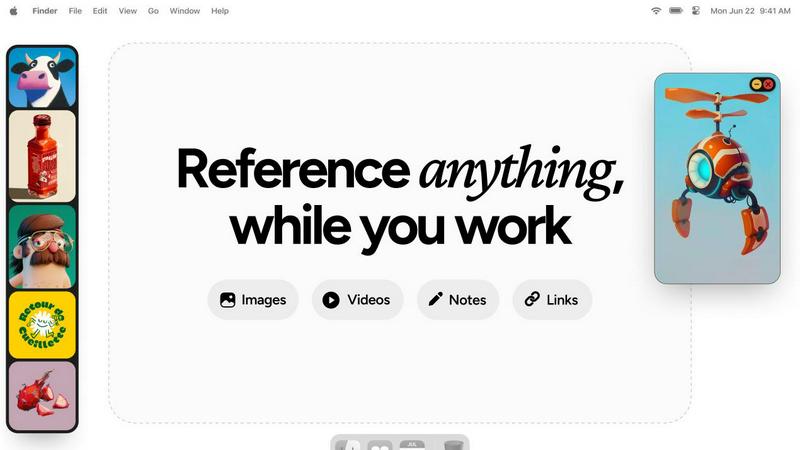
Refbox floats your reference images and notes above your workspace for instant access.
Last updated: February 28, 2026
Visual Comparison
Decode This Text

Refbox
Feature Comparison
Decode This Text
Comprehensive Analysis
Receive an in-depth analysis of the context behind any conversation you provide. The tool evaluates emotional tones, intentions, and patterns within the messages to provide you with clarity and understanding.
User-Friendly Interface
With a simple and intuitive design, Decode This Text allows users to easily paste messages, upload screenshots, or describe scenarios without any technical hassle. This ensures that users can quickly access the insights they need.
Emotional Tone Detection
Decode This Text goes beyond mere words to assess the emotional temperature of messages. It identifies whether the tone is friendly, sarcastic, or cold, helping you interpret the underlying sentiment effectively.
Customized Response Suggestions
Stuck on how to reply? Decode This Text offers three tailored response options—calm, direct, or firm—allowing you to communicate confidently and appropriately based on the analysis provided.
Refbox
Always-On-Top Floating Frames
This core feature allows you to drag any reference—image, video, GIF, or note—from your library and pin it as a resizable, transparent window that stays above all other applications. You can position these frames directly over Photoshop, Blender, or Figma, ensuring your inspiration is always visible without ever blocking your workflow. This eliminates the need for constant alt-tabbing and window rearranging, keeping you locked in your creative zone.
Centralized Media Sidebar & Infinite Canvas
Refbox provides a central hub, or "Box," for all your reference material. You can import images, videos, GIFs, and notes from your computer, web links, or clipboard into this organized sidebar. For broader overviews, you can view your entire collection on an infinite canvas or flip through items in a focused slideshow mode for quick comparison, ensuring you have the right layout for every stage of your project.
Advanced Media-Specific Tools
Beyond simple viewing, Refbox includes powerful tools tailored for professional use. You can step through GIFs frame-by-frame for detailed animation reference, use the built-in color picker on any media to sample and copy colors, crop images to focus on specific details, and even take website screenshots directly by pasting a URL. These features turn Refbox from a simple viewer into an active part of the creative process.
Smart Workflow Enhancements
The tool is packed with intelligent touches designed to save time and maintain focus. You can auto-hide the main Box to declutter your screen, swap between floating references using arrow keys, lock frames in place to work behind them, and instantly switch between different collections of references. Full keyboard shortcut support gives you complete, efficient control over your entire reference library without touching the mouse.
Use Cases
Decode This Text
Understanding Ambiguous Messages
When you receive a vague text from a friend or colleague, Decode This Text helps clarify their true intentions, ensuring you respond in a way that fosters positive communication and understanding.
Professional Communication Clarity
For work-related messages, such as terse emails from your boss, Decode This Text interprets the nuances that dictate the emotional state behind the words, helping you respond appropriately without misinterpretation.
Navigating Relationships
In personal relationships, when silence or short responses become the norm, this tool aids in understanding whether someone is losing interest or simply busy, providing insights that can help you navigate your interactions more effectively.
Conflict Resolution
Decode This Text can assist in conflict situations by analyzing the emotional undertones of messages exchanged between parties. By understanding these dynamics, you can address issues more constructively and with greater empathy.
Refbox
3D Modeling and Texturing
For 3D artists working in Blender, Maya, or ZBrush, Refbox is essential. You can keep floating reference images of concept art, material surfaces, and anatomical studies directly over your viewport. The ability to lock frames and sample colors directly from references accelerates the modeling and texturing process, ensuring accuracy and artistic fidelity without breaking immersion in your complex 3D software.
Digital Illustration and Concept Art
Illustrators and concept artists can use Refbox to assemble comprehensive mood boards and pin multiple style references, color palettes, and compositional sketches around their canvas in Procreate, Photoshop, or Clip Studio Paint. The infinite canvas and gallery modes make it easy to organize inspiration, while floating frames keep key visual guides permanently in sight throughout the entire drawing and painting process.
UI/UX and Web Design
Designers in Figma, Sketch, or Adobe XD can use Refbox to manage competitor screenshots, design system components, and inspiration from sites like Dribbble. The website screenshot feature lets you quickly capture live pages for reference. Keeping these UI patterns and notes in always-on-top frames allows for constant comparison and iteration, streamlining the design workflow and ensuring consistency.
Animation and Motion Graphics
Animators can leverage Refbox to study motion reference. By importing video clips or GIFs and using the frame-by-frame playback control, they can analyze movement in detail while working in After Effects or similar software. Floating these reference videos next to their timeline allows for precise imitation and creative interpretation of motion, greatly enhancing the quality and efficiency of the animation process.
Overview
About Decode This Text
Decode This Text is a groundbreaking tool that empowers users to unravel the complexities of communication, making it an essential asset for anyone navigating the often confusing landscape of interpersonal messages. Whether you find yourself puzzled by an ambiguous email from your boss, a vague text from a friend, or a perplexing message from a client, this tool offers invaluable clarity. By simply pasting the conversation or describing the context, users receive a detailed analysis that highlights underlying intentions, emotional tones, and effective responses. Ideal for professionals, friends, and families alike, Decode This Text enhances communication skills and fosters better relationships, eliminating misunderstandings. Its user-friendly interface and rapid response time allow you to engage confidently in interactions, alleviating the stress of overanalyzing every word. Experience the transformative power of clear communication with Decode This Text.
About Refbox
Refbox is the indispensable, non-negotiable tool for modern creative professionals who cannot afford to have their momentum shattered by workflow interruptions. It directly solves the fundamental, daily frustration of constant window switching and tab management by providing instant, always-accessible access to inspiration and reference material. This essential floating desktop application is designed to keep your visual research—including images, GIFs, videos, and notes—pinned in resizable, always-on-top frames directly over your primary work applications like Photoshop, Blender, Figma, or any other software. You no longer need to waste time digging through disorganized folders, managing a cluttered desktop, or alt-tabbing through a dozen browser tabs. The workflow is seamless: you add media from the web, your computer, or clipboard into a centralized sidebar and then drag individual references directly onto your digital canvas. With versatile viewing modes like Masonry, Gallery, and floating frames, you can tailor the layout precisely to your task. For anyone involved in sketching, designing, animating, 3D modeling, illustration, or concept art, Refbox is the absolute necessity that ensures your inspiration is literally at your fingertips. It transforms a fragmented, distracting process into a seamless, fluid, and highly focused creative session, making it an essential component for achieving quality output efficiently.
Frequently Asked Questions
Decode This Text FAQ
How does Decode This Text ensure privacy?
Your privacy is paramount. Decode This Text operates on a 100% anonymous basis, meaning no human reviews your messages, ensuring complete confidentiality while you seek clarity.
Can I use Decode This Text for professional communication?
Absolutely! Decode This Text is designed for both personal and professional contexts. It helps users decode ambiguous emails, messages from clients, and more, providing clarity in various communication scenarios.
What types of messages can I analyze?
You can analyze any type of message, whether it's a text message, email, or social media conversation. Just paste the text or upload a screenshot, and Decode This Text will give you insights.
Is there a limit to how much text I can input?
Currently, there are no strict limits on the size of the text you can input. However, it's recommended to keep messages concise for more focused analysis and quicker response times.
Refbox FAQ
What types of files does Refbox support?
Refbox supports a wide range of media essential for creative work. You can import common image formats (JPG, PNG, SVG, etc.), video files, and GIFs. It also features a dedicated Notes panel for text, checklists, and styled notes. A unique feature is the ability to paste a website URL to automatically generate a screenshot for your reference library.
How does Refbox handle privacy with my reference images?
Your data and reference files are stored locally on your computer. Refbox does not upload your images, videos, or notes to any external cloud server unless you explicitly use a cloud sync service for your own library folder. This ensures your proprietary work and confidential project references remain private and secure on your own machine.
Can I use Refbox with multiple monitors?
Yes, Refbox is fully functional across multiple monitor setups. You can position your main Box sidebar on one screen and drag floating reference frames onto any other screen, placing them over your primary application windows. This flexibility is ideal for professionals who use one monitor for their main work canvas and another for tools and references.
Is there a free trial or a free version available?
Based on the provided context, Refbox is offered as a one-time purchase license. This suggests there is a single, perpetual license fee rather than a subscription model. The website context indicates a "One-time" purchase option, meaning you pay once to own the software for personal use on your machine, with no recurring monthly or annual fees.
Alternatives
Decode This Text Alternatives
Decode This Text is an essential tool in the Productivity & Management category, specifically designed to help users unravel the complexities of confusing conversations. With its quick and human-like analyses, it provides clarity in just 30 seconds, enabling smoother communication in both personal and professional settings. Users often seek alternatives to Decode This Text for various reasons, including pricing, specific features, or compatibility with their preferred platforms. When choosing an alternative, it’s crucial to consider aspects such as ease of use, the depth of analysis provided, and the ability to adapt to different communication styles to ensure effective understanding and response.
Refbox Alternatives
Refbox is an essential productivity tool for creative professionals, designed to eliminate workflow interruptions by keeping reference images and notes in always-on-top windows over your primary applications. It belongs squarely in the category of creative workflow and reference management software, acting as a non-negotiable utility for sustained focus. Users may seek alternatives for various practical reasons, such as budget constraints, specific feature requirements not covered, or compatibility needs with different operating systems. The search often stems from a need to solve the same core problem: accessing visual inspiration without constant, momentum-killing window switching. When evaluating any alternative, prioritize solutions that deliver on the absolute necessity of instant, always-accessible reference viewing. The critical features to look for are reliable always-on-top window functionality, seamless media import from multiple sources, and a clean interface that stays out of the way until you need it. The right tool should feel like an indispensable extension of your workspace.