
audiovideogenerator vs Melograph
Side-by-side comparison to help you choose the right tool.

audiovideogenerator
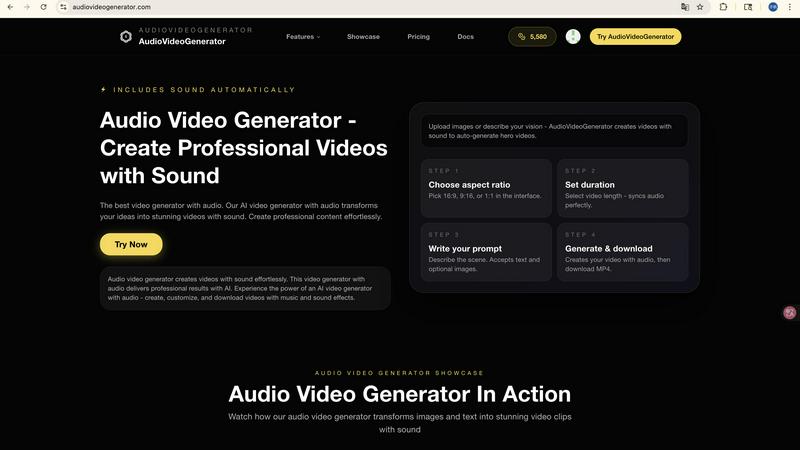
Create stunning professional videos with synchronized audio effortlessly using our AI-powered AudioVideoGenerator.

Melograph transforms your music tracks into stunning videos with customizable templates in just minutes, hassle-free.
Last updated: February 28, 2026
Visual Comparison
audiovideogenerator
Melograph

Feature Comparison
audiovideogenerator
Text to Video with Audio
Transform your written content into dynamic videos effortlessly. The Text to Video feature allows users to input text descriptions, which are then converted into engaging videos with automatically generated background music and sound effects, ensuring an immersive experience.
Image to Video with Audio
This feature takes your static images and breathes life into them by converting them into captivating videos. With the Image to Video capability, users can expect dynamic transitions complemented by relevant background music and sound effects to enhance visual storytelling.
Automatic Audio Generation
AudioVideoGenerator excels at adding audio elements to your videos without requiring any manual input. The Automatic Audio Generation feature ensures that every video includes carefully selected background music, sound effects, and ambient audio, creating a polished final product.
Multiple AI Models
Choose from a variety of supported AI models tailored to your video generation needs. Whether you require fast video creation or advanced features, AudioVideoGenerator offers models like A2V, WAN2.5, SORA2, and VEO3.1, providing flexible options for every project.
Melograph
Easy Template Selection
Melograph features a simple and user-friendly interface that allows users to choose from a variety of stunning templates. These templates cater to different musical styles and moods, making it easy for creators to find the perfect visual match for their tracks.
Audio-Reactive Visuals
One of the standout features of Melograph is its audio-reactive technology. Users can upload their audio tracks, and the visuals will automatically respond to the music, creating dynamic waveforms that enhance the listening experience and engage viewers.
Quick Export Options
Melograph allows users to export their videos in 1080p MP4 format, ensuring high-quality visuals that are ready for posting on various platforms. The quick export feature is designed for efficiency, allowing users to share their content without unnecessary delays.
Customizable Text and Graphics
Users can easily customize their videos by adding artist names, song titles, and even logos or album covers on selected templates. This personalization helps creators maintain brand consistency and provides a professional touch to their visuals.
Use Cases
audiovideogenerator
Social Media Content Creation
Maximize your social media presence by creating engaging videos optimized for platforms like Instagram, TikTok, and YouTube. AudioVideoGenerator produces content with perfect aspect ratios and professional audio, making your posts stand out.
Marketing Videos
Generate compelling marketing content that captures the attention of your audience. With integrated audio features, you can create promotional videos that effectively highlight products or services, ensuring effective communication and brand messaging.
Educational Content Development
Enhance your educational materials by transforming them into engaging videos. This use case is ideal for online courses, tutorials, and presentations, as the added audio elements help reinforce learning and maintain viewer interest.
Event Highlights
Capture and relive the excitement of your events by creating memorable recap videos. AudioVideoGenerator allows you to generate highlight reels filled with background music and sound effects, making it easy to share the energy and emotion of your gatherings.
Melograph
Independent Artists
Indie musicians can leverage Melograph to create eye-catching promotional videos for their music releases. With minimal time investment, they can produce professional-looking visuals that enhance their music's appeal on social media.
Producers and DJs
Music producers and DJs can use Melograph to generate dynamic visuals for their sets or tracks. The audio-reactive visuals not only captivate audiences but also provide a unique backdrop during performances, enhancing the overall experience.
Record Labels
Labels can utilize Melograph to maintain a consistent visual identity across their releases. By using the same premium templates, they can create a cohesive brand image that effectively showcases their artists' music.
Content Creators
Melograph is an invaluable tool for content creators who want to produce engaging video content for platforms like TikTok, Instagram Reels, and YouTube Shorts. The ease of use and quick export options make it perfect for creators looking to enhance their video content with minimal effort.
Overview
About audiovideogenerator
AudioVideoGenerator is a revolutionary AI-powered platform designed for anyone looking to create professional-quality videos with seamless audio integration. This all-in-one tool simplifies the video creation process, allowing content creators, marketers, educators, and hobbyists to produce stunning videos effortlessly. With its intelligent features, AudioVideoGenerator enables users to generate engaging videos that include background music, voiceovers, and sound effects, all perfectly synchronized with the visuals. Whether you need promotional content, educational material, or social media posts, this platform caters to a variety of styles and formats. Its user-friendly interface and powerful AI capabilities mean you can bring your creative vision to life in just minutes, making it the go-to solution for modern video production. Experience the ease of generating captivating videos that not only look great but sound incredible as well.
About Melograph
Melograph is an essential web-based music visualizer maker designed specifically for musicians and creators seeking to generate stunning visuals effortlessly. This innovative tool eliminates the complexities associated with traditional video editing, allowing users to create captivating audio-reactive videos in just minutes. With an intuitive interface, Melograph offers a variety of premium templates tailored to suit diverse styles such as chill, cinematic, retro, and futuristic. Users simply upload their tracks, input their artist name and song title, and can quickly export high-quality videos. Perfect for indie artists, producers, labels, and DJs, Melograph enhances musical releases with professional visuals while saving time and effort. The core value proposition of Melograph lies in its ability to streamline the visual creation process, enabling users to focus on their music while producing engaging content suitable for social media and other platforms.
Frequently Asked Questions
audiovideogenerator FAQ
What types of videos can I create with audiovideogenerator?
You can create a wide range of video types, including promotional clips, educational videos, social media content, product demonstrations, and event highlights, all with integrated audio.
Is audiovideogenerator easy to use for beginners?
Absolutely! AudioVideoGenerator is designed with user-friendliness in mind. Its intuitive interface and automated features ensure that users of all skill levels can create professional-quality videos without needing extensive technical knowledge.
Can I customize the audio in my videos?
Yes, while AudioVideoGenerator automatically generates audio elements, you also have the option to customize the music and sound effects to better suit your project's needs, enhancing your creative control.
How long does it take to generate a video using audiovideogenerator?
The video generation process is remarkably fast. Depending on the complexity and length of your project, you can create professional videos in just minutes, significantly reducing the time typically required for video production.
Melograph FAQ
Do I need editing experience to use Melograph?
No, you do not need any editing experience. Melograph is designed for simplicity, allowing anyone to create stunning visuals by simply selecting a template and entering text.
Is Melograph suitable for TikTok or Instagram Reels?
Yes, Melograph is perfect for creating videos specifically formatted for TikTok, Instagram Reels, and YouTube Shorts. The tool provides export options that cater to these platforms.
Can I use Melograph for multiple songs?
Absolutely! Melograph allows users to create visuals for multiple tracks, making it a versatile tool for artists and creators who produce a variety of music.
What do I receive after making a payment?
After payment, users unlock full access to Melograph's premium template library, enabling them to create high-quality visuals without any watermarks. They will receive the number of export credits corresponding to their selected plan.